Best VPN for Small Business in 2026
📅 Last Updated: April 2026 ⏱ 20 min read
Remote work, public Wi-Fi, and cloud tools have made a business VPN essential – not optional. A data breach or intercepted connection can cost a small business far more than any VPN subscription. This article reviews the 8 best VPN for small business to help you secure your team’s data across the US, UK, Canada, and Australia. Every provider listed has been vetted using our 5-point review methodology.
Table of Contents
Quick Comparison Table
| Tool | Best For | Devices | Starting Price | Score |
|---|---|---|---|---|
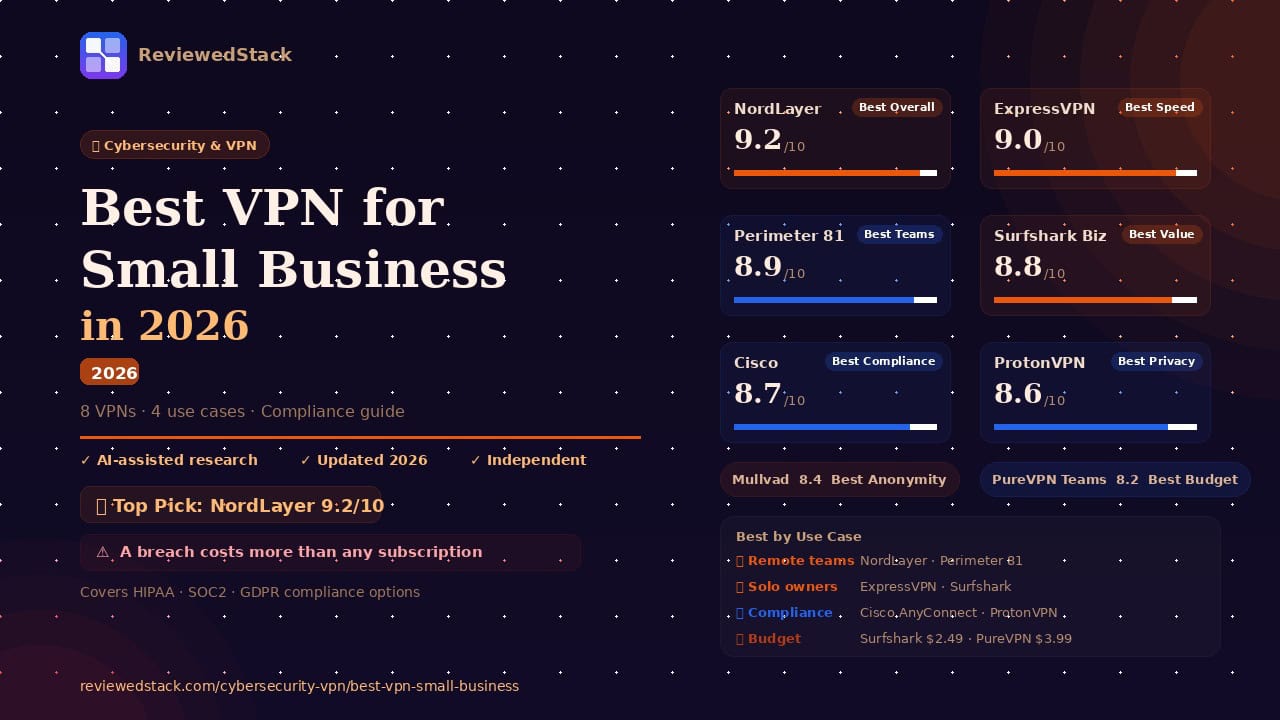
| NordLayer | Best Overall | Unlimited | $7/user/mo | 9.2/10 |
| ExpressVPN | Best Speed | 8 | $12.99/mo | 9.0/10 |
| Perimeter 81 | Best for Teams | Unlimited | Custom | 8.9/10 |
| Cisco AnyConnect | Best Enterprise | Unlimited | Custom | 8.7/10 |
| Surfshark Biz | Best Value | Unlimited | $19/mo | 8.8/10 |
| ProtonVPN Biz | Best Privacy | 10 | $8.99/user | 8.6/10 |
| Mullvad | Best Anonymity | 5 | €5/mo flat | 8.4/10 |
| PureVPN Teams | Best Budget Teams | Unlimited | $12.95/month | 8.2/10 |
Note: Pricing verified April 2026. Always check vendor site for current rates. Business pricing differs from consumer plans.
The Best VPNs for Small Business
1. NordVPN Teams (NordLayer) – Best Overall for Small Business
NordLayer is a dedicated business-to-business security solution that scales effortlessly from five employees to hundreds.
Key Features:
- Centralised team management dashboard for easy provisioning
- Dedicated servers and static IPs for secure remote access
- Zero-trust network access (ZTNA) capabilities
- AES-256 encryption and automatic kill switch
- SSO integration (Google, Azure AD, Okta)
Pricing: From $7/user/month. Save up to 22% with yearly payment.
Pros:
- Extremely easy to deploy across distributed teams.
- High-speed performance via the NordLynx protocol.
- Excellent centralised billing and user management.
Cons:
- Dedicated IPs require a higher-tier subscription.
- No free version for testing.
Evaluation: NordLayer is designed specifically with the IT-light small business in mind. Onboarding a new employee takes minutes via the dashboard, and the SSO integration means employees don’t have to manage another set of credentials. It provides the security of an enterprise network without the need for a dedicated on-site IT team. The platform excels at bridging the gap between simple consumer privacy and complex corporate infrastructure. Because it is cloud-native, there is no hardware to maintain, making it ideal for teams that grew up in the browser. You get a cohesive overview of who is connected and from where, which is vital for maintaining a security perimeter in a remote-first world.
- Real-World Use Case: A 12-person remote marketing agency uses NordLayer to provision new freelancers instantly via Google SSO and revoke access the same day a contract ends, ensuring no “zombie” accounts retain access to client data.
- Standout Feature in Action: Using the “Auto-Connect” feature combined with the NordLynx protocol, an employee opens their laptop at a public airport; the VPN tunnels their traffic before the first webpage even loads, preventing any unencrypted data leakage.
- Main Limitation: While the basic features are affordable, advanced security layers like Cloud Firewall and custom DNS filtering are locked behind the “Advanced” or “Enterprise” tiers, which can double your per-user cost.
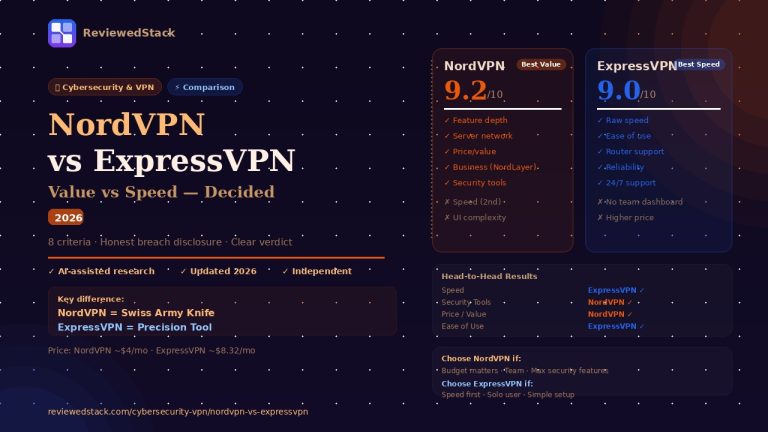
2. ExpressVPN – Best for Speed and Ease of Use
ExpressVPN is the premier choice for solo entrepreneurs and micro-teams who prioritise speed and a frictionless user experience.Key Features:
- Lightway protocol for industry-leading speeds
- TrustedServer technology (RAM-only servers)
- Simple apps for every major OS and device
- Split-tunneling to choose which apps use the VPN
Pricing: From $12.99/month. Save up to 78% with biyearly payment.
Pros:
- Fastest server network in the category.
- Simplest user interface for non-technical staff.
- Industry-leading 24/7 customer support.
Cons:
- Lacks a centralised management dashboard for teams.
- Higher price point for solo plans.
Evaluation: While ExpressVPN lacks the “team management” features of NordLayer, it is the best consumer-grade VPN for business use. It is ideal for solo owners or teams under five people who want a “set it and forget it” solution. Its speed ensures that video calls and large file transfers aren’t hindered by the encryption layer. The proprietary Lightway protocol is particularly impressive, offering near-instant connection times that won’t frustrate staff who are constantly switching between networks. Because the interface is so stripped-back, you won’t spend time training non-technical staff on how to use it. It remains the gold standard for reliability, rarely suffering from the connection drops that plague cheaper alternatives.
- Real-World Use Case: A solo management consultant traveling between international client offices uses ExpressVPN to bypass local network restrictions and access their home-country SaaS tools without triggering “suspicious login” alerts.
- Standout Feature in Action: The “Split-Tunneling” feature allows a user to run their sensitive banking and email through the VPN while keeping their high-bandwidth video rendering software on a local, unencrypted connection to maximize speed.
- Main Limitation: There is no centralized billing or administrative console, meaning if you have five employees, you must manage five separate subscriptions and five different sets of login credentials manually.
📖 NordVPN vs ExpressVPN comparison →
3. Perimeter 81 – Best for Growing Remote Teams
Perimeter 81 is a modern, cloud-native firewall and VPN replacement built specifically for the zero-trust security model.Key Features:
- Zero-trust network access (ZTNA) for granular security
- Cloud management platform for global network visibility
- Automated Wi-Fi security for remote workers
- Integration with major cloud providers (AWS, Azure, GCP)
Pricing: Verify on vendor site and ask for custom pricing.
Pros:
- Superior granular access controls compared to traditional VPNs.
- Fast deployment of private gateways.
- Comprehensive activity monitoring and reporting.
Cons:
- Requires a minimum of 5 or 10 users depending on the plan.
- Slightly steeper learning curve for setup.
Evaluation: Perimeter 81 is not a traditional VPN; it is a Software-Defined Perimeter (SDP). This makes it perfect for remote-first small businesses that need to control exactly which employees can access which internal resources. It offers a level of network visibility that standard VPNs cannot match, allowing admins to see real-time data on network health and user activity. The setup involves creating “regions” and “gateways,” which provides a much more robust infrastructure than a simple app-based tunnel. For businesses moving away from physical offices entirely, this acts as your virtual private headquarters. It scales beautifully, allowing you to add complex networking rules as your headcount grows.
- Real-World Use Case: A 20-person fintech startup uses Perimeter 81 to ensure that only the engineering team can access the AWS staging environment, while the sales team is restricted strictly to the CRM and email tools.
- Standout Feature in Action: An admin uses the “Device Posture Check” to automatically block any employee from connecting to the company network if their laptop’s operating system is out of date or if their local firewall is turned off.
- Main Limitation: The platform requires a minimum of 10 users for its core functional tiers, making it an expensive and overly complex choice for micro-businesses or teams of three.
4. Surfshark Business – Best Value for Teams
Surfshark Business offers a high-end security suite at a price point that is accessible to the most budget-conscious startups.Key Features:
- Unlimited simultaneous device connections
- CleanWeb feature to block ads, trackers, and malware
- Dedicated IP options available
- Bypasser (split-tunneling) for specific business apps
Pricing: From $19/month. Save up to 89% with biyearly payment.
Pros:
- Best price-to-performance ratio in the industry.
- Unlimited devices allow for massive scalability.
- Strong focus on user privacy and data protection.
Cons:
- Team management features are less robust than NordLayer.
- Customer support response times can vary.
Evaluation: Surfshark stands out because it allows for unlimited device connections. For a small business with employees who use multiple laptops, tablets, and phones, this prevents the “device limit” headaches common with other providers. It is the most cost-effective way to secure a small team without sacrificing encryption quality. The addition of a dedicated business tier has brought much-needed administrative tools to their high-speed infrastructure. It is particularly useful for businesses that need to test how their websites or ads appear in different global markets due to its massive server count. Despite the low price, the security suite is comprehensive, including features that many competitors charge extra for.
- Real-World Use Case: A small e-commerce brand with a 5-person team uses Surfshark to secure 15 different devices (laptops, warehouse tablets, and work phones) under a single affordable plan without ever hitting a connection cap.
- Standout Feature in Action: The “CleanWeb” feature actively filters out phishing URLs and malware-heavy pop-ups at the VPN level, significantly reducing the number of “I clicked a weird link” support tickets for the business owner.
- Main Limitation: While the “Business” plan adds a manager dashboard, it is still significantly less granular than NordLayer or Perimeter 81 when it comes to setting specific user-level permissions.
5. Cisco AnyConnect – Best for Compliance-Heavy Teams
Cisco AnyConnect (now part of Cisco Secure Client) is the gold standard for businesses that must meet strict regulatory requirements.Key Features:
- Enterprise-grade endpoint posture assessment
- Deep integration with Cisco’s security ecosystem
- Comprehensive audit trails and logging for compliance
- Multi-factor authentication (MFA) via Duo
Pricing: Custom pricing; verify with a Cisco partner.
Pros:
- Meets the highest standards for HIPAA, SOC2, and GDPR.
- Unparalleled customisation and security policy control.
- Extremely stable for large-scale enterprise use.
Cons:
- Complex setup requires professional IT knowledge.
- Pricing is significantly higher than consumer-style VPNs.
Evaluation: If your small business operates in healthcare, finance, or government contracting, Cisco is often the necessary choice. It provides the audit logs and endpoint visibility required to pass security audits. However, it is overkill for a standard marketing agency or retail business. The software is built for stability and deep integration with physical Cisco hardware, though the cloud-only “Secure Client” version is now more accessible. It handles complex network environments-like those with multiple on-premise servers and cloud hybrids-better than any consumer-focused tool. Expect a steep learning curve, but once it is configured, it is arguably the most “unbreakable” connection on this list.
- Real-World Use Case: A private medical clinic uses Cisco AnyConnect to provide doctors with a HIPAA-compliant encrypted tunnel to access sensitive patient electronic health records (EHR) from their home offices.
- Standout Feature in Action: The “Always-On” VPN capability ensures that a company-managed laptop cannot access the internet at all unless the VPN tunnel is established, effectively forcing security compliance on every staff member.
- Main Limitation: The user interface is utilitarian and dated, often leading to “VPN fatigue” among employees who find the connection process more cumbersome than modern, one-click apps.
6. ProtonVPN Business – Best for Privacy-First Teams
ProtonVPN, developed by CERN scientists, is built on a foundation of radical transparency and Swiss privacy laws.Key Features:
- Swiss-based jurisdiction with no-logs policy
- Open-source apps audited by independent third parties
- Secure Core servers that route traffic through multiple countries
- Centralised billing and user management for businesses
Pricing: From $8.99/month. Save up to 22% with yearly payment.
Pros:
- Exceptional reputation for privacy and integrity.
- NetShield feature blocks malware and trackers at the DNS level.
- High-speed 10Gbps server network.
Cons:
- Smaller server network than NordVPN or ExpressVPN.
- Business features are still evolving.
Evaluation: ProtonVPN is the logical choice for businesses where privacy is the product-such as legal firms, investigative journalism, or high-end financial consulting. Because the apps are open-source, your IT team can verify the security claims themselves, providing a level of trust other vendors can’t match. The Swiss jurisdiction offers a legal “shield” that US or UK-based providers simply cannot provide against data subpoenas. Their business plans include a dedicated account manager, which is a rare perk at this price point. The performance is surprisingly high, as they use a high-bandwidth 10Gbps network that rivals the “big” consumer names.
- Real-World Use Case: A boutique law firm uses ProtonVPN to protect privileged attorney-client communications, relying on the Swiss jurisdiction to ensure their traffic logs can never be legally seized.
- Standout Feature in Action: The “Secure Core” feature routes traffic through a hardened server in Switzerland or Iceland before sending it to the final destination, protecting the team even if a local exit server is compromised.
- Main Limitation: The server network, while high quality, is smaller than competitors, which can occasionally lead to slightly higher latency for teams based in Southeast Asia or South America.
7. Mullvad – Best for Maximum Anonymity
Mullvad is a unique provider that prioritises anonymity above all else, even forgoing traditional account names and passwords.Key Features:
- No email or personal information required for accounts
- Flat-rate pricing (€5/month) regardless of plan length
- Accepts cash and cryptocurrency for total anonymity
- External audits of infrastructure and code
Pricing: €5 per month flat.
Pros:
- Most anonymous VPN on the market.
- Transparent, no-gimmick pricing.
- Excellent WireGuard implementation.
Cons:
- No dedicated business or team management features.
- Limited to 5 devices per account.
Evaluation: Mullvad is for the business owner who wants zero paper trail. While it lacks a central dashboard to manage a team, you can purchase multiple accounts using cash or crypto. It is a niche but powerful tool for individuals or small teams working in high-risk environments. There are no “business plans” or “sales calls” here; you simply pay the flat €5 fee and get a high-performance WireGuard tunnel. The transparency is unmatched, with Mullvad frequently undergoing and publishing infrastructure audits. For a technical founder who just wants five keys for five developers, it is the most honest tool in the shed.
- Real-World Use Case: A freelance cybersecurity researcher uses Mullvad to conduct anonymous penetration testing for clients, paying in Monero to ensure their research activity is never linked to their personal or business identity.
- Standout Feature in Action: The account creation process generates a random 16-digit number with no email required, meaning even if Mullvad were breached, there is no “customer list” containing your company’s information.
- Main Limitation: There is absolutely no way to “recover” an account if the 16-digit code is lost, and the lack of a centralized billing portal makes it an accounting headache for larger teams.
8. PureVPN Teams – Best Budget Team Option
PureVPN Teams provides a low-cost entry point for businesses that need basic team features without the NordLayer price tag.Key Features:
- Dedicated IP addresses for secure remote access
- Centralised admin console for billing and user management
- IP whitelisting capabilities
- 24/7 technical support for business accounts
Pricing: From $12.95/month. Save up to 82% with biyearly payment.
Pros:
- Very affordable for small teams.
- Easy-to-use administration dashboard.
- Global server coverage in over 65 countries.
Cons:
- Speeds can be inconsistent compared to ExpressVPN.
- Privacy history is not as spotless as Proton or Mullvad.
Evaluation: PureVPN Teams is a solid “utility” choice. It doesn’t have the bells and whistles of Perimeter 81, but it provides centralized billing and dedicated IPs for a fraction of the cost. It is ideal for very small businesses that simply need to whitelist their employees’ IPs for access to a secure server. The admin dashboard is surprisingly clean, allowing for quick deployment of “gateways” in various countries. While it doesn’t lead the pack in speed, it is consistently “good enough” for standard office work and SaaS usage. It represents the “value” tier of dedicated business VPNs.
- Real-World Use Case: A 7-person customer support team uses PureVPN Teams to give every agent a “Dedicated IP,” which is then whitelisted in the company’s CRM so the database remains closed to the general public.
- Standout Feature in Action: The “IP Whitelisting” dashboard allows the business owner to see exactly which IP addresses are permitted to access the company’s private cloud storage, blocking all other unauthorized traffic.
- Main Limitation: PureVPN has a complicated history regarding its “no-logs” claims; while they are now independently audited and “Always-On” audited, some privacy-conscious businesses may still prefer Proton or Mullvad.
What to Look for in a Business VPN
Team Management Features
Unlike consumer VPNs, business versions should offer a centralized dashboard that acts as a “single pane of glass” for your security. This allows you to add or remove employees (provisioning) instantly, which is critical for offboarding staff securely. When evaluating, check if the tool supports SSO (Single Sign-On) like Okta or Azure AD, as this allows employees to use one password for everything. A good dashboard should also allow you to group users by department, giving different access levels to your marketing team versus your finance team.
Encryption and Security Standards
Ensure the VPN uses AES-256 encryption, which is the same standard used by banks and the military. For protocols, WireGuard is the modern standard for speed and mobile reliability, while OpenVPN remains the gold standard for bypassing strict firewalls. When testing a VPN, check if the “Kill Switch” is customizable-you want to ensure that if the VPN connection drops, the device’s internet is cut immediately to prevent data leaks. Practical guidance: Ask the vendor for their latest penetration test report to see if their encryption has been recently challenged by experts.
No-Logs Policy
A “no-logs” policy means the provider doesn’t track what you do, when you log in, or what files you download. However, “no-logs” is often used as a marketing term, so you must look for providers that have undergone independent, third-party audits by firms like PwC or Deloitte. Check the jurisdiction of the VPN provider as well; companies based in “14-Eyes” countries may be legally compelled to start logging in secret. Practical guidance: Search the provider’s blog for “Transparency Reports” to see how they handle law enforcement requests for data.
Server Network and Speed
A large server network reduces congestion, ensuring your team doesn’t experience “lag” during important client presentations. For business, Dedicated IPs are often more important than shared ones, as they allow you to “whitelist” your team’s access to internal company tools like AWS or your private CRM. Without a dedicated IP, your staff might be blocked by your own security systems because their IP address changes every time they log in. Practical guidance: Test the VPN speed from the specific locations where your remote staff actually live, not just the provider’s “optimal” server.
Device and OS Support
Your team likely uses a mix of Windows, Mac, iOS, and Android, often on their own personal devices (BYOD). Ensure the VPN has native, user-friendly apps for all these platforms to avoid the headache of manual configurations, which are prone to user error. Look for a “multi-hop” or “double VPN” feature if your team handles extremely sensitive data on mobile devices. Practical guidance: Check if the VPN allows for “Router Installation,” which can protect an entire home office’s worth of devices (including printers and VOIP phones) with a single connection.
Compliance and Audit Support
If you handle sensitive data in the US, UK, or EU, you may need a VPN that helps you meet GDPR, HIPAA, or SOC2 requirements. This involves more than just encryption; it requires a provider that keeps “access logs” (who accessed the VPN and when) without logging “activity logs” (what they did on the internet). Enterprise-grade providers like Cisco or Perimeter 81 are built specifically to provide these audit trails for your compliance officer. Practical guidance: If your industry requires a BAA (Business Associate Agreement) for HIPAA, ensure the VPN provider is willing to sign one before you commit.
Business VPN by Use Case
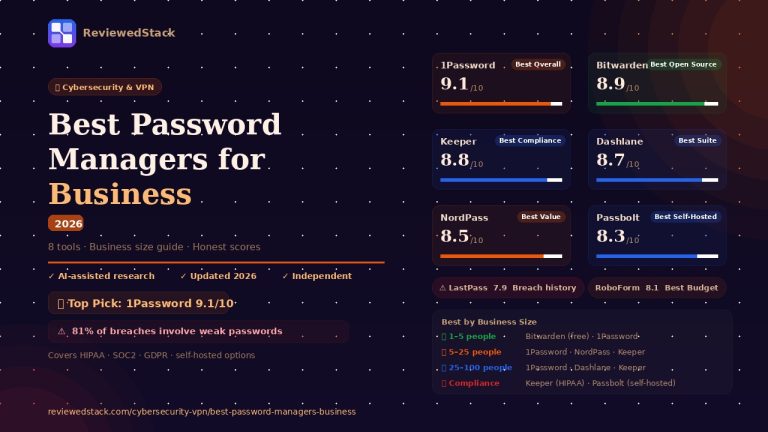
- Best for Remote Teams: NordLayer (management) or Perimeter 81 (zero trust).
- Best for Solo Owners: ExpressVPN (speed) or Surfshark (value).
- Best for Compliance: Cisco AnyConnect (enterprise) or ProtonVPN (privacy-audited).
- Best Budget Options: Surfshark Business (~$2.49/user) or PureVPN Teams (~$3.99/user).
Our Verdict
For most small businesses, NordLayer is the best overall choice. Its combination of easy team management, Zero-Trust security, and SSO integration makes it a complete solution that grows with your company without requiring a massive IT budget.
If you are a solo owner or a very small team of three, ExpressVPN remains the king of speed and reliability. For those who need granular control over a remote workforce, Perimeter 81 offers a more modern, cloud-based approach to network security.
Ultimately, for a business under 10 people, either NordLayer or Surfshark Business will cover 99% of your security needs at a highly competitive price point. For more in-depth analysis, visit our Cybersecurity & VPN reviews section.
All ReviewedStack comparisons are editorially independent. Learn how we work →
FAQs
Q: Do small businesses need a VPN?
Yes. A VPN encrypts your company data, protecting it from hackers on public Wi-Fi and securing remote access to internal tools.
Q: What is the best VPN for a small business with remote workers?
NordLayer and Perimeter 81 are the best choices because they offer centralised management and Zero-Trust access controls.
Q: Is NordVPN good for business use?
The standard NordVPN is great for individuals, but for business, you should use NordLayer, which is their dedicated corporate solution. For a full NordVPN review, see our NordVPN Review 2026.
Q: What is the difference between a consumer VPN and a business VPN?
Consumer VPNs protect an individual’s privacy. Business VPNs offer centralised billing, user management, dedicated IPs, and the ability to control team access to specific resources.
Q: How much does a business VPN cost?
Most business VPNs cost between $3 and $9 per user, per month, depending on the features and team size.
Q: Can I use a free VPN for business?
No. Free VPNs often sell user data to cover costs and lack the security protocols and management features required for professional use.
Q: What VPN is best for GDPR compliance?
ProtonVPN and Cisco AnyConnect are excellent for compliance due to their strong privacy jurisdictions and detailed audit trails. For more security tools, see our Best Password Managers for Business.

Former engineering leader at HARMAN International, where he acted as business architect in SAP ME and Siemens Teamcenter PLM implementations. Built ERP and process automation applications in .NET. Holds a degree in Business Information Management. Reviews SaaS tools from the perspective of someone who has evaluated, implemented, and lived with enterprise software at scale.
LinkedIn Profile