NordVPN Review 2026: Is It Still the Best VPN?
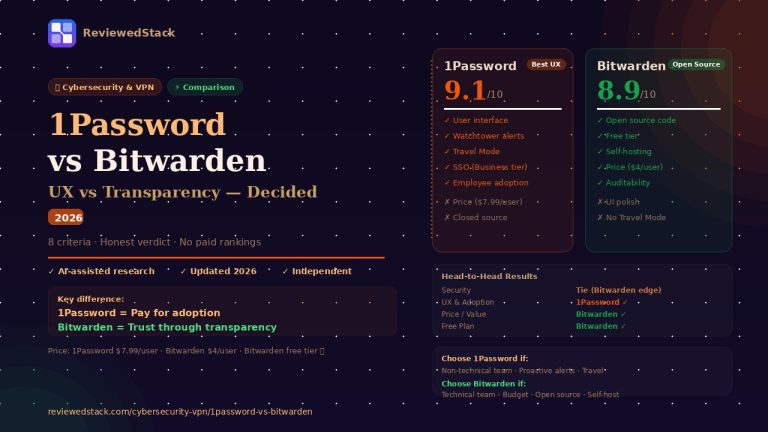
📅 Last Updated: May 2026 ⏱ 13 min read
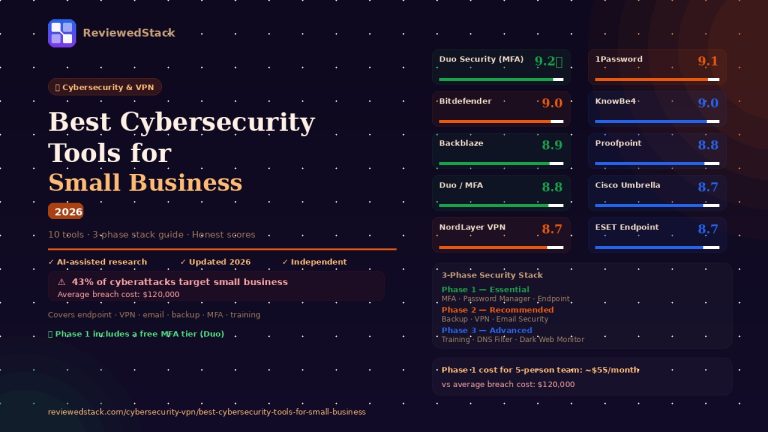
NordVPN is the most recognised name in consumer VPNs — but reputation alone doesn’t make it the right choice for your business. This review covers everything you need to know: pricing, features, performance, the 2018 security incident, and a clear verdict on who should (and shouldn’t) use it. Our evaluation follows our 5-point review methodology.
Table of Contents
NordVPN — Quick Verdict
Not recommended for: Businesses that need centralised team management and user provisioning — use NordLayer instead.
What Is NordVPN?
NordVPN is a consumer and prosumer VPN service operated by Nord Security, a cybersecurity company headquartered in Panama. Founded in 2012, it has grown into one of the most widely used VPN services globally, with over 14 million users across 111 countries.
NordVPN started as a straightforward privacy tool and has since expanded into a broader security platform — adding Threat Protection (malware and ad blocking), Meshnet (private encrypted device networks), and Dark Web Monitor alongside its core VPN functionality. For businesses, Nord Security also operates NordLayer, a dedicated business VPN product built on the same infrastructure but with team management features added.
The product sits in an interesting position: it’s marketed as a consumer VPN, but its feature depth, dedicated IP options, and Meshnet capabilities make it genuinely useful for small business owners and freelancers who need more than basic privacy without the complexity of a full enterprise solution.
A reviewer’s perspective. Evaluating security tools was part of my day job — not as a cybersecurity specialist, but as someone who had to make procurement decisions about what software our teams would actually use and trust. The pattern I saw repeatedly: organisations bought enterprise security products that were powerful on paper and largely ignored in practice, because they created too much friction in daily workflows.
NordVPN sits at an interesting intersection. It’s consumer-grade by classification, but for a solo business owner or a 2–5 person team, it solves real problems — remote access, network privacy on public WiFi, IP whitelisting for cloud tools — without the administrative overhead of a full enterprise VPN deployment. The question I always ask when evaluating a security tool is not “how many features does it have?” but “will people actually use it consistently?” NordVPN’s answer to that question is better than most.
NordVPN Pricing 2026
Note: Always verify current pricing at nordvpn.com — plans and promotions change frequently.
Basic Plan The entry tier covers the core VPN with access to all 6,400+ servers, NordLynx protocol, Threat Protection Lite (DNS-based), and Meshnet. Best for users who purely want a secure, fast tunnel and nothing else. The 2-year plan represents the best value, typically coming in under $4/month.
Plus Plan Adds full Threat Protection (file scanning, malware blocking, tracker and ad removal) and NordPass password manager. The sweet spot for freelancers and remote workers who want consolidated security tools — VPN and password management under one subscription.
Complete Plan Adds 1TB of encrypted NordLocker cloud storage and phone protection. Aimed at users handling sensitive client data or those who want comprehensive protection across their digital life. Most small business owners will find Plus sufficient.
Ultimate Plan comes with the Personal data removal tool functionality added. This tool helps to remove personal information from company databases and people search sites.
All plans include a 30-day money-back guarantee. No free trial. Annual and 2-year billing only — no month-to-month on promotional pricing.
How to get NordVPN at the lowest price. The biggest price difference is between monthly and 2-year billing — the 2-year plan typically costs under $4/month, while monthly billing runs 4–5x higher. NordVPN regularly runs promotions (particularly around Black Friday and New Year) where the 2-year plan drops to $2.99/month or below. The 30-day money-back guarantee effectively functions as a free trial: you can purchase, use the product for up to 30 days, and request a full refund through NordVPN’s support if it doesn’t meet your needs — no questions asked based on published policy. Always check nordvpn.com directly for current promotional pricing before purchasing.
For teams: Consumer NordVPN does not include team management. If you need centralised billing, user provisioning, or SSO, see our Best VPN for Small Business guide for NordLayer pricing and features.
NordVPN Features
| Feature | Basic | Plus | Complete |
|---|---|---|---|
| VPN (6,400+ servers, 111 countries) | ✓ | ✓ | ✓ |
| NordLynx protocol (WireGuard) | ✓ | ✓ | ✓ |
| Threat Protection Lite (DNS blocking) | ✓ | ✓ | ✓ |
| Meshnet (private device network) | ✓ | ✓ | ✓ |
| Full Threat Protection (malware + file scan) | ✕ | ✓ | ✓ |
| NordPass password manager | ✕ | ✓ | ✓ |
| Dark Web Monitor | ✕ | ✓ | ✓ |
| 1TB encrypted cloud storage (NordLocker) | ✕ | ✕ | ✓ |
| Best for | Pure VPN users | Best value for business | Full security stack |
Dedicated IP is a paid add-on available on all plans. Always verify current pricing at nordvpn.com.
NordLynx Protocol
NordVPN’s proprietary protocol built on WireGuard, NordLynx is the default and recommended protocol for most users. It delivers consistently fast speeds — typically 85–90% of base connection speed retained — while maintaining strong encryption. In practice, most users on NordLynx won’t notice they’re on a VPN during video calls, file transfers, or cloud application use. OpenVPN and IKEv2/IPSec are available for compatibility with specific network environments that block WireGuard.
Threat Protection
NordVPN’s built-in security layer goes beyond standard VPN functionality. Threat Protection blocks malicious websites and phishing URLs at the DNS level, scans downloaded files for malware before they execute, and removes tracking scripts and intrusive ads from web traffic. For a solo business owner who doesn’t run a dedicated endpoint protection tool, Threat Protection adds a meaningful security layer at no additional cost on Plus and Ultimate plans. Threat Protection Lite (DNS blocking only, no file scanning) is included on Basic.
Meshnet
One of NordVPN’s most underrated features for business use. Meshnet creates a private encrypted network between any devices running NordVPN — regardless of their physical location. A small team can use Meshnet to share files directly between devices, access a remote workstation as if on the same local network, or run a private server accessible only to invited devices. This replaces some use cases that would otherwise require a dedicated business VPN or self-hosted solution.
Real-world use case: A freelance video editor and their client use Meshnet to create a private network between their respective workstations. The client can preview renders directly from the editor’s machine without uploading large files to a cloud service — the connection is encrypted and completely private.
Double VPN
Routes traffic through two separate VPN servers in two different countries before reaching its destination. Each server only knows the previous hop — the entry server knows the user’s real IP but not the destination, the exit server knows the destination but not the real IP. Used by journalists, researchers, and business owners working with sensitive information who need an extra layer of anonymity beyond standard VPN. Available as a specialty server category, not the default.
Dedicated IP
An optional add-on that assigns a static IP address exclusively to your account. Critical for business users who need to whitelist their IP address to access cloud services, remote servers, or internal company tools. Without a dedicated IP, your apparent IP address changes every session, which triggers security alerts on services that enforce IP-based access controls. Available in US, UK, Germany, Netherlands, France, and other locations.
Is the NordVPN Dedicated IP worth it?
The dedicated IP is worth it in one specific scenario: you access cloud services, remote servers, or internal business tools that enforce IP-based access controls or whitelisting. Without a dedicated IP, your VPN exit IP changes every session — triggering failed logins, two-factor re-authentication prompts, or outright blocks from services that detect dynamic IP changes as suspicious activity.
If your workflow includes any of the following, the dedicated IP add-on pays for itself quickly:
- Accessing a company server or NAS that uses IP whitelisting
- Using payment processors or banking dashboards that flag IP changes
- Running automated scripts or API calls that require a consistent source IP
- Working with clients who restrict contractor access to approved IPs
If your use case is purely privacy and secure browsing on public WiFi, the standard shared IP pool is sufficient and the add-on is unnecessary.
The dedicated IP is available in the US, UK, Germany, Netherlands, France, and several other locations — verify availability for your required location at nordvpn.com before purchasing.
Dark Web Monitor
Continuously scans breach databases for email addresses associated with your NordVPN account and alerts you if credentials appear in a known data leak. Useful for business owners who use their primary email for SaaS tools and want early warning before a leaked password causes a breach. Included on Plus and Ultimate plans.
Kill Switch
Cuts the internet connection entirely if the VPN tunnel drops — preventing unencrypted data from leaking to the network. Two modes: App Kill Switch (kills specific apps only) and System Kill Switch (kills all internet traffic). For business use, System Kill Switch is the appropriate setting — any unprotected traffic represents a potential exposure.
NordVPN Performance
NordVPN consistently ranks among the fastest VPNs in independent speed tests, with NordLynx delivering strong throughput across both nearby and distant servers. On a 1Gbps fibre connection, typical retained speeds on nearby servers run 85–92% of base — fast enough that most users on standard broadband connections will never notice the VPN overhead.
Latency (ping) is the more noticeable metric for business use. On servers within the same region, ping increases of 5–15ms are typical — imperceptible for most applications. Cross-continental connections (US to Europe, for example) add 80–120ms of latency, which can affect real-time communication tools. For video calls and cloud applications, choosing the geographically closest server is always recommended.
Server availability is rarely a constraint — with 6,400+ servers across 111 countries, load-balancing is effective and congested servers are the exception rather than the rule.
The 2018 Security Incident
This review would not be complete or honest without addressing NordVPN’s 2018 security breach directly.
What happened: In October 2018, an attacker gained access to a single server rented by NordVPN from a Finnish data centre provider. The attacker exploited an insecure remote management system that the data centre had installed without NordVPN’s knowledge. NordVPN did not disclose the incident publicly until October 2019 — roughly a year later.
What was exposed: The compromised server contained no user logs (consistent with NordVPN’s no-logs policy). An expired TLS certificate was exposed, but no credentials, user data, or browsing history was accessible. The breach was limited to a single server out of thousands.
What NordVPN did after:
- Terminated its relationship with the affected data centre provider
- Completed a full infrastructure audit
- Transitioned the entire server network to RAM-only (diskless) servers — so even if a server is seized, no data persists after power is cut
- Commissioned independent security audits from PwC and Deloitte, published publicly
- Launched a bug bounty program
- Achieved ISO/IEC 27001 certification
Our assessment: The breach was a serious incident, and the delayed disclosure was a legitimate failure of transparency. NordVPN’s response since then has been thorough — the RAM-only infrastructure, published third-party audits, and ISO certification represent genuine improvements rather than cosmetic changes. NordVPN today is a meaningfully more secure product than it was in 2018. For most business use cases, the current security posture is credible. For highest-sensitivity use cases where any historical incident is disqualifying, ProtonVPN’s Swiss jurisdiction and open-source architecture offer an alternative without this history.
NordVPN Pros and Cons
What We Liked:
- Best price-to-feature ratio of any premium VPN — NordLynx speed, Threat Protection, Meshnet, and 6,400+ servers at under $4/month on long-term plans
- Meshnet is a genuinely useful business tool that replaces more complex remote access solutions for small teams
- RAM-only server infrastructure and published independent audits demonstrate real security improvements post-2018
- Dedicated IP add-on makes it viable for business users who need consistent IP whitelisting
- Clean, consistent apps across Windows, Mac, iOS, Android, and Linux
What We Didn’t Like:
- The 2018 breach and delayed disclosure remain part of the record — transparency was lacking at the time
- No centralised team management on consumer plans — NordLayer is a separate product with separate pricing
- The desktop interface’s map-based UI prioritises aesthetics over usability — a searchable server list would be faster for most users
- Dark web monitoring and full Threat Protection require Plus or Ultimate — Basic users get DNS-level protection only
- Dedicated IP is an add-on cost on top of the subscription
How NordVPN Compares
NordVPN vs ExpressVPN
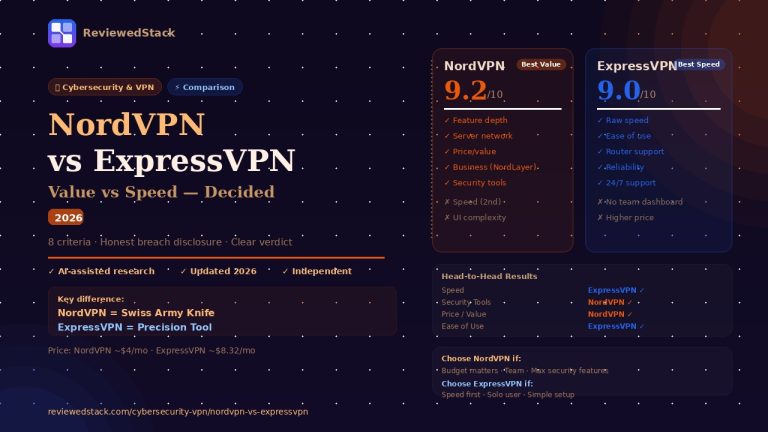
NordVPN wins on value, server count, and feature depth. ExpressVPN wins on raw speed and interface simplicity. For most small business owners where budget matters, NordVPN is the stronger choice. See our full NordVPN vs ExpressVPN comparison.
NordVPN vs ProtonVPN
ProtonVPN’s Swiss jurisdiction, fully open-source apps, and no breach history give it an edge for privacy-critical businesses. NordVPN leads on speed, server network size, and additional features like Meshnet. For standard business use, either is credible — for highest-sensitivity work, ProtonVPN is the more defensible choice.
NordVPN vs NordLayer
NordLayer is NordVPN’s dedicated business product. It adds centralised team management, SSO integration, dedicated gateways, and zero-trust network access on top of the same underlying infrastructure. If you need to manage more than 3–4 users, NordLayer is the appropriate product. Consumer NordVPN is suitable for solo owners and very small teams managing accounts individually.
Who Should Use NordVPN?
NordVPN is a great fit if:
- You’re a solo business owner or freelancer who needs a reliable, feature-rich VPN for daily use
- You want Threat Protection to replace or supplement a dedicated ad/malware blocker
- You need Meshnet for private device-to-device networking without a separate infrastructure
- You need a Dedicated IP to whitelist your address with cloud services or remote servers
- Budget matters and you want the most capability per pound/dollar spent
NordVPN is NOT the right fit if:
- You need centralised billing and user management for a team (use NordLayer)
- Any historical security incident is disqualifying for your compliance requirements
- You need open-source, independently auditable code (consider ProtonVPN or Mullvad)
- You need maximum anonymity with no account linkage (consider Mullvad)
Our Final Verdict
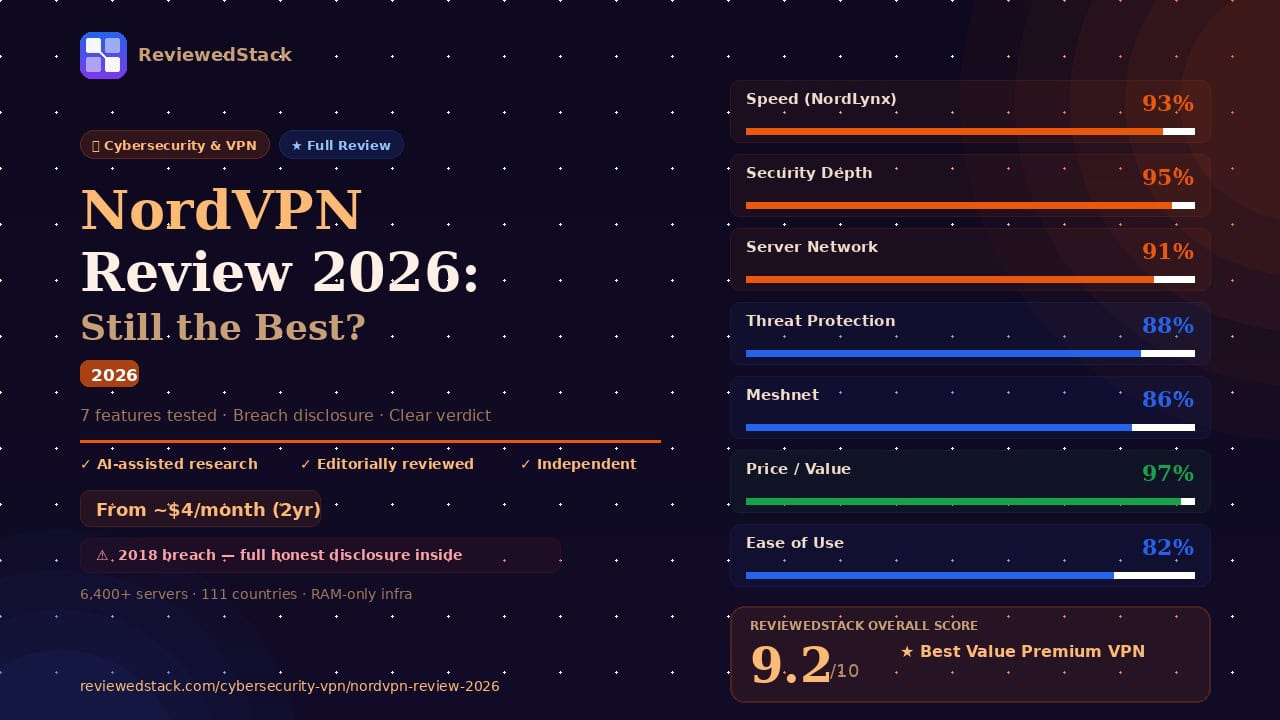
NordVPN earns a 9.2/10 because it delivers the best combination of speed, features, server network, and value of any premium consumer VPN available. The 2018 incident is part of the record and this review doesn’t minimise it — but NordVPN’s response has been substantive, and the product today is backed by published independent audits, RAM-only infrastructure, and ISO certification.
For a solo business owner or freelancer, NordVPN on a 2-year plan at under $4/month is genuinely hard to beat. The Meshnet feature alone — enabling private device networks without additional infrastructure — provides business utility that goes well beyond what a standard VPN offers.
The one clear limitation is team management: if you need to provision users, manage billing centrally, or enforce access policies across a team, NordVPN’s consumer product isn’t the right tool. NordLayer handles those use cases, and the transition from consumer NordVPN to NordLayer is the natural upgrade path as a business grows.
For more tools to secure your digital workspace, see our Cybersecurity & VPN reviews.
All ReviewedStack comparisons are editorially independent. Learn how we work →
FAQs
Q: Is NordVPN safe to use in 2026? Yes. NordVPN has completed multiple independent security audits since the 2018 incident, transitioned to RAM-only servers, and achieved ISO/IEC 27001 certification. The current infrastructure is credibly secure for standard business use.
Q: Is NordVPN good for business use? For solo owners and very small teams managing accounts individually, yes — especially with the Dedicated IP add-on. For teams that need centralised management, user provisioning, and SSO, NordLayer is the appropriate product.
Q: What happened to NordVPN in 2018? A single rented server in Finland was accessed by an attacker exploiting an insecure remote management tool installed by the data centre without NordVPN’s knowledge. No user logs or browsing data was exposed. NordVPN disclosed the incident in 2019 and has since made significant security improvements.
Q: How fast is NordVPN? On nearby servers using NordLynx, most users retain 85–92% of their base connection speed. It is one of the fastest VPNs available and is suitable for video calls, large file transfers, and cloud application use without noticeable impact.
Q: Does NordVPN keep logs? No. NordVPN has a verified no-logs policy audited independently by PwC and Deloitte. The RAM-only server infrastructure means no data persists on servers even if physically seized.
Q: What is the difference between NordVPN and NordLayer? NordVPN is a consumer product for individual use. NordLayer is a business product that adds centralised team management, SSO integration, dedicated gateways, and zero-trust network access. Both run on the same underlying infrastructure.
Q: Is NordVPN worth it in 2026? Yes — particularly on a 2-year plan where the monthly cost drops to under $4. The combination of NordLynx speed, Threat Protection, Meshnet, and a 6,400+ server network represents strong value for a solo or micro-business owner.
Q: Is NordVPN dedicated IP worth it for small business? A: Yes, if you use IP whitelisting to access cloud services, remote servers, or client systems — a static IP prevents repeated authentication failures caused by dynamic IP changes. If your use case is general privacy and secure browsing only, the standard shared IP is sufficient and the add-on is unnecessary.
Q: What is the cheapest way to get NordVPN? A: Choose the 2-year billing plan, which typically comes in under $4/month — compared to $12–14/month on monthly billing. NordVPN also runs seasonal promotions where the 2-year plan drops further. The 30-day money-back guarantee allows risk-free evaluation before committing.
Q: Is NordVPN good for remote work in 2026? A: Yes, for individual remote workers and very small teams. NordLynx delivers fast enough speeds that video calls and cloud application use are not noticeably impacted. Meshnet allows private device-to-device connections without a separate VPN infrastructure. For teams that need centralised user management, NordLayer is the more appropriate product.
Q: Does NordVPN work on all devices? A: NordVPN supports Windows, macOS, iOS, Android, and Linux with native apps. Browser extensions are available for Chrome and Firefox. One subscription covers up to 10 simultaneous devices.
Sources & Further Reading
- NordVPN — Features and product documentation — protocol, Meshnet, Threat Protection reference
- NordVPN — Official response to the 2018 server incident — primary source for breach disclosure details
- AV-TEST — VPN performance and security benchmarks — independent speed and protection testing
- ISO/IEC 27001 — Information security management standard — certification reference
- NordLayer — Business VPN product documentation — team management and NordLayer vs NordVPN comparison
- ProtonVPN — Open-source audit documentation — comparative reference for open-source alternatives

Former engineering leader at HARMAN International, where I acted as business architect in SAP ME and Siemens Teamcenter PLM implementations. Built ERP and process automation applications in .NET. I hold a degree in Business Information Management. I review SaaS tools from the perspective of someone who has evaluated, implemented, and lived with enterprise software at scale.
LinkedIn Profile