Semrush Review 2026: Is It Worth It for Small Business?
📅 Last Updated: April 2026 ⏱ 14 min read
Semrush is the most recommended SEO tool on the market – but at $139/month it’s also one of the most expensive. Is it worth it for a small business, or are you paying for features you’ll never use? This review covers pricing, core features, comparisons, pros/cons, and who should (and shouldn’t) buy Semrush. Methodology: this review follows our 5-point review methodology.
Table of Contents
Semrush – Quick Verdict
Not recommended for: Businesses that only need basic keyword research or rank tracking — cheaper alternatives exist.
What Is Semrush?
Semrush launched in 2008 as a focused SEO toolkit for competitive keyword research and domain analysis. Over the years it has deliberately expanded beyond pure SEO into a unified marketing platform, adding modules for PPC research, content workflow, social media scheduling, local listings, and broader competitive intelligence. That evolution was driven by customer demand: agencies and in-house teams wanted a single source of truth to plan organic, paid, and content strategies without switching tools.
Today Semrush is used by freelancers, in-house marketing teams, agencies, ecommerce owners, and product marketers who need cross-channel visibility. Typical users include content managers who run weekly editorial calendars, PPC managers who need competitor ad intel, and technical SEOs who run regular site audits. Semrush’s integrations (Google Analytics, Search Console, Google Docs, WordPress, and various reporting APIs) and add-ons mean teams can fold Semrush data into existing workflows rather than starting from scratch.
Functionally, Semrush’s selling point is consolidation: keyword research, audits, backlink analysis, content creation guidance, and traffic estimation live in one platform so teams can move from discovery to execution without disconnects. That breadth makes it attractive to small businesses that run multiple channels but lack the budget to buy and learn several specialist tools.
A reviewer’s perspective. My background is in enterprise software evaluation and implementation — including SAP Manufacturing Execution and Siemens Teamcenter PLM at HARMAN International, where tool selection had real operational consequences. When I look at Semrush, I apply the same lens: does it actually get used, or does it sit unused after the onboarding enthusiasm fades?
The honest answer is that Semrush has a steeper learning curve than it presents in its own marketing. The platform has grown significantly, and the sheer number of modules can feel overwhelming in the first two weeks. But unlike many enterprise tools I’ve evaluated, the core workflows — keyword research, site audit, rank tracking — become genuinely fast once you’ve set up your projects. For a small marketing team running content and SEO together, the consolidation value is real: one login, one dataset, one reporting view. That matters more than it sounds when you’re a team of two trying to move quickly.
Semrush Pricing 2026
Note upfront: always verify current pricing on semrush.com – tiers and prices change frequently.| Feature | Pro $139.95/mo | Guru $249.95/mo | Business $499.95/mo |
|---|---|---|---|
| Projects | 5 | 15 | 40 |
| Keywords to track | 500 | 1,500 | 5,000 |
| Content Marketing Platform | ✕ | ✓ | ✓ |
| Historical data | ✕ | ✓ | ✓ |
| White-label reports | ✕ | ✕ | ✓ |
| API access | ✕ | ✕ | ✓ |
| Best for | Freelancers & small businesses | Growing teams — best value | Agencies & enterprise |
Prices shown are monthly billing rates. Annual plans save ~17%. Always verify current pricing at semrush.com.
Semrush Free Trial: What You Actually Get
Semrush periodically offers a 7-day free trial on Pro or Guru plans — check semrush.com directly for current availability, as promotions change. The free trial gives full access to the plan’s feature set, including Keyword Magic Tool, Site Audit, Position Tracking, and the Content Marketing Platform (Guru tier trial only).
What to do during the trial to get maximum value:
- Set up your first project immediately and run a full site audit — this alone surfaces technical issues worth fixing regardless of whether you subscribe.
- Run a keyword gap analysis against your top two competitors to identify content opportunities.
- Set up Position Tracking for your 10 most important target keywords to establish a baseline.
- Export all reports before the trial ends — CSV exports are available on all tracked data.
There is no permanently free plan. Semrush does offer a limited free account with 10 keyword lookups per day and restricted access to tools, but it is not a substitute for the paid experience. If you need more than basic keyword lookups, the trial is the right way to evaluate the platform properly.
Tip: Annual billing saves approximately 17% compared to monthly — if you decide to subscribe after the trial, commit annually only if you have a clear use case for at least three modules (e.g., keyword research + site audit + rank tracking). Single-feature users will find cheaper alternatives.
Semrush Features
Keyword Research
- Keyword Magic Tool – 25B+ keywords
- Keyword difficulty scoring
- Search intent classification
- Keyword gap analysis vs competitors
- Questions and related keywords
Evaluation
Semrush’s keyword tools surface large keyword lists, intent signals, and groupings that help you plan topical content and prioritize pages by business value. The Keyword Magic Tool gives you filters (match type, intent, SERP features) so you can quickly separate transactional from informational queries. For small teams, the grouping and tagging features speed up campaign planning by letting you assemble topic clusters and assign priorities. Data quality is strong for mainstream markets, though volume and CPC figures are aggregated and should be treated as directional rather than exact. The intent classification is useful but not infallible – you should validate intent against live SERPs for high-value terms.
Use case
A local bakery uses Keyword Magic to find high-intent phrases like “best birthday cakes near me” and long-tail ideas for seasonal pages (“Easter hot cross buns order”) to drive foot traffic and preorders.
Concrete example
The Keyword Magic Tool shows estimated monthly search volume, keyword difficulty, CPC, and a search-intent tag side-by-side, plus filters for question-format keywords and SERP features (e.g., knowledge panel, local pack).
Limitation
Volume and CPC estimates can be rounded or smoothed across locations and should be cross-checked for very niche, low-volume queries.
Site Audit & Technical SEO
- Full site crawler
- Issue prioritisation and scoring
- Core Web Vitals integration
- Crawl budget analysis
- HTTPS and security checks
Evaluation
The Site Audit crawler identifies on-page and technical issues and ranks them by severity so you can focus fixes that will improve visibility fastest. It integrates Core Web Vitals and provides page-level diagnostics (e.g., slow LCP, missing alt text, thin content) plus crawl-budget and indexation reports. The issue descriptions include affected URLs and remediation tips, which is useful for small teams that need actionable task lists. Audit coverage is robust for HTML and server-rendered sites, but JavaScript-heavy sites need proper rendering settings and may require additional passes. Scheduled audits and historical trend charts help monitor whether fixes actually move the needle over time.
Use case
An ecommerce store runs a weekly site audit to find and prioritize broken category links, duplicate meta tags, and slow key product pages ahead of a holiday campaign.
Concrete example
The audit report lists each issue with a severity score, the exact URL(s) affected, the number of occurrences, and recommended fixes (e.g., “Add rel=canonical to duplicate content – affected URLs: /a, /b, /c”).
Limitation
Pages that rely heavily on client-side rendering or require login may be missed or misdiagnosed unless you configure the crawler to render JavaScript and provide credentials.
Rank Tracking
- Daily position tracking
- Mobile and local rank tracking
- SERP feature tracking (featured snippets, PAA)
- Competitor rank comparison
Evaluation
Semrush provides daily rank tracking with mobile/local segmentation and flags for SERP features so you can see not just position changes but whether you’re winning snippets, PAA boxes, or local packs. The historical charts and competitor overlays make it easy to spot whether a ranking move is site-wide or keyword-specific. Local and mobile visibility reports are particularly helpful for small businesses that depend on nearby customers. Tracking is constrained by keyword quotas per plan, so you’ll need to prioritize which terms and markets matter most. For very high-volume tracking needs, consider higher tiers or supplementary tools.
Use case
A home-services company tracks 150 local keywords across three cities to monitor visibility for “plumber near me” and “emergency plumbing” and to measure the impact of a new landing page.
Concrete example
The Position Tracking dashboard shows daily position, position change vs previous period, SERP features present (e.g., local pack, featured snippet), and competitor rankings for each tracked keyword.
Limitation
Lower-tier plans limit the number of tracked keywords and devices/locations, so comprehensive national tracking requires an upgraded plan.
Backlink Analysis
- Backlink audit tool
- Referring domain analysis
- Link building outreach tool
- Toxic link identification
Evaluation
Semrush’s backlink tools provide useful domain- and link-level metrics (referring domains, anchors, Authority Score) and a toxic-link detector for manual disavow workflows. The Backlink Audit helps you prioritize links to keep or remove and pairs with outreach tools to reclaim or earn links. Semrush is competitive on link auditing and historical reference, but its raw backlinks index and freshness trail Ahrefs by some margin, which matters if you need the absolute most complete, up-to-the-minute link graph. Still, for small businesses doing routine link monitoring and outreach, Semrush’s coverage is sufficient and integrated into broader campaigns. Expect occasional gaps on newly acquired or very obscure backlinks.
Use case
A local PR push landed mentions in three regional outlets; the marketing lead uses Backlink Audit to confirm the referring domains and to generate outreach tasks for thanking and asking for canonical links.
Concrete example
The Backlink report lists each backlink with source URL, anchor text, target URL, follow/nofollow status, Authority Score, and a Toxicity score to flag risky links.
Limitation
The backlinks index is not as expansive or as frequently refreshed as the market leader (Ahrefs), so very new or low-authority links may not appear immediately.
Content Marketing Tools
- Topic Research tool
- SEO Writing Assistant (Google Docs and WordPress)
- Content Audit
- Brand Monitoring
Evaluation
Semrush’s Content Marketing Platform combines topic research, content audits, and writing guidance so teams can ideate, draft, and optimize in one flow. Topic Research surfaces popular subtopics and headlines, the SEO Writing Assistant scores draft content against target keywords and readability, and the Content Audit finds underperforming pages to refresh. The Google Docs and WordPress plugins reduce friction between ideation and publishing, speeding time-to-publish for small editorial teams. Recommendations are data-driven but prescriptive; they improve on-page SEO and relevance but don’t guarantee rankings – you still need promotion and backlinks. The Content Audit can miss qualitative context (brand voice, UX) so pair it with editorial review.
Use case
A small Saas company uses Topic Research to create a 12-week blog calendar around user intent and then uses the SEO Writing Assistant to keep posts aligned with target keywords and readability goals.
Concrete example
The SEO Writing Assistant provides a content score, semantic suggestions, readability grade, recommended target keywords to add, and alerts for overused or missing keywords directly in Google Docs.
Limitation
The tool’s recommendations focus on on-page optimization and semantic coverage; they don’t replace the need for off-page promotion or domain authority improvements to rank competitive keywords.
Competitive Intelligence
- Traffic Analytics
- Market Explorer
- Competitor keyword and ad research
- Advertising research (PPC)
Evaluation
Semrush’s competitive intelligence suite (Traffic Analytics, Market Explorer, Keyword Gap, and Advertising Research) helps you benchmark traffic, spot competitor top-performing pages, and uncover paid keywords and ad copy. For small businesses, this means you can identify content gaps, copy inspirations, and traffic channels that competitors leverage. Traffic estimates and market shares are directional and work best for comparative insights rather than absolute traffic accounting. Historical trend charts let you see whether a competitor’s growth is organic, paid, or seasonal. The limitation: traffic and conversion estimates are modeled and can be inaccurate for very small or niche sites.
Use case: A regional retailer uses Traffic Analytics to confirm that a competitor’s recent traffic spike came from a paid social campaign, then adapts its own ad creative and budget to compete.
Concrete example
Traffic Analytics shows estimated monthly visits, engagement metrics (pages per visit, bounce rate), top traffic sources (organic, paid, social, referral), top pages, and geolocation distribution.
Limitation
Traffic figures are estimates based on panel data and modeling-expect variance for low-traffic or privacy-focused sites and treat numbers as comparative signals rather than precise measurements.
Reporting and Dashboards
- Custom PDF reports
- Scheduled reporting
- White-label reports (Business tier)
- My Reports builder
Evaluation
Semrush’s reporting tools let you build scheduled PDF reports, custom dashboards, and white-label client reports (Business tier) that pull live data from projects and tracking tools. The My Reports builder is drag-and-drop, making it practical for small agencies to automate monthly deliverables without manual spreadsheet work. Widgets and charts cover traffic trends, keyword performance, backlink growth, and audit progress so you can tailor reports to different stakeholders. The exported PDFs are polished, but highly bespoke visualizations or deep data blending require external BI tools. For agencies needing heavy customization or complex multi-source dashboards, you may still export CSVs into a dedicated analytics platform.
Use case
A freelance marketer prepares a monthly white-label PDF that includes site-audit progress, top-10 keyword movements, and backlink summaries to show measurable progress to a local client.
Concrete example
The My Reports PDF includes charts for organic traffic trend, a table of top-ranking keywords with positions and changes, a list of newly acquired backlinks, and the latest site-audit score with top issues.
Limitation
While flexible, the built-in report builder is not a full BI solution-deep cross-dataset joins or highly custom visual layouts are better handled in external reporting tools.
Semrush Pros and Cons
Pros
- Most comprehensive feature set in the mid-market SEO category
- Content Marketing Platform is genuinely useful for content teams
- Competitive intelligence and PPC research alongside SEO in one tool
- Strong site audit with prioritised recommendations
- Regular updates and new feature additions
Cons
- Expensive at $139/month for Pro – overkill for basic keyword research
- Steeper learning curve than simpler tools like Mangools or Moz
- Backlink database not as strong as Ahrefs
- Some advanced features (Trends, Local) cost extra on top of subscription
How Does Semrush Compare?
Semrush vs Ahrefs
Semrush wins on content tools, site-audit depth, and PPC research; Ahrefs wins on backlink data quality and UI simplicity. Choose Semrush if you need a broader marketing stack; choose Ahrefs if backlinks are the core priority. See our full Ahrefs vs Semrush comparison.
Semrush vs Moz Pro
Semrush is more comprehensive but more expensive; Moz Pro is better for beginners who need guided recommendations and a simpler interface. For small teams focused purely on organic basics, Moz can be easier to adopt. See the Best SEO Tools for Small Business guide for alternatives.
Semrush vs SE Ranking
SE Ranking is significantly cheaper with good core features (rank tracking, basic audits, keyword tools). Semrush outperforms on content tools, competitive intelligence, and data depth – but SE Ranking is a strong value play for tighter budgets.
Getting Started with Semrush: A Beginner’s Roadmap
Semrush has a steeper learning curve than tools like Moz or Mangools — but beginners can get real value quickly if they follow a structured onboarding path rather than exploring randomly.
Week 1: Set up the foundations Start with a single project for your own domain. Run a Site Audit immediately — this gives you a prioritized list of technical issues to fix and establishes a baseline score. Don’t try to fix everything at once; focus on errors first, then warnings.
Week 2: Keyword research basics Open the Keyword Magic Tool and enter your primary topic (e.g., “accounting software for freelancers”). Filter by keyword difficulty under 40 and search volume over 100. Build a shortlist of 20–30 terms and organize them by intent (informational vs. transactional) before writing any content.
Week 3: Track your progress Set up Position Tracking for the 10–15 keywords most relevant to your existing pages. This gives you a weekly view of whether your content changes are moving rankings. Without tracking, you’re optimizing blind.
Common beginner mistake to avoid: Don’t chase high-volume, high-difficulty keywords in your first months. A new site realistically competes for keywords with difficulty scores under 30–35. Semrush shows difficulty scores clearly — use them.
Semrush Academy (free): Semrush offers free certification courses inside the platform. The SEO Fundamentals and Keyword Research courses are worth completing in the first two weeks — they’re taught using Semrush’s own tools, which speeds up your hands-on learning significantly.
Who Should Use Semrush?
Semrush is a great fit if:
- You manage SEO and content together
- You want competitive intelligence alongside keyword research
- You run PPC alongside organic SEO
- You need a site audit tool that prioritises issues clearly
- You have a marketing team of 2+
Semrush is NOT a great fit if:
- You only need basic keyword research (Mangools or Ubersuggest are cheaper)
- Your primary need is backlink analysis (Ahrefs leads here)
- You’re a complete SEO beginner (Moz Pro is more beginner-friendly)
- Your budget is under $100/month
Our Final Verdict
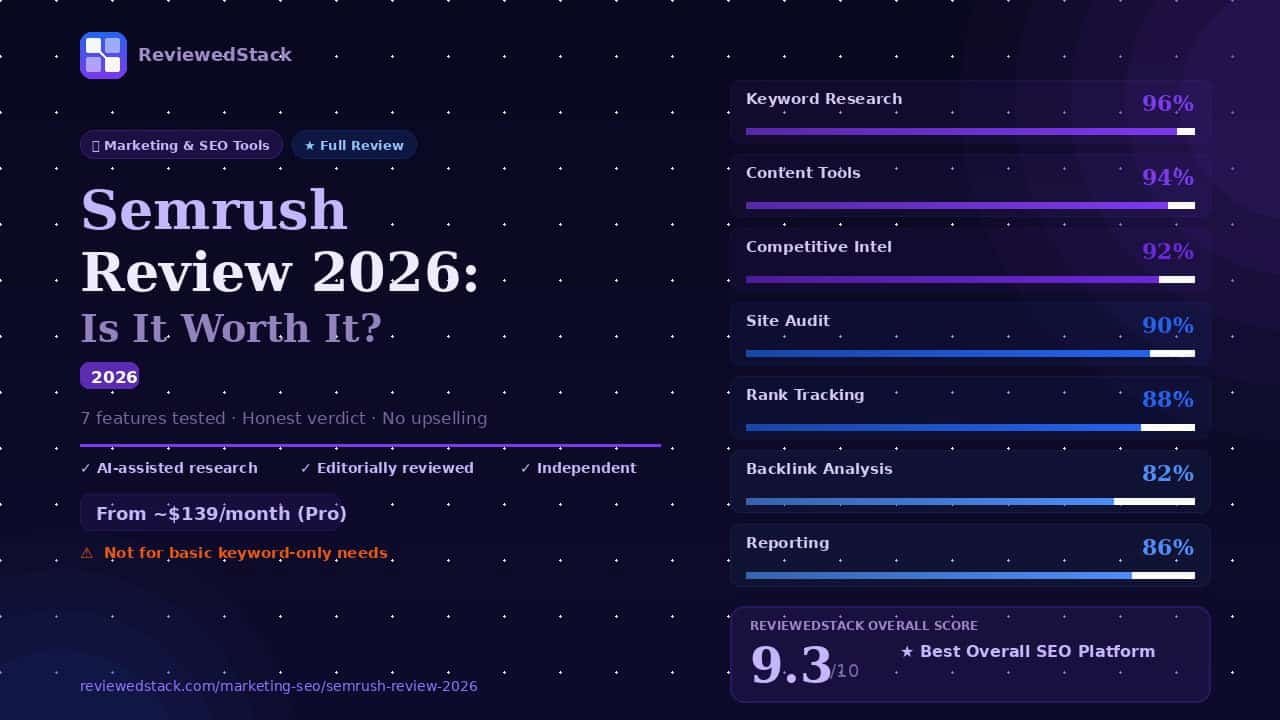
Score: 9.3/10. Semrush earns a high score because it combines deep SEO tooling with content workflow, competitive intelligence, and PPC research in one platform – a valuable consolidation for growth-focused small businesses.
Best for: marketing teams and small businesses that run content and paid & organic channels together; not ideal for those who only need occasional keyword checks or purely backlink research.
Value argument: $139/month (Pro) is justified when you use multiple modules (keyword research, audits, content tools, reporting) and have at least two users benefiting from the platform. It isn’t justified if you only need single-feature tools – check cheaper alternatives in our Best SEO Tools for Small Business guide.
All ReviewedStack comparisons are editorially independent. Learn how we work →
FAQs
Q: Is Semrush worth it for small business in 2026?
A: Yes, if you run content and SEO together, need competitive insights, or manage paid search alongside organic – it’s an efficient all-in-one option. If you only need one basic function, cheaper tools may be smarter.
Q: What is Semrush best used for?
A: Keyword research, site audits, content workflows, competitive/traffic intelligence, and combined SEO+PPC strategy.
Q: How much does Semrush cost per month?
A: Tiered pricing varies – Pro, Guru, Business – check semrush.com for current rates. Note: Pro has historically started around $139/month; annual plans typically save ~17%.
Q: Is Semrush better than Ahrefs?
A: It depends. Semrush is stronger for content, audits, and PPC research; Ahrefs is often stronger for backlink research and a simpler backlink-focused workflow. See our full Ahrefs vs Semrush comparison.
Q: Does Semrush have a free plan?
A: Semrush does not typically offer an unlimited free plan; trials (commonly 7 days) are usually available. Check semrush.com for current promotions.
Q: Is Semrush good for beginners?
A: Semrush is powerful but has a steeper learning curve. Beginners can use it, but Moz or simpler tools may be easier for initial learning.
Q: What is the cheapest way to use Semrush?
A: Use annual billing to save about ~17%, restrict seats and projects to the minimum you need, and avoid paid add-ons unless necessary. Also evaluate short-term trials to complete specific research tasks.
Q: Is Semrush legitimate and safe to use? A: Yes. Semrush is a publicly traded company (NYSE: SEMR) founded in 2008, headquartered in Boston, MA, with over 95,000 paying customers. It is used by brands including Tesla, Samsung, Amazon, and IBM. Payment processing uses standard SSL encryption, and the platform complies with GDPR. There are no credible reports of data misuse or security incidents. It is a legitimate, established business.
Q: Can I use Semrush for free? A: Semrush offers a limited free account with 10 keyword searches per day and restricted tool access — enough for occasional lookups but not for ongoing SEO work. A 7-day free trial with full plan access is periodically available. Check semrush.com for current trial offers.
Q: How long does it take to see results from using Semrush? A: Semrush is a research and tracking tool — it surfaces opportunities and measures progress, but it doesn’t directly cause rankings to improve. Acting on its recommendations (fixing technical issues, publishing optimized content, building links) typically shows measurable ranking movement within 6–12 weeks for low-competition keywords, longer for competitive ones.

Former engineering leader at HARMAN International, where he acted as business architect in SAP ME and Siemens Teamcenter PLM implementations. Built ERP and process automation applications in .NET. Holds a degree in Business Information Management. Reviews SaaS tools from the perspective of someone who has evaluated, implemented, and lived with enterprise software at scale.
LinkedIn Profile