Best Cybersecurity Tools for Small Business in 2026
📅 Last Updated: April 2026 ⏱ 28 min read
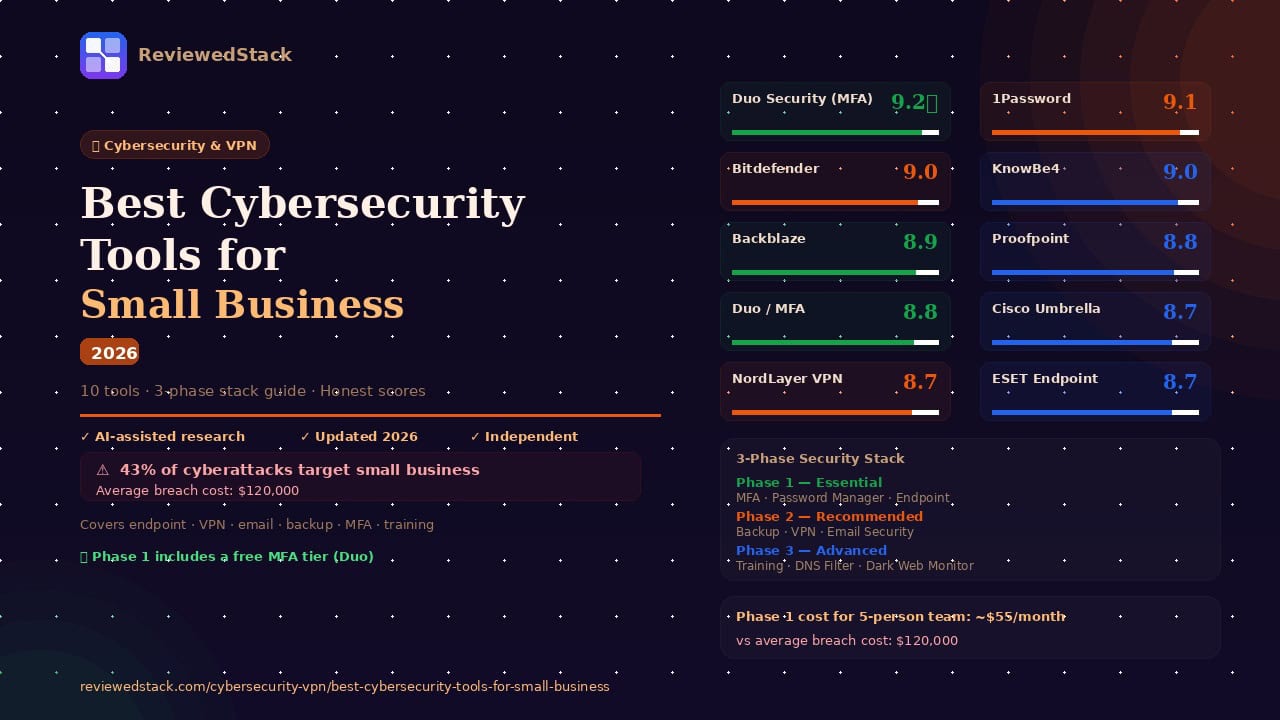
Small businesses are the most targeted organisations in cybersecurity — and the least protected. 43% of cyberattacks target small businesses, yet most have no dedicated IT security function. The good news: building a credible security stack doesn’t require enterprise budget or an IT team. This guide covers the 10 essential cybersecurity tools every small business should have in 2026, with honest assessments of the best option in each category. Every recommendation follows our 5-point review methodology.
Table of Contents
The Essential Small Business Security Stack
Before diving into individual tools, it helps to understand what a complete security stack looks like for a small business. Most breaches exploit one of five gaps: unprotected endpoints, weak or stolen credentials, unencrypted network traffic, unpatched software, and employee error. The tools in this guide address each gap systematically.
| Category | Top Pick | Starting Price | Score |
|---|---|---|---|
| Endpoint Protection | Bitdefender GravityZone | $118.99/yr/3 dev | 9.0/10 |
| Password Manager | 1Password Business | $7.99/user/mo | 9.1/10 |
| VPN | NordLayer | $7/user/mo | 9.2/10 |
| Email Security | Proofpoint Essentials | $3/user/mo | 8.8/10 |
| DNS Filtering | Cisco Umbrella | $2.20/user/mo | 8.7/10 |
| Backup & Recovery | Backblaze for Business | $7/mo | 8.9/10 |
| Security Awareness Training | KnowBe4 | Custom | 9.0/10 |
| Multi-Factor Authentication | Duo Security | Free/paid | 8.8/10 |
| Network Monitoring | Datto | Custom | 8.5/10 |
| Dark Web Monitoring | Flare | $200/mo | 8.4/10 |
Note: Pricing verified April 2026. Always check vendor sites for current rates.
The 10 Best Cybersecurity Tools for Small Business
1. Bitdefender GravityZone — Best Endpoint Protection
Bitdefender GravityZone is a cloud-delivered endpoint protection platform that protects every device in your business from malware, ransomware, and phishing — managed from a single dashboard.
Key Features:
- Multi-layered ransomware detection and automatic file rollback
- Risk Analytics dashboard identifying risky employee behaviour
- Network attack defence and traffic scanning
- Centralised cloud management console
- Behavioural threat intelligence
Pricing: From approximately $118.99/year for 5 devices. Verify current rates at bitdefender.com.
What We Liked:
- Consistently top-ranked by AV-TEST and AV-Comparatives — detection rates above 99.9% in independent tests
- Risk Analytics proactively identifies vulnerabilities before an incident occurs
- Management console accessible for non-IT business owners with actionable remediation guidance
What We Didn’t Like:
- Initial deployment across larger device fleets requires planning and time
- Advanced features like full disk encryption management locked behind higher tiers
Evaluation: Endpoint protection is the foundation of any security stack — if a device isn’t protected, every other tool is weakened. GravityZone earns the top spot because it covers the basics exceptionally well while adding business-specific features that consumer antivirus tools simply don’t offer. The Risk Analytics dashboard is the standout feature, shifting protection from reactive to proactive by identifying which employees represent the highest risk before a breach occurs.
For a small business without dedicated IT, the management console provides the visibility and control that would otherwise require hiring a security professional. You can see every device’s status, push policy updates remotely, and receive alerts for new threats — all from a browser tab.
Real-world use case: A 20-person professional services firm uses GravityZone to monitor all laptops. When a Risk Analytics alert flags that five employees have been using the same password across multiple services, the IT lead enforces a password reset policy remotely before any credential-stuffing attack can exploit the weakness.
Standout feature: After ransomware executes on a sales rep’s laptop, GravityZone detects the encryption attempt within milliseconds, terminates the process, and automatically rolls back the partially encrypted files — the employee sees a notification and nothing else is disrupted.
Limitation: For businesses with fewer than 5 devices, Malwarebytes for Teams offers comparable protection at a lower entry price and simpler setup.
📖 Best Antivirus Software for Business guide →
For a full comparison of endpoint protection tools, see our Best Antivirus Software for Business guide.
2. 1Password Business — Best Password Manager
1Password Business is a team credential management platform that eliminates shared passwords, unsecured spreadsheets, and the inevitable “what’s the login for X?” Slack message.
Key Features:
- Team and department vaults with granular access permissions
- Admin console with detailed activity logs and audit trails
- Watchtower — monitors for breached passwords across all vaults
- Travel Mode — hide sensitive vaults when crossing borders
- SSO integration with Okta, Azure AD, and Google Workspace
Pricing: $7.99/user/month. Verify current rates at 1password.com.
What We Liked:
- Best user interface in the category — employees actually adopt it, which is the most important feature of any security tool
- Watchtower provides real-time breach monitoring across all team credentials, not just individual accounts
- SSO integration means offboarding an employee from your identity provider automatically locks their 1Password access
What We Didn’t Like:
- No permanent free tier — the 14-day trial is short for evaluating team rollout
- Per-user pricing adds up for larger teams compared with flat-rate alternatives
Evaluation: 81% of data breaches involve weak or stolen passwords. A password manager isn’t a nice-to-have — it’s the second most important security tool after endpoint protection. 1Password Business earns the top spot in this category because its combination of polished UX and enterprise features drives genuine adoption across teams, which is the real challenge with security tools.
The Watchtower dashboard provides visibility into credential health across the entire organisation — not just individual accounts. When an employee’s work email appears in a third-party breach, the admin receives an alert before the compromised credentials can be used in a credential-stuffing attack.
Real-world use case: A 12-person marketing agency uses 1Password to manage 200+ client platform credentials. When a team member leaves, the admin revokes their vault access in one click — preventing them from retaining client social media passwords on their personal devices after their last day.
Standout feature: Watchtower alerts the admin that an employee’s credentials appeared in a breach of a third-party tool they use for client reporting — the admin resets the credentials before any unauthorised access occurs.
Limitation: For very small teams of 2–3 people, Bitwarden’s free tier provides comparable core functionality at no cost.
📖 Best Password Managers for Business guide →
For a full comparison, see our Best Password Managers for Business guide.
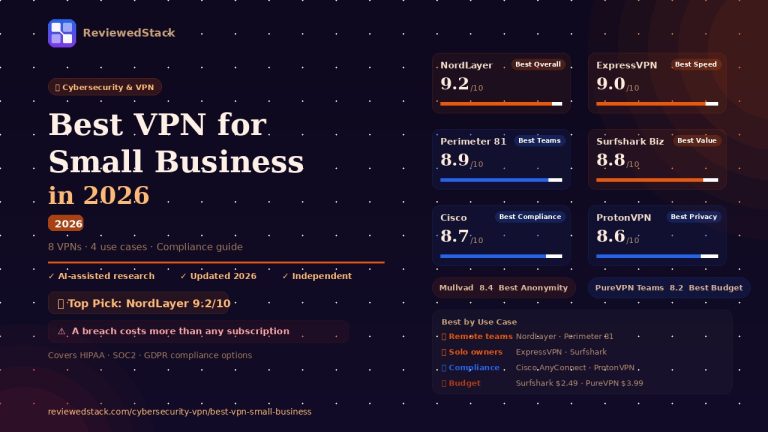
3. NordLayer — Best Business VPN
NordLayer is a business VPN and zero-trust network access platform built specifically for small and growing teams — providing secure remote access, centralised team management, and SSO integration.
Key Features:
- Centralised team management dashboard with user provisioning
- Dedicated servers and static IPs for whitelisting
- Zero-trust network access (ZTNA) capabilities
- SSO integration with Google, Azure AD, and Okta
- AES-256 encryption with NordLynx protocol
Pricing: From $7/user/month. Verify current rates at nordlayer.com.
What We Liked:
- Onboarding a new employee takes minutes via the dashboard — revoking access is instantaneous
- SSO integration means one less set of credentials for employees to manage
- Clean upgrade path from individual NordVPN accounts as a team grows
What We Didn’t Like:
- Advanced features like Cloud Firewall require higher tiers, which can double per-user cost
- No free trial — 14-day money-back guarantee only
Evaluation: Remote work has made business VPN non-negotiable. Without encrypted network traffic, employees working from coffee shops, hotels, or home networks are exposing company data to interception. NordLayer’s advantage over consumer VPNs is the management layer — the ability to provision access, enforce connection policies, and revoke credentials centrally is what separates a business security tool from a personal privacy tool.
The ZTNA capability is particularly valuable for businesses where employees need access to specific internal resources. Rather than giving blanket network access, ZTNA allows granular policies — the finance team can access the accounting system, but not the engineering repository.
Real-world use case: A 15-person remote consultancy uses NordLayer to secure client calls and file transfers across 11 countries. When a contractor’s engagement ends, the admin removes their account from the dashboard — their VPN access is revoked immediately, even if they still have the app installed.
Standout feature: Auto-connect ensures that any employee who opens a company device automatically connects to the VPN before any other network traffic occurs — no manual activation required, no gaps in protection.
Limitation: For solo owners and very small teams that don’t need centralised management, consumer NordVPN provides the same underlying infrastructure at a lower per-month cost.
📖 Best VPN for Small Business guide →
For a full comparison, see our Best VPN for Small Business guide.
4. Proofpoint Essentials — Best Email Security
Proofpoint Essentials is a cloud-based email security platform that filters phishing attempts, malicious attachments, and business email compromise (BEC) attacks before they reach employee inboxes.
Key Features:
- Advanced threat protection for inbound email
- Business email compromise (BEC) detection
- Spam and phishing filtering with machine learning
- Email continuity during outages
- Security awareness training integration
Pricing: From approximately $3/user/month. Verify current rates at proofpoint.com.
What We Liked:
- Email is the #1 attack vector for small businesses — dedicated email security catches threats that Microsoft 365 and Google Workspace built-in filters miss
- BEC detection specifically targets the “impersonation” attacks that cause the most financial damage to small businesses
- Simple Microsoft 365 and Google Workspace integration — no email infrastructure changes required
What We Didn’t Like:
- Some legitimate emails (especially from new senders or marketing platforms) can be caught in aggressive filtering and require manual release
- The admin console has a learning curve for non-technical owners
Evaluation: Email security is the most underinvested category in small business cybersecurity. Microsoft 365 and Google Workspace include basic spam filtering, but advanced threats — particularly business email compromise attacks where an attacker impersonates a supplier or executive — frequently bypass standard filters. The average BEC attack costs a small business $125,000, which makes a $3/user/month email security layer the most cost-effective insurance available.
Proofpoint’s machine learning engine is trained on billions of threat signals, giving it a threat intelligence advantage that smaller providers can’t match. For a business that processes supplier invoices, handles client payments, or executes wire transfers, the BEC detection alone justifies the subscription.
Real-world use case: A 10-person construction company receives an email appearing to be from their main materials supplier, requesting a change to the bank account details for an upcoming payment. Proofpoint flags the email as a BEC attempt based on domain spoofing patterns, quarantines it, and alerts the admin — preventing a fraudulent wire transfer.
Standout feature: The email continuity feature maintains access to incoming email during an outage of Microsoft 365 or Google Workspace — employees can continue working via a backup portal without interruption.
Limitation: For very small businesses with limited email volume and budget, Microsoft Defender for Office 365 Plan 1 (included in Microsoft 365 Business Premium) provides a reasonable baseline before investing in a dedicated email security tool.
5. Cisco Umbrella — Best DNS Filtering
Cisco Umbrella is a cloud-delivered DNS security layer that blocks malicious websites, command-and-control connections, and phishing pages before a network connection is even established.
Key Features:
- DNS-layer blocking of malicious domains
- Secure web gateway with content filtering policies
- Blocks malware, ransomware C2 connections, and phishing
- Works on and off the corporate network
- Reporting and visibility dashboard
Pricing: From approximately $2.20/user/month. Verify current rates at umbrella.cisco.com.
What We Liked:
- DNS filtering is the most cost-effective security layer available — blocking threats at the DNS level before any content is loaded prevents the vast majority of web-based attacks at a fraction of the cost of endpoint detection
- Covers devices off-network — employees working from home or a coffee shop are protected without VPN connection
- Minimal performance impact — DNS lookups happen in milliseconds
What We Didn’t Like:
- Requires some DNS configuration to deploy — not a one-click setup for non-technical owners
- Can occasionally block legitimate services that share infrastructure with flagged domains
Evaluation: DNS filtering is the most under-utilised cheap security win for small businesses. Every malware download, ransomware command-and-control connection, and phishing page starts with a DNS lookup — if that lookup is blocked before the connection is established, the attack never lands. Cisco Umbrella’s threat intelligence database is updated in real time based on global traffic patterns, giving it coverage of newly registered malicious domains that other tools take days to catalogue.
For remote teams, the off-network coverage is particularly valuable. Unlike a network firewall that only protects devices on the office network, Umbrella’s DNS protection follows employees to their home network, a client’s office, or an airport lounge.
Real-world use case: An employee at a 25-person financial advisory firm clicks a link in a phishing email that Proofpoint didn’t catch. Umbrella blocks the DNS lookup to the phishing domain, the page never loads, and the employee sees a block page explaining why the site was flagged.
Standout feature: Umbrella blocks the command-and-control connection that ransomware uses to receive encryption keys from its operator — even if the ransomware executes on a device, it cannot complete the attack without phoning home to its C2 server.
Limitation: DNS filtering alone is not sufficient endpoint protection — it works best as a complementary layer alongside Bitdefender or another endpoint protection tool.
6. Backblaze for Business — Best Backup and Recovery
Backblaze for Business is a cloud backup service that continuously backs up every file on every enrolled device — providing the recovery capability that makes ransomware attacks survivable.
Key Features:
- Continuous automatic backup of all files on enrolled devices
- 1-year version history — restore any file to any point in the past year
- Unlimited storage per device
- Central admin console for fleet management
- Extended version history available as an add-on
Pricing: $7/month per computer. Verify current rates at backblaze.com.
What We Liked:
- Continuous backup means data loss is measured in minutes at most — not days or weeks
- 1-year version history is the most important ransomware recovery feature: if ransomware encrypts files and isn’t detected immediately, you can restore to a pre-infection state from days before
- At $7/computer/month it is the lowest-cost unlimited cloud backup available for business use
What We Didn’t Like:
- Initial backup of large drives can take days or weeks on average broadband connections
- The restore process, while functional, is slower than dedicated disaster recovery tools for large data volumes
Evaluation: Backup is not a security tool in the traditional sense — it doesn’t prevent attacks. But it is the single most important factor in determining whether a ransomware attack is a business-ending event or a recoverable incident. Businesses with current, tested backups can recover from ransomware by restoring clean data; businesses without backups face a binary choice between paying the ransom or losing everything.
Backblaze earns the top spot in this category because of its combination of continuous backup, long version history, and pricing that makes it accessible to businesses of any size. The 1-year version history is the critical feature — many ransomware strains are designed to sit dormant for weeks before activating, ensuring they’ve been backed up in their encrypted form. The ability to restore from 30 or 60 days ago makes that tactic ineffective.
Real-world use case: A 5-person creative agency discovers their file server has been encrypted by ransomware. Because Backblaze has been continuously backing up all files, the IT consultant can restore the entire server to its state from 48 hours before the encryption occurred — the agency loses two days of work rather than everything.
Standout feature: The 1-year version history allows restoring individual files to any point in time — useful not just for ransomware recovery but for recovering accidentally deleted or overwritten client project files.
Limitation: Backblaze is a backup tool, not a disaster recovery platform. For businesses that need rapid recovery with near-zero downtime (RTO under 1 hour), purpose-built disaster recovery tools like Datto provide faster restoration from local snapshots.
7. KnowBe4 — Best Security Awareness Training
KnowBe4 is a security awareness training and simulated phishing platform that trains employees to recognise and report social engineering attacks — addressing the human vulnerability that technical tools can’t fully solve.
Key Features:
- Library of 1,000+ security awareness training modules
- Simulated phishing campaigns with detailed per-employee reporting
- Automated training assignment based on phishing test failures
- Phish Alert Button (PAB) for employees to report suspicious emails
- Risk scoring per employee and department
Pricing: Custom pricing based on seat count. Verify current rates at knowbe4.com.
What We Liked:
- Phishing simulations are more effective at changing employee behaviour than passive training — employees who fail a simulation are automatically enrolled in targeted training
- The Phish Alert Button turns employees from a vulnerability into an active detection layer — reported phishing emails are analysed and can update filters for the whole organisation
- Detailed per-employee risk scoring allows management to identify and remediate the specific individuals who represent the highest social engineering risk
What We Didn’t Like:
- Custom pricing makes it harder to budget for without going through a sales conversation
- The training module library, while large, varies in quality — some content feels dated compared with more modern platforms
Evaluation: 95% of successful cyberattacks begin with human error. Technical tools are essential but they cannot fully compensate for an employee who clicks a phishing link, calls back a vishing number, or opens a malicious attachment. Security awareness training is the only tool that directly addresses the human element of the attack surface.
KnowBe4 is the market leader in this category because its platform demonstrates measurable behavioural change. Organisations that run regular simulated phishing campaigns see phishing click rates drop from an industry average of 30%+ to under 5% within 12 months. For a small business where a single employee clicking a phishing link can trigger a catastrophic breach, that reduction in susceptibility is among the highest-ROI security investments available.
Real-world use case: A simulated phishing campaign at a 30-person accounting firm reveals that 9 employees clicked the test link. Those 9 employees are automatically enrolled in a 15-minute targeted phishing awareness module — the following month’s simulation sees the click rate fall to 2.
Standout feature: The Phish Alert Button integration with Microsoft Outlook means employees can report suspicious emails with a single click, turning the human layer into an active threat detection mechanism rather than purely a vulnerability.
Limitation: Security awareness training addresses the human layer but doesn’t replace technical controls — it should be deployed alongside endpoint protection, email security, and DNS filtering rather than as a standalone solution.
8. Duo Security — Best Multi-Factor Authentication
Duo Security is a multi-factor authentication (MFA) platform that adds a second verification step to all logins — making stolen passwords useless to attackers without physical access to the employee’s enrolled device.
Key Features:
- Push notification, biometric, and hardware key MFA options
- Device health checks before granting access
- Adaptive authentication policies based on risk signals
- SSO integration with Microsoft 365, Google Workspace, and 100+ applications
- Zero-trust access policies per application
Pricing: Free tier available for up to 10 users. Paid tiers from $3/user/month. Verify current rates at duo.com.
What We Liked:
- MFA is the single most effective control for preventing account takeover — Microsoft reports that MFA blocks 99.9% of credential-based attacks
- The free tier for up to 10 users makes it accessible to even the smallest businesses with no budget justification required
- Device health checks mean a compromised or unpatched device can be blocked from accessing company applications before login completes
What We Didn’t Like:
- Push notification fatigue is a real risk — employees who receive too many push requests may approve them reflexively, which attackers exploit via MFA bombing attacks
- Some legacy applications don’t support modern MFA protocols and require workarounds
Evaluation: Multi-factor authentication is the highest-return security control available per dollar spent — including the free tier. A stolen password combined with MFA is useless to an attacker; without the second factor, the credential doesn’t open the door. For a small business where employees reuse passwords across personal and work accounts (which most do despite training), MFA is the control that limits the damage when those passwords inevitably appear in a breach.
Duo’s device health check feature adds a layer beyond simple MFA — it verifies that the device attempting to authenticate meets minimum security standards (OS updated, antivirus installed, disk encryption enabled) before granting access. This turns every login attempt into a mini security audit.
Real-world use case: An employee’s email password is stolen in a third-party breach and sold on the dark web. An attacker attempts to log into the company’s Microsoft 365 account using the credentials. Duo sends a push notification to the employee’s phone — the employee declines it and reports the suspicious login attempt to the admin.
Standout feature: Duo’s risk-based authentication automatically requires additional verification for logins from new devices, unusual geographic locations, or after hours — adding friction precisely where the risk is highest without disrupting normal workflows.
Limitation: MFA requires employee buy-in and consistent enforcement — if MFA policies have exceptions, those exceptions become the attack surface. The free tier limits advanced features like device health checks and adaptive policies.
9. Datto — Best Backup and Disaster Recovery for Critical Systems
Datto is a business continuity and disaster recovery (BCDR) platform that provides local and cloud backup with rapid recovery capabilities — designed for businesses where downtime costs more than the tool.
Key Features:
- Local snapshot backup with near-instant virtualisation
- Cloud replication for offsite redundancy
- Recovery time objectives (RTO) measured in minutes
- Ransomware detection within backup data
- Managed via MSP or direct business subscription
Pricing: Custom pricing through Datto partners. Verify current rates at datto.com.
What We Liked:
- Near-instant virtualisation means a failed server can be replaced with a virtual machine from the backup in minutes — critical for businesses where every hour of downtime has a measurable cost
- Ransomware detection scans backup data for encryption patterns, preventing a contaminated backup from being restored over clean data
- Both local and cloud copies provide redundancy against both hardware failure and site-level disasters
What We Didn’t Like:
- Pricing is custom and typically delivered through MSP partners — less transparent than Backblaze’s flat per-device rate
- Overkill for businesses with basic file storage needs — Backblaze is more cost-effective for most SMBs
Evaluation: Datto fills a specific gap: businesses where the cost of downtime justifies a premium recovery solution. For a law firm that bills hourly, a hospital that cannot interrupt patient care, or a logistics company that processes time-sensitive shipments, the difference between recovering in 4 hours (Backblaze) and 15 minutes (Datto) has a real financial value that exceeds the tool’s cost.
The local snapshot capability is the critical differentiator. By maintaining a local appliance that continuously takes snapshots, Datto can spin up a virtualised copy of a failed server in minutes — without waiting for a multi-hour cloud restore. That capability is what justifies the premium for businesses with strict recovery time requirements.
Real-world use case: A server running a critical inventory management system fails at a retail chain’s distribution centre at 3am. The Datto appliance virtualises the server from the last snapshot in 8 minutes — the warehouse team starts their shift with the system fully operational and less than an hour of transactions to reprocess.
Standout feature: The ransomware detection engine scans each new backup snapshot for unusual encryption patterns — if a ransomware attack encrypted files between snapshots, the contaminated snapshot is flagged rather than silently overwriting the clean version.
Limitation: Datto’s pricing and deployment model (typically via MSP partners) makes it more suitable for businesses already working with a managed service provider.
10. Flare — Best Dark Web Monitoring
Flare is a threat intelligence platform that monitors dark web forums, paste sites, Telegram channels, and breach databases for leaked business credentials, stolen data, and mentions of your organisation.
Key Features:
- Continuous monitoring of dark web marketplaces and forums
- Breach credential monitoring for business email domains
- Stolen data detection (client records, financial data, IP)
- Threat actor tracking and alerting
- API integration for SIEM and security workflows
Pricing: From approximately $200/month for SMB plans. Verify current rates at flare.io.
What We Liked:
- Monitoring dark web forums manually is not feasible for a small business — Flare automates detection of leaked credentials and stolen data across sources that are inaccessible through normal channels
- Domain-level monitoring means all employee email addresses are covered, not just those registered individually
- Alerts arrive early enough to act — most credential alerts arrive before the credentials are actively exploited
What We Didn’t Like:
- At $200/month, it is the most expensive tool on this list and harder to justify for businesses under 20 people
- Alert volume can be high for organisations with large footprints — requires some triage to separate actionable signals from noise
Evaluation: Dark web monitoring is the proactive layer that most small businesses don’t know they’re missing. Credentials stolen in a third-party breach — a SaaS tool your team uses, an industry forum, a supplier’s database — are typically listed for sale on dark web marketplaces 24–48 hours after the breach. Without monitoring, businesses don’t know their credentials are compromised until an attacker uses them. With monitoring, there’s a window to change the credentials before exploitation.
Flare’s coverage extends beyond credential monitoring to stolen data detection — if client records, financial documents, or intellectual property appear on a paste site or dark web marketplace, Flare generates an alert. For professional services firms or businesses handling sensitive client data, that early warning capability has real legal and reputational value.
Real-world use case: Flare detects that an employee’s email and password combination from a compromised third-party forum appears in a dark web credential dump. The admin resets the password and enables MFA for that account within the hour — before an attacker can use the credential to access company systems.
Standout feature: Flare monitors Telegram channels used by cybercriminal groups — a source of threat intelligence that most commercial monitoring tools don’t cover, and where stolen business credentials are increasingly traded.
Limitation: For smaller teams where budget is the primary constraint, 1Password’s Watchtower and HaveIBeenPwned domain monitoring provide basic credential breach alerts at much lower cost.
Building Your Security Stack: A Practical Guide
Not every business needs all 10 tools immediately. Here’s a phased approach based on budget and team size.
Phase 1 — Essential (Any Business, Any Size)
These three tools address the highest-probability attack vectors and should be the first investments regardless of budget:
- Duo Security (MFA) — Free for up to 10 users. Blocks 99.9% of credential-based account takeovers.
- 1Password Business — $7.99/user/month. Eliminates weak and reused passwords.
- Bitdefender GravityZone — $77.69/year. Endpoint protection with ransomware recovery.
Estimated cost for a 5-person team: approximately $55/month.
Phase 2 — Recommended (5+ People or Handling Client Data)
Add these tools once Phase 1 is in place and budget allows:
- Backblaze for Business — $7/computer/month. Ransomware recovery insurance.
- NordLayer — $7/user/month. Encrypted network traffic for remote workers.
- Proofpoint Essentials — $3/user/month. Email security for phishing and BEC.
Estimated additional cost for a 5-person team: approximately $85/month.
Phase 3 — Advanced (10+ People or Regulated Industries)
Add these tools for mature security posture or compliance requirements:
- KnowBe4 — Security awareness training to reduce human error.
- Cisco Umbrella — DNS filtering for an additional network-layer block.
- Flare — Dark web monitoring for early breach detection.
- Datto — Enterprise-grade disaster recovery for mission-critical systems.
Our Verdict
Building a complete security stack sounds daunting, but the Phase 1 tools alone — MFA, password management, and endpoint protection — eliminate the vast majority of attack vectors that small businesses face. At approximately $55/month for a 5-person team, that baseline protection is the cheapest insurance a business can buy against a breach that averages $120,000 in recovery costs.
The most common mistake small businesses make is treating cybersecurity as a one-time decision rather than an ongoing practice. Tools need to be maintained, employees need regular training, and the stack needs to evolve as the threat landscape changes. The tools in this guide are all cloud-delivered, which means updates happen automatically — but the human element requires consistent attention.
For more tools across each category, see our dedicated guides in the Cybersecurity & VPN reviews section
All ReviewedStack comparisons are editorially independent. Learn how we work →
FAQs
Q: What cybersecurity tools does a small business actually need? At minimum: multi-factor authentication (Duo), a password manager (1Password), and endpoint protection (Bitdefender). These three tools address the most common attack vectors and provide a credible baseline for any size business.
Q: How much should a small business spend on cybersecurity? Industry benchmarks suggest 5–10% of IT budget. In practice, a 10-person business can build a strong security stack for $150–$200/month — significantly less than the average cost of a single breach.
Q: Is free antivirus good enough for a small business? No. Free antivirus lacks centralised management, audit logs, ransomware rollback, and remote remediation capabilities. Without a management console, you have no visibility into what’s happening on other devices in your business.
Q: What is the most important cybersecurity tool for a small business? Multi-factor authentication provides the highest return per dollar spent. Microsoft reports that MFA blocks 99.9% of automated credential-based attacks — and it’s free for teams of up to 10 with Duo.
Q: How do I know if my business data has been breached? Dark web monitoring tools like Flare provide automated alerts when business credentials appear in breach databases. For a basic free check, haveibeenpwned.com allows domain-level monitoring of all email addresses associated with your business.
Q: Do small businesses really get targeted by hackers? Yes — 43% of cyberattacks target small businesses. Small businesses are attractive targets precisely because they typically have weaker security than large enterprises but hold valuable data: client records, financial information, and supplier relationships.
Q: What is the difference between antivirus and endpoint protection? Antivirus is the traditional term for signature-based malware detection. Endpoint protection is the modern standard — it encompasses antivirus plus behavioural detection, ransomware protection, exploit prevention, web filtering, and centralised management. All the tools on this list qualify as endpoint protection.
Sources & Further Reading
- Verizon — Data Breach Investigations Report (DBIR) 2025 — SMB targeting statistics and attack vector data
- Microsoft Security — MFA blocks 99.9% of account attacks — source for MFA effectiveness statistics
- AV-TEST — Business Endpoint Protection benchmarks — independent detection rate and performance testing
- KnowBe4 — Phishing by Industry Benchmarking Report 2025 — phishing click rate and training effectiveness data
- FBI — Internet Crime Report 2024 (IC3) — business email compromise loss statistics
- Cisco Umbrella — Cybersecurity Threat Spotlight — DNS-layer threat blocking statistics
- Backblaze — Business Backup product documentation — pricing and version history reference
- Duo Security — MFA product documentation — adaptive authentication and device health features
- Proofpoint — Email Protection product documentation — BEC detection and email continuity reference
- Flare — Threat Intelligence Blog — dark web monitoring methodology reference

Former engineering leader at HARMAN International, where I acted as business architect in SAP ME and Siemens Teamcenter PLM implementations. Built ERP and process automation applications in .NET. I hold a degree in Business Information Management. I review SaaS tools from the perspective of someone who has evaluated, implemented, and lived with enterprise software at scale.
LinkedIn Profile