Best Antivirus Software for Business in 2026
📅 Last Updated: April 2026 ⏱ 27 min read
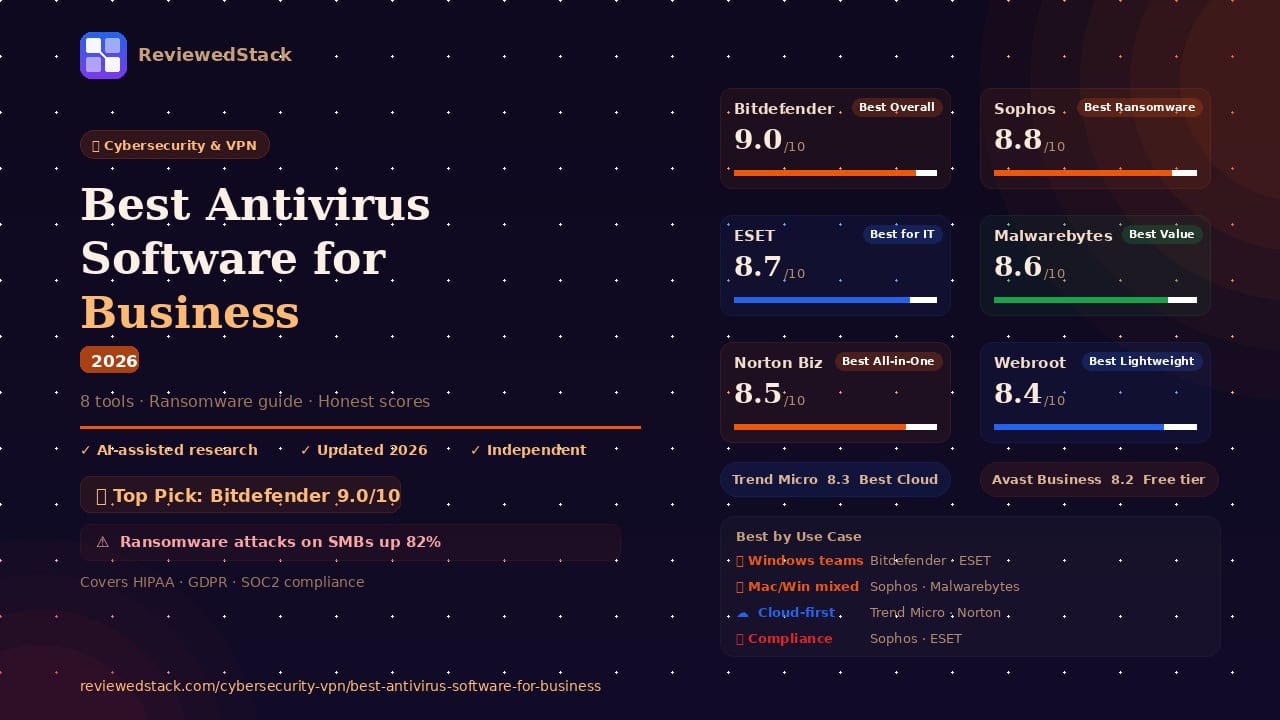
Ransomware attacks on small businesses increased 82% in the last two years — and the average cost of a breach now exceeds $120,000. A business antivirus isn’t optional; it’s the cheapest insurance you can buy. This article reviews the 8 best antivirus tools for business to help you protect your devices, data, and team. Every product has been evaluated using our 5-point review methodology.
Table of Contents
Quick Comparison Table
| Tool | Best For | Devices | Starting Price | Score |
|---|---|---|---|---|
| Bitdefender GravityZone | Best Overall | Unlimited | $132.99/yr | 9.0/10 |
| Sophos Intercept X | Best Enterprise-Grade | Unlimited | $28/user/yr | 8.8/10 |
| ESET Endpoint Security | Best for IT Teams | Unlimited | $190/yr | 8.7/10 |
| Malwarebytes for Teams | Best Value | Unlimited | $39.99/yr | 8.6/10 |
| Norton Small Business | Best All-in-One | Up to 20 | $59.99/yr | 8.5/10 |
| Webroot Business | Best Lightweight | Unlimited | $150/yr | 8.4/10 |
| Trend Micro Worry-Free | Best for Cloud | Unlimited | $75/yr | 8.3/10 |
| Avast Business | Best Free Starting Point | Unlimited | Free/paid | 8.2/10 |
Note: Pricing verified April 2026 — entry-level plans shown. Always check vendor site for current rates. Business pricing scales with device count.
The Best Antivirus Software for Business
1. Bitdefender GravityZone — Best Overall for Small Business
Bitdefender GravityZone is a cloud-delivered endpoint protection platform built specifically for businesses that need enterprise-grade threat detection without an enterprise IT team.
Key Features:
- Multi-layered ransomware protection with automatic rollback
- Centralized GravityZone cloud management console
- Advanced behavioral threat intelligence
- Network attack defense and traffic scanning
- Risk Analytics dashboard that scores employee device behaviors
Pricing: Verify current rates at bitdefender.com. GravityZone Business Security starts at approximately $132.99/year for 6 devices, scaling with seat count. Annual billing is standard; no monthly option on most SMB plans.
What We Liked:
- Consistently top-ranked by AV-TEST and AV-Comparatives — detection rates routinely exceed 99.9% in independent lab tests
- Risk Analytics dashboard is genuinely unique — it identifies which employees have risky behaviors (reusing passwords, visiting unsafe sites) before a breach happens
- Management console is clean and accessible for non-IT business owners, with actionable remediation steps for every flagged issue
What We Didn’t Like:
- Initial setup can be slow for larger device fleets — deploying agents across 20+ machines requires planning
- Some advanced features like full disk encryption management are locked behind higher GravityZone tiers
Evaluation: Bitdefender GravityZone earns the top spot because it combines industry-leading detection with business-specific features that consumer antivirus simply doesn’t offer. The Risk Analytics dashboard is the standout — rather than waiting for a threat to land, it proactively identifies the weakest links in your team’s security posture. For a small business owner without a dedicated IT department, that kind of visibility is genuinely valuable.
The management console means you can see the security status of every device in your business from a single browser tab, which is critical when an employee’s laptop is sitting in a coffee shop in another city. Bitdefender’s detection engine is routinely ranked first or second in independent lab tests, which is the metric that actually matters when ransomware hits.
Real-world use case: A 15-person accounting firm uses GravityZone to monitor all client-facing laptops. When the Risk Analytics dashboard flags that three employees have been clicking unverified email attachments, the IT lead pushes a policy update remotely before any infection occurs.
Standout feature in action: After a ransomware payload executes on a sales rep’s laptop, GravityZone detects and blocks the encryption attempt within milliseconds, then automatically rolls back the four files that were partially encrypted — the employee sees a notification and nothing else.
Limitation: For businesses with fewer than 5 devices, the per-device pricing makes it slightly less competitive against Malwarebytes, which offers comparable protection at a lower entry price.
2. Sophos Intercept X — Best Enterprise-Grade Protection for SMBs
Sophos Intercept X is a deep-learning-powered endpoint protection platform that brings enterprise-class AI threat detection to small and mid-sized businesses.
Key Features:
- Deep learning AI engine (not signature-based)
- CryptoGuard — detects and rolls back ransomware automatically
- Exploit prevention for zero-day attacks
- Managed Threat Response (MTR) add-on for 24/7 monitoring
- Central Sophos cloud console with cross-device visibility
Pricing: Verify current rates at sophos.com. Intercept X Advanced starts at approximately $28/user/year, scaling by seat count. MTR and XDR modules are add-ons with separate pricing.
What We Liked:
- CryptoGuard ransomware rollback is the best implementation of this feature in the category — files are restored automatically even if the attack partially succeeds
- Deep learning engine catches novel threats that signature-based tools miss entirely — critical for zero-day exploits that haven’t been catalogued yet
- Sophos Central console is the most powerful management dashboard on this list, giving IT teams granular control over policies per device group
What We Didn’t Like:
- Pricing becomes expensive quickly as the team grows, especially if adding MTR or XDR modules
- The depth of features can overwhelm non-technical owners — this is a tool that benefits from IT oversight
Evaluation: Sophos Intercept X is the right choice for businesses that have outgrown basic antivirus but aren’t ready for full enterprise security stacks. The CryptoGuard feature alone justifies the cost for any business that stores sensitive client data — if ransomware executes, files come back. That’s a fundamentally different level of protection than tools that simply block threats at the perimeter.
The deep learning engine is genuinely differentiated. Where signature-based tools need to have seen a threat before to block it, Sophos’ AI identifies malicious behavior patterns from the way code executes — which is why it catches zero-day threats that other tools let through. For a business operating in legal, healthcare, or finance, that capability matters.
Real-world use case: A 30-person law firm uses Sophos Intercept X after a near-miss ransomware incident. When a paralegal opens a malicious email attachment six months later, CryptoGuard detects the encryption attempt, kills the process, and rolls back the two affected files — the paralegal doesn’t lose a minute of work.
Standout feature in action: The exploit prevention module blocks a fileless malware attack that executes entirely in memory — a technique that completely bypasses traditional antivirus scanners that only check files on disk.
Limitation: The full value of Sophos requires IT-literate management. A solo business owner without technical support will find the console powerful but potentially overwhelming without onboarding support.
3. ESET Endpoint Security — Best for IT-Managed Environments
ESET Endpoint Security is a veteran endpoint protection platform known for its low system footprint, granular controls, and strong support for mixed OS environments including Linux.
Key Features:
- Multi-layered threat detection (signature + behavioral + ML)
- ESET PROTECT cloud management console
- Strong Linux and macOS support alongside Windows
- Network attack protection and botnet detection
- Removable media control and device management
Pricing: Verify current rates at eset.com. ESET PROTECT Entry starts at approximately $190/year for 5 devices. Higher tiers add EDR, vulnerability scanning, and full disk encryption management.
What We Liked:
- Exceptionally low system resource usage — ESET’s agent is one of the lightest on the market, making it ideal for businesses with older hardware or high-performance workstations where background processes matter
- Linux support is genuinely strong — most SMB antivirus tools treat Linux as an afterthought; ESET provides real endpoint protection for Linux servers and workstations
- Granular policy controls allow IT teams to customize protection rules per device group, OS, or user role
What We Didn’t Like:
- The management console has a steeper learning curve than Bitdefender or Malwarebytes — best suited to IT professionals rather than non-technical owners
- Ransomware rollback is not included in lower tiers, unlike Sophos
Evaluation: ESET is the tool IT professionals reach for when they need precision control and don’t want their security software slowing down the machines it’s supposed to protect. In performance benchmarks, ESET consistently scores near the top for minimal system impact — a meaningful advantage for businesses running CAD software, video editing, or database servers where background CPU and RAM usage directly affects productivity.
The Linux support is a meaningful differentiator for development teams, agencies running Linux servers, or businesses with mixed OS environments. Most SMB-focused tools provide token Linux compatibility at best; ESET provides real protection with real policy controls.
Real-world use case: A software development agency with 20 developers uses ESET to protect Windows workstations, MacBooks, and Linux servers from a single console. The IT manager sets different policies for each OS group and gets unified threat reporting without running three different security products.
Standout feature in action: ESET’s removable media control automatically blocks a USB drive plugged into a developer’s workstation unless it matches the approved device whitelist — preventing a social engineering attack where a malicious USB was left in the car park.
Limitation: ESET’s ransomware protection at the entry tier relies on behavioral detection without automatic file rollback — for businesses where ransomware recovery time is critical, Sophos or Bitdefender provide stronger rollback capabilities.
4. Malwarebytes for Teams — Best Value
Malwarebytes for Teams is a straightforward, highly effective endpoint protection platform that prioritizes ease of deployment over feature depth — making it the best choice for non-technical business owners.
Key Features:
- Real-time malware, ransomware, and exploit protection
- Simple cloud management portal
- Brute-force attack protection
- Uninstall protection to prevent tampering
- Browser Guard integration for web-based threats
Pricing: Verify current rates at malwarebytes.com. Teams plan starts at approximately $39.99/year per device. Simple per-seat pricing with no complex tiers.
What We Liked:
- The simplest deployment process on this list — the management portal is designed for business owners who aren’t IT professionals, with clear language and a minimal learning curve
- Exceptional malware removal capabilities — Malwarebytes built its reputation cleaning infections that other tools missed, and that remediation strength carries through to the business product
- Transparent, predictable pricing with no hidden add-ons or complex tier structures
What We Didn’t Like:
- Detection rates, while solid, don’t consistently match Bitdefender or Sophos in independent lab tests
- The management console lacks the depth of GravityZone or Sophos Central — advanced policy controls and detailed audit logs require upgrading to higher tiers
Evaluation: Malwarebytes for Teams is the right tool for the business owner who needs reliable protection and doesn’t have time to learn a security platform. The setup process genuinely takes minutes — install the console, deploy agents via email link, and every device reports back to a central dashboard without any technical configuration.
The value proposition is straightforward: at approximately $49.99/device/year, Malwarebytes provides real-time protection against malware, ransomware, and web-based threats at roughly half the cost of Bitdefender. For a five-person team with no dedicated IT, that pricing combined with the simple management experience makes it the most accessible business-grade antivirus available.
Real-world use case: A 6-person real estate agency deploys Malwarebytes for Teams across all laptops in an afternoon. The office manager — not an IT professional — sets up the console, invites agents via email, and has full device visibility within the hour. No IT contractor required.
Standout feature in action: When an agent downloads a fake invoice attachment that contains ransomware, Malwarebytes detects the behavioral pattern and terminates the process before a single file is encrypted — the agent receives a notification explaining what was blocked.
Limitation: For businesses in regulated industries that need detailed audit logs, compliance reports, and advanced policy enforcement, Malwarebytes’ simpler console won’t meet those requirements — Keeper or ESET are better choices in that scenario.
5. Norton Small Business — Best All-in-One for Very Small Teams
Norton Small Business is an all-in-one security suite that bundles antivirus, VPN, password manager, and cloud backup into a single subscription — designed for very small teams who want to consolidate their security tools.
Key Features:
- Antivirus and malware protection across Windows and Mac
- Integrated VPN for secure remote connections
- Password manager (Norton Password Manager)
- 25GB cloud backup per device
- Up to 20 devices on a single plan
Pricing: Verify current rates at smallbusiness.norton.com. Plans start at approximately $59.99/year covering up to 6 devices, scaling to 20 devices.
What We Liked:
- The bundled VPN and password manager replace two separate subscriptions — for a 5-person team, the combined cost is often lower than buying antivirus, VPN, and password manager separately
- Simple, consistent interface across Windows and Mac that non-technical staff can navigate without training
- 25GB cloud backup per device provides a recovery option that most antivirus tools don’t include
What We Didn’t Like:
- The management console is basic compared to GravityZone or Sophos — limited policy controls and no risk analytics
- Device cap of 20 makes it unsuitable for growing teams
- The included tools (VPN, password manager) are functional but not best-in-class — dedicated tools like NordLayer or 1Password outperform them
Evaluation: Norton Small Business makes the most sense for a sole trader or micro-business that wants one subscription covering all the security basics. If you’re currently paying separately for antivirus, a VPN, and a password manager, consolidating to Norton Small Business will likely save money while maintaining adequate protection across all three areas.
The 25GB cloud backup is a feature few competitors offer at this price point — for a small business where a single laptop contains critical client data, having an automatic offsite backup included in the antivirus subscription is a meaningful safety net.
Real-world use case: A freelance graphic designer uses Norton Small Business to secure two laptops and a tablet. The VPN activates automatically when connecting to client Wi-Fi networks, the password manager handles 200+ client login credentials, and the cloud backup means a hardware failure won’t cost her a week’s work.
Standout feature in action: When the designer’s laptop is stolen at a conference, the cloud backup means her files are fully restored on a new machine within two hours — the integrated backup pays for the entire year’s subscription in that single incident.
Limitation: Once a team grows past 10 people, the basic management console and 20-device cap make it necessary to migrate to a proper endpoint protection platform like Bitdefender or ESET.
6. Webroot Business Endpoint — Best Lightweight Option
Webroot Business Endpoint is a cloud-native antivirus that uses cloud-based scanning to deliver protection with the smallest system footprint in this category — making it ideal for older hardware and low-spec devices.
Key Features:
- Cloud-based threat intelligence (no heavy local database)
- Sub-1-second scan times via cloud lookup
- Centralized Webroot console for fleet management
- Evasion shield against fileless attacks
- DNS protection for web filtering
Pricing: Verify current rates at webroot.com. Business Endpoint starts at approximately $150/year for 5 devices.
What We Liked:
- The lightest installation on this list — deploys in seconds and uses minimal CPU and RAM because threat lookups happen in the cloud rather than locally
- Sub-second scan times mean it never causes the “my computer slowed down when I installed antivirus” complaint that plagues heavier tools
- DNS protection provides web filtering at the network level — useful for businesses that need to restrict access to certain categories of sites
What We Didn’t Like:
- Detection rates, while improving, have historically lagged behind Bitdefender and Sophos in independent lab tests
- The cloud-dependent architecture means protection is reduced when devices are completely offline — a limitation for remote workers in low-connectivity areas
Evaluation: Webroot is the right answer when the device, not the threat, is the constraint. For a small business running five-year-old Windows laptops or thin clients, installing a heavyweight security agent that consumes 20% of available RAM is not a viable solution — but Webroot’s cloud architecture adds almost no measurable load to the host machine.
The sub-second scan time is a genuine practical benefit. In environments where employees scan dozens of email attachments daily, a tool that checks each one against a cloud database in milliseconds is meaningfully faster than one that runs a local behavioral analysis.
Real-world use case: A small manufacturing company has 12 workstations running Windows 10 on hardware that’s nearly a decade old. Webroot deploys across all machines without impacting performance on the shop floor — the production management software and barcode scanning tools run exactly as they did before installation.
Standout feature in action: Webroot’s evasion shield detects and blocks a fileless PowerShell attack that executes malicious code directly in memory — a technique specifically designed to bypass tools that only scan files written to disk.
Limitation: For businesses that handle sensitive data and need regulatory-grade detection rates, Webroot’s cloud-dependent model and historically lower lab scores make Bitdefender or Sophos the more defensible choice for compliance purposes.
7. Trend Micro Worry-Free — Best for Cloud-First Businesses
Trend Micro Worry-Free is a cloud-delivered endpoint protection platform designed for businesses that run primarily on Microsoft 365 or Google Workspace, with tight integration into those environments.
Key Features:
- Microsoft 365 email scanning and threat protection
- Cloud application security for Google Workspace
- Ransomware protection with behavioral analysis
- Centralized Worry-Free Services console
- Mobile device management (MDM) for iOS and Android
Pricing: Verify current rates at trendmicro.com. Worry-Free Services starts at approximately $75/year for 2 users.
What We Liked:
- Microsoft 365 integration is the strongest of any tool on this list — email, SharePoint, Teams, and OneDrive are all scanned for threats within the Microsoft ecosystem
- Mobile device management inclusion means iOS and Android devices get endpoint protection alongside Windows and Mac — rare at this price point
- Cloud-first architecture means no on-premise infrastructure is required, which suits businesses that have moved entirely off physical servers
What We Didn’t Like:
- Detection rates for traditional endpoint threats are good but not best-in-class — Bitdefender and Sophos outperform in independent lab comparisons
- The console UX feels dated compared to GravityZone or Malwarebytes — it’s functional but not modern
Evaluation: Trend Micro Worry-Free earns its place because of a specific use case: the business that runs almost entirely on Microsoft 365. If your team lives in Outlook, Teams, SharePoint, and OneDrive, and your primary threat vector is email-based phishing and malicious attachments, Worry-Free’s native Microsoft integration means those threats are caught before they reach the endpoint — rather than after.
The mobile device management inclusion is a meaningful value-add for businesses with sales teams or remote workers using personal smartphones for work. Managing security on iOS and Android devices from the same console as Windows laptops avoids the gap that most endpoint tools leave open.
Real-world use case: A 10-person insurance brokerage runs entirely on Microsoft 365. When a phishing email containing a malicious Excel attachment reaches the team inbox, Worry-Free scans it within Microsoft’s own mail pipeline and quarantines it before it appears in any employee’s inbox.
Standout feature in action: The Microsoft Teams scanning module flags and removes a file shared in a team channel that contains an embedded macro — preventing the threat from spreading via internal communication rather than just external email.
Limitation: For businesses with on-premise servers, mixed physical and cloud environments, or Linux workstations, Worry-Free’s cloud-first focus leaves gaps that ESET or Bitdefender cover more completely.
8. Avast Business Antivirus — Best Free Starting Point
Avast Business Antivirus provides essential endpoint protection with a free tier for very small businesses and affordable paid plans — making it the lowest-barrier entry point to business-grade antivirus.
Key Features:
- Real-time file and behaviour scanning
- Web shield and email protection
- Free tier with core antivirus protection
- Centralized Avast Business Hub console
- Firewall and network scanner on paid tiers
Pricing: Verify current rates at avast.com/business. Essential Business Security is free for unlimited devices. Paid tiers starting at approximately $35.99/device/year add additional layers.
What We Liked:
- The free tier is genuine business-grade protection, not a crippled consumer product — it includes a management console and covers unlimited devices at no cost
- The Business Hub console is accessible for non-technical owners, with a clear device overview and one-click remediation
- Low cost of entry means a startup or micro-business can begin building a security posture before revenue justifies a premium tool
What We Didn’t Like:
- Detection rates on the free tier lag behind paid competitors — for a business handling sensitive data, the gap matters
- Avast has faced scrutiny over data handling practices in its consumer division; while the business product is separate, some security-conscious IT professionals remain wary
Evaluation: Avast Business makes sense as a starting point, not a long-term destination. For a two-person startup that genuinely cannot justify $50–$100/year on security tools yet, the free tier provides real protection against common threats — far better than running Windows Defender alone with no central management.
The Business Hub console is the differentiator from consumer antivirus. Even on the free tier, a business owner can see every device’s status, run scans remotely, and receive alerts when a threat is detected — capabilities that the free consumer version simply doesn’t provide.
Real-world use case: A newly launched e-commerce startup with two laptops uses Avast Business free tier for the first six months. When the business reaches a point where client payment data is being processed, they upgrade to a paid tier — having already established the habit of centralized endpoint monitoring.
Standout feature in action: The Business Hub sends the founder an alert when a threat is detected on the co-founder’s home laptop — a device the founder has no physical access to — enabling a remote scan and quarantine without interrupting the co-founder’s workday.
Limitation: For any business handling customer data, financial records, or operating in a regulated industry, the free tier’s detection rates and absence of advanced features make it an insufficient long-term solution — Malwarebytes or Bitdefender should replace it as soon as budget allows.
What to Look for in a Business Antivirus
Detection Rates and Technology
The most important metric for any antivirus is how reliably it catches threats before they cause damage. Look for tools tested by independent labs — AV-TEST and AV-Comparatives publish quarterly results for both Windows and Mac protection. Avoid drawing conclusions from vendor-provided statistics; third-party lab scores are the only objective measure. Signature-based detection identifies known threats; behavioral and machine-learning detection catches new and unknown threats. The best business antivirus tools use all three layers simultaneously. For small businesses that can’t afford a breach, prioritize tools that score 99%+ in real-world protection tests consistently.
Centralized Management Console
Consumer antivirus gives you no visibility into other devices in your business — if an employee’s laptop is infected, you won’t know until it’s too late. Every business antivirus on this list includes a management console that shows the security status of every enrolled device from a single dashboard. When evaluating consoles, check whether you can push policy updates remotely, run scans without physical access to the device, see threat history per device, and receive email or SMS alerts for new detections. The quality of this console is often more important than the underlying detection engine for a day-to-day business owner.
Ransomware Protection
Ransomware is the most financially damaging threat facing small businesses in 2026. Standard antivirus blocks known ransomware strains; advanced tools add behavioral detection that catches new ransomware variants before they’re catalogued. The gold standard is automatic file rollback — if ransomware does encrypt files before being detected, the tool automatically restores the originals from a pre-infection snapshot. Sophos CryptoGuard and Bitdefender’s ransomware remediation both offer this. For any business where data loss would be catastrophic — client records, financial data, project files — rollback capability should be a non-negotiable requirement.
System Performance Impact
A security tool that slows your machines by 30% is a productivity tax that employees will resent and eventually disable. Before purchasing, check independent performance benchmarks from AV-TEST, which scores tools specifically on system impact during scans and idle periods. Webroot and ESET consistently score best for lightweight operation; Sophos and Bitdefender are heavier but justify it with detection capability. For businesses running older hardware or resource-intensive software, performance impact should be weighted heavily in the buying decision. Ask vendors for a trial before committing — real-world performance on your specific hardware matters more than benchmark numbers.
OS and Device Coverage
Most small businesses run a mix of Windows and Mac, with some iOS and Android devices in the mix. Ensure the tool covers every OS your team uses — not just Windows. If your team includes developers on Linux, ESET or Sophos provide meaningful Linux support. If mobile devices access company email or files, look for tools that include mobile device management alongside endpoint protection. BYOD environments (employees using personal devices for work) require specific policy controls that not all tools support — check whether the console can enforce minimum security standards on personally owned hardware.
Compliance Support
If your business handles patient data (HIPAA), customer data from EU citizens (GDPR), or payment card information (PCI-DSS), your antivirus tool becomes part of your compliance infrastructure. Auditors will ask for evidence that all endpoints are protected and that threat events are logged with timestamps. Sophos, ESET, and Bitdefender provide the reporting capabilities that compliance officers need. For healthcare or finance, also check whether the vendor will sign a Business Associate Agreement (BAA) or provide a formal compliance statement — not all vendors will. See our Best Password Managers for Business for complementary compliance tools.
Antivirus by Business Use Case
Best for Windows-only teams: Bitdefender GravityZone, ESET Endpoint Security
Best for mixed Mac/Windows teams: Sophos Intercept X, Malwarebytes for Teams
Best for remote/home office workers: Webroot (lightweight, cloud-delivered), Norton Small Business (VPN included)
Best for compliance-heavy industries: Sophos Intercept X, ESET Endpoint Security
Best free/budget options: Avast Business (free tier), Malwarebytes ($49.99/yr)
Our Verdict
Bitdefender GravityZone is our top recommendation for most small businesses. Its combination of industry-leading detection rates, Risk Analytics dashboard, and accessible management console makes it the most complete SMB endpoint protection available at a competitive price. If a single tool can tell you which employees are the highest security risk before an incident occurs, it’s worth the subscription.
For businesses that need enterprise-grade features, Sophos Intercept X is the upgrade path — particularly if ransomware file rollback is a non-negotiable requirement. ESET is the choice for IT-managed environments with mixed OS requirements, and Malwarebytes is the right answer for business owners who want strong protection with zero IT overhead.
Regardless of which tool you choose, avoid using free consumer antivirus for business purposes. Consumer products have no management console, no audit logs, no remote remediation, and no ransomware rollback — they leave you blind to what’s happening on your team’s devices.
For more tools to protect your digital workspace, see our Cybersecurity & VPN reviews.
All ReviewedStack comparisons are editorially independent. Learn how we work →
FAQs
Q: What is the best antivirus for a small business in 2026? Bitdefender GravityZone is the best overall choice for most small businesses — it combines top detection rates with a centralized management console and risk analytics at competitive pricing. For very small teams on a tight budget, Malwarebytes for Teams offers strong protection at a lower price point.
Q: Is Windows Defender enough for a small business? No. Windows Defender lacks a centralized management console, audit logs, remote remediation, and ransomware rollback. It provides basic protection for a single device but leaves a business completely blind to what’s happening on other machines. A dedicated business antivirus is necessary as soon as a second device is involved.
Q: What is the difference between consumer and business antivirus? Consumer antivirus protects one device with no management features. Business antivirus adds a centralized console to monitor all devices, remote policy enforcement, audit logs for compliance, team billing, and advanced features like ransomware rollback — all of which are essential once more than one person is involved.
Q: Does my business need endpoint protection or just antivirus? Endpoint protection is the modern term for business antivirus — it encompasses traditional virus scanning plus behavioral detection, ransomware protection, exploit prevention, web filtering, and centralized management. All the tools on this list qualify as endpoint protection. The distinction matters when evaluating tools: “antivirus” alone (signature-based only) is no longer sufficient for business use.
Q: What antivirus is best for HIPAA compliance? Sophos Intercept X and ESET Endpoint Security are the strongest choices for HIPAA-regulated environments due to their detailed audit logs, policy enforcement capabilities, and vendor willingness to provide compliance documentation. See also our Best Password Managers for Business for complementary credential security tools.
Q: How much does business antivirus cost? Most business antivirus tools cost between $30 and $200 per device per year, depending on features and team size. Malwarebytes starts at approximately $49.99/device/year; Bitdefender starts around $77.69/year for 3 devices; Sophos at $28/user/year. Volume discounts typically apply for teams of 10+.
Q: Can I use free antivirus for my business? Avast Business provides a genuine free tier with a management console — a credible starting point for very small startups. For any business handling customer data, financial records, or operating in a regulated industry, a paid solution with better detection rates and advanced features is strongly recommended.
Sources & Further Reading
- AV-TEST — Business Endpoint Protection for Windows — detection rate and performance benchmarks
- AV-Comparatives — Business Security Test 2025 — real-world protection and false positive rates
- CrowdStrike — Global Threat Report 2025 — SMB ransomware attack frequency data
- Verizon — Data Breach Investigations Report (DBIR) 2025 — breach cost and attack vector statistics
- Bitdefender — GravityZone Business Security — product documentation and feature reference
- Sophos — Intercept X Endpoint Protection — CryptoGuard and deep learning engine documentation
- ESET — Endpoint Security for Business — product documentation and PROTECT console reference
- Malwarebytes — Teams Endpoint Protection — product documentation and pricing
- Norton — Small Business Security Suite — product documentation and device coverage
- Webroot — Business Endpoint Protection — cloud architecture and system impact documentation
- Trend Micro — Worry-Free Business Security Services — Microsoft 365 integration documentation
- Avast — Business Antivirus — free tier features and Business Hub documentation

Former engineering leader at HARMAN International, where I acted as business architect in SAP ME and Siemens Teamcenter PLM implementations. Built ERP and process automation applications in .NET. I hold a degree in Business Information Management. I review SaaS tools from the perspective of someone who has evaluated, implemented, and lived with enterprise software at scale.
LinkedIn Profile