Best Social Media Scheduling Tools for Small Business in 2026
📅 Last Updated: April 2026 ⏱ 13 min read
Posting manually to social media is a time trap. The right scheduling tool can save 5-10 hours a week and keep your presence consistent even when you’re busy running the business. This guide reviews the 8 best social media scheduling tools for small businesses in 2026, with short profiles, pricing notes, pros/cons, and recommendations by use case. Methodology: tools were evaluated on platform coverage, scheduling features, analytics, team workflows, and value – see our 5-point review methodology.
Table of Contents
Quick Comparison Table
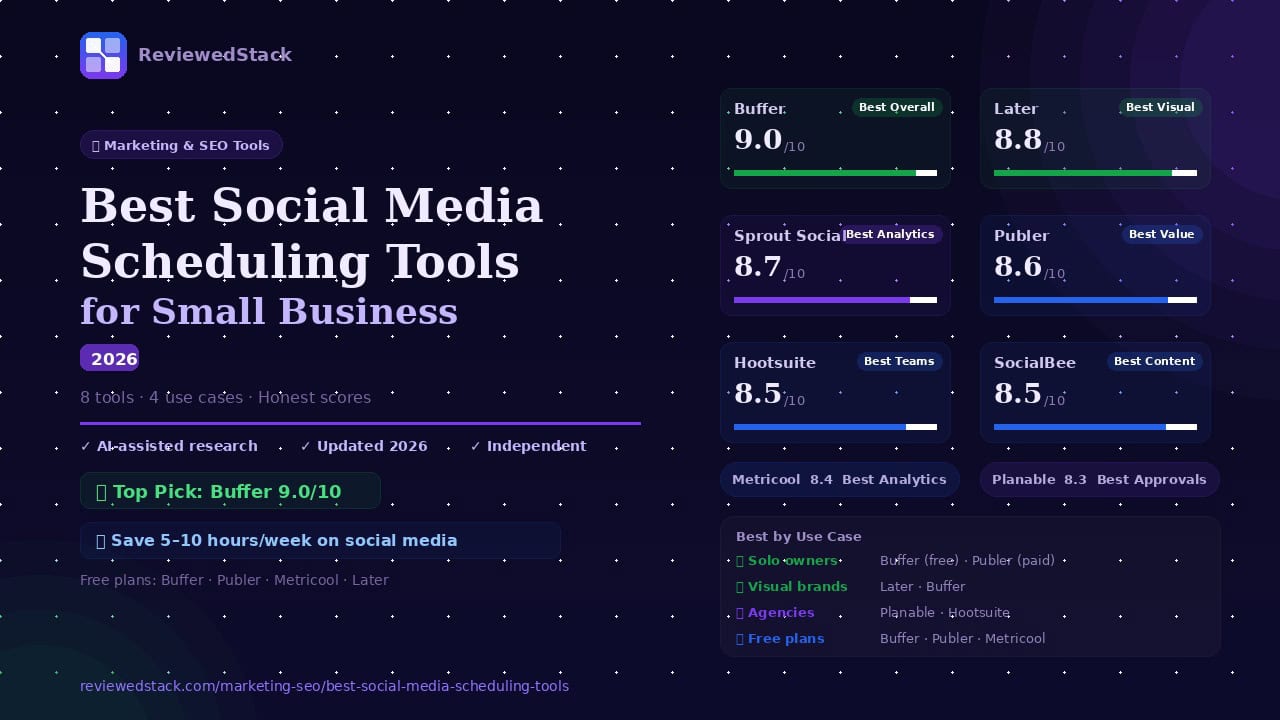
| Tool | Best For | Free Plan | Starting Price | Score |
|---|---|---|---|---|
| Buffer | Best overall | ✅ 3 channels | $6/mo | 9.0/10 |
| Later | Best for Visual | ✅ 1 profile | $18/mo | 8.8/10 |
| Hootsuite | Best for Teams | ❌ | $99/mo | 8.5/10 |
| Sprout Social | Best Enterprise | ❌ | $249/mo | 8.7/10 |
| Publer | Best Value | ✅ 3 profiles | $12/mo | 8.6/10 |
| SocialBee | Best for Content | ❌ | $29/mo | 8.5/10 |
| Metricool | Best Analytics | ✅ 1 brand | $22/mo | 8.4/10 |
| Planable | Best for Approval | ✅ 50 posts | $39/mo | 8.3/10 |
Note: Pricing verified April 2026. Always check vendor site for current rates.
The Best Social Media Scheduling Tools
1. Buffer – Best Overall for Small Business
What it is: A clean, easy-to-use scheduler focused on getting posts out across multiple networks without clutter.
Key features:
→ Multi-platform scheduling (Instagram, Facebook, X, LinkedIn, TikTok, Pinterest)
→ AI assistant for post ideas and caption drafting
→ Analytics and engagement reporting
→ Link-in-bio landing page (Start Page)
→ Team collaboration on higher tiers
Free plan: 3 channels, 10 posts/channel
Pricing: verify on vendor site
Pros:
• Simple interface that’s quick to learn
• Generous free tier for solo owners
• Useful built-in AI and Start Page
Cons:
• Advanced analytics behind higher tiers
• Some networks have posting restrictions (native API limits)
Evaluation: Buffer strikes the best balance of ease, affordability, and core features for small businesses. Its straightforward workflow makes it ideal for solo marketers and small teams who want reliable cross-platform scheduling without an enterprise price tag. The Start Page and AI drafting tools add real value for small brands that need quick content boosts.
2. Later – Best for Visual Content and Instagram
What it is: A visual-first scheduler built around Instagram and image/video planning with a drag-and-drop calendar.
Key features:
→ Drag-and-drop visual calendar and media library
→ Instagram-first workflow with visual preview and grid planning
→ Link in Bio tool and shoppable post support
→ Basic analytics and best-time suggestions
→ Supports Facebook, Pinterest, TikTok, LinkedIn
Free plan: 1 social profile per platform
Pricing: verify on vendor site
Pros:
• Best-in-class visual calendar and media management
• Strong Instagram post and story workflow
• Useful Link in Bio and shopping features for creators
Cons:
• More limited analytics than enterprise tools
• Some features gated to higher tiers (e.g., advanced analytics)
Evaluation: Later is ideal for brands and creators who rely on visuals – the calendar and media previews make planning feeds and campaigns intuitive. If Instagram is a primary channel for your business, Later’s workflow and Link in Bio tools make it a top choice.
3. Sprout Social – Best for Analytics and Reporting
What it is: An enterprise-grade platform focused on deep analytics, reporting, and team workflows.
Key features:
→ Advanced analytics and custom reporting
→ Social CRM and audience insights
→ Unified inbox and engagement tools
→ Team workflows, approvals, and role-based access
→ Integrations with major CRM and BI tools
Free plan: none
Pricing: verify on vendor site
Pros:
• Best reporting and analytics in the category
• Strong CRM and customer care features
• Scales well for agencies and growing teams
Cons:
• Expensive for small teams and solo owners
• Steeper learning curve than lightweight tools
Evaluation: Sprout Social excels when deep reporting, audience insights, and CRM integration matter. It’s overkill for many solo owners but a strong investment for agencies and companies that need reliable analytics and collaboration at scale.
4. Publer – Best Value All-in-One
What it is: A value-focused scheduler that packs a lot of features into affordable plans.
Key features:
→ AI writing assistant for captions
→ Recycling/recurring posts and category-based queues
→ Bulk scheduling and link shortener
→ Post preview and UTM tagging
→ Multi-account support with role permissions
Free plan: 3 profiles, 10 posts
Pricing: verify on vendor site
Pros:
• Strong feature set for the price
• Useful recycling and bulk scheduling tools
• Built-in AI and link shortening
Cons:
• UI can feel less polished than premium competitors
• Some advanced integrations limited to higher tiers
Evaluation: Publer delivers the most features per dollar, making it an excellent pick for budget-conscious businesses that still want AI assistance, recycling, and bulk tools. It’s a practical alternative when you want capabilities similar to expensive tools but at a lower cost.
5. Hootsuite – Best for Larger Teams
What it is: A long-standing platform built to centralize scheduling, listening, and team workflows for larger groups.
Key features:
→ Centralized scheduling across major networks
→ Social listening and keyword monitoring
→ Team assignment, approval workflows, and permissions
→ Campaign planning and reporting
→ Integrations with ad platforms and CRM tools
Free plan: none
Pricing: verify on vendor site
Pros:
• Mature platform with broad feature coverage
• Strong team management and social listening
• Extensive integrations
Cons:
• Expensive for solo users and very small teams
• Can be complex to set up and customize
Evaluation: Hootsuite remains a solid choice for teams of 3+ that need centralized workflows, social listening, and team assignments. It’s a reliable, proven product, but its price and complexity make it less suitable for solo entrepreneurs.
6. SocialBee – Best for Content Categories
What it is: A content-category-focused scheduler that excels at recycling and automated rotation of evergreen posts.
Key features:
→ Category-based scheduling and content rotation
→ Recycling of evergreen content with rules
→ Content templates and basic AI copy help
→ RSS feeds and content curation tools
→ Team collaboration on higher tiers
Free plan: none
Pricing: verify on vendor site
Pros:
• Excellent for structured content rotation
• Strong evergreen recycling features
• Good onboarding for content workflows
Cons:
• Analytics are more limited than analytics-first tools
• Less visual planning features for Instagram
Evaluation: SocialBee’s category system is unique and powerful for businesses that want to maintain a balanced mix of content types automatically. Coaches, consultants, and businesses with evergreen assets benefit most from its rotation capabilities.
7. Metricool – Best for Analytics + Scheduling Combined
What it is: A hybrid platform that pairs scheduling with surprisingly strong analytics and competitor tracking at an affordable price.
Key features:
→ Scheduling across networks plus link tracking
→ Robust analytics, competitor tracking, and ad analytics
→ Campaign tracking and UTM management
→ Reporting exports and dashboards
→ Content calendar and bulk scheduling
Free plan: 1 brand
Pricing: verify on vendor site
Pros:
• Strong analytics for the price point
• Competitor tracking and ad performance insights
• Clean reporting and exports
Cons:
• Scheduling UX is functional but less refined than visual-first tools
• Some social networks have limited native posting support
Evaluation: Metricool is a great pick for data-driven owners who want both scheduling and rich analytics without buying separate tools. Its competitor tracking and ad analytics make it especially valuable for businesses running paid social.
8. Planable – Best for Content Approval Workflows
What it is: A collaboration-first platform built for agencies and teams that require client or manager approvals before posts go live.
Key features:
→ Visual calendar and post previews for all networks
→ Structured approval workflows and versioning
→ Commenting and client-facing review modes
→ Bulk scheduling and team roles
→ Integration with publishing APIs
Free plan: 50 total posts (lifetime)
Pricing: verify on vendor site
Pros:
• Best-in-class approval and review workflows
• Client-friendly collaboration features
• Clear visual previews for sign-off
Cons:
• Not the cheapest option for straightforward scheduling
• Some advanced analytics are limited compared with enterprise tools
Evaluation: Planable is tailored to agencies and in-house teams that need clear client sign-off and version control. If approvals and collaborative review are part of your process, Planable streamlines that workflow better than general-purpose schedulers.
What to Look for in a Social Media Scheduling Tool
Platform Coverage
Which social networks are supported – Instagram, Facebook, X, LinkedIn, TikTok, Pinterest, YouTube Shorts. Verify native posting vs. notification posting per network.
Scheduling Features
Bulk scheduling, queue-based posting, best-time-to-post suggestions, recurring posts and content recycling.
Content Calendar
Visual calendar view – essential for planning campaigns and maintaining a consistent posting cadence.
Analytics and Reporting
Engagement metrics, reach, follower growth, best performing posts. Competitor tracking and ad analytics for advanced needs.
Team and Approval Workflows
Important for agencies and multi-person marketing teams. Approval chains, role-based access, client collaboration, and version history.
AI Features
Post idea generation, caption writing, hashtag suggestions – increasingly standard across tools in 2026. Consider how AI output fits your brand voice and verification needs.
Social Media Scheduling Tools by Use Case
Best for Solo Business Owners
→ Buffer (free plan generous)
→ Publer (best value paid)
Best for Instagram and Visual Brands
→ Later (best visual calendar)
→ Buffer (multi-platform)
Best for Agencies
→ Planable (approval workflows)
→ Hootsuite (team management)
Best Free Plans
→ Buffer (3 channels, 10 posts)
→ Publer (3 profiles, 10 posts)
→ Metricool (1 brand, full analytics)
Our Verdict
Best overall (Buffer) and why
Buffer is our top pick for most small businesses because it combines a clean interface, cross-platform support, a generous free plan, and built-in AI features that speed up content creation. It covers the essentials without overwhelming you, so teams and solo owners can start publishing quickly.
Best by use case
For visual-first brands and creators, Later’s calendar and media previews are unmatched. Sprout Social is the choice for enterprises and agencies that need deep analytics and CRM-like audience insights. Planable stands out when approvals and client collaboration drive your workflow.
Recommendation
Start with Buffer’s free plan to test cross-platform scheduling and AI features; upgrade or add a specialty tool (Later, Sprout, Planable) as your needs grow – for analytics depth, team approvals, or visual planning. For more tools across marketing, see our Marketing & SEO Tools reviews.
All ReviewedStack comparisons are editorially independent. Learn how we work →
FAQs
Q: What is the best social media scheduling tool for small business?
A: For most small businesses, Buffer offers the best balance of price, ease of use, and features. Choose Later if visual Instagram planning is your priority, Publer if you want the most features for the budget, and Planable or Hootsuite if you need agency-style approvals or team workflows.
Q: Is Buffer still worth using in 2026?
A: Yes – Buffer remains a strong, lightweight option for small teams and solo owners, with continued improvements to AI drafting, analytics, and Start Page features. It’s especially useful if you value simplicity and a capable free tier.
Q: What is the best free social media scheduling tool?
A: Buffer and Publer offer the most useful free plans for small businesses (Buffer: 3 channels, 10 posts/channel; Publer: 3 profiles, 10 posts). Metricool’s free tier is also valuable for basic analytics on one brand. For analytics-focused free tools, also see Metricool’s free tier which includes competitor tracking on 1 brand.
Q: Is Hootsuite worth the price for a small business?
A: Hootsuite is powerful but tends to be expensive for solo owners. It’s worth the investment for teams (3+) that need centralized scheduling, listening, and complex team workflows; less so for one-person operations. For solo owners, consider Buffer as a more affordable alternative.
Q: What is the best tool for Instagram scheduling?
A: Later is often best for Instagram-focused workflows due to its visual calendar, grid preview, and Link in Bio features. Buffer is a good multi-platform alternative that supports Instagram as well.
Q: Which social media scheduler has the best analytics?
A: Sprout Social and Metricool lead in analytics: Sprout for enterprise-grade reporting and CRM features, Metricool for cost-effective competitor and ad analytics.
Q: Do I need a social media scheduling tool if I use Meta Business Suite?
A: Meta Business Suite handles Facebook and Instagram natively and is a solid free option for those two platforms. However, if you post to multiple networks, need team approvals, cross-platform analytics, or advanced scheduling/recycling, a dedicated scheduler is more efficient. For a broader marketing toolkit comparison, see our Best SEO Tools for Small Business guide.

Former engineering leader at HARMAN International, where he acted as business architect in SAP ME and Siemens Teamcenter PLM implementations. Built ERP and process automation applications in .NET. Holds a degree in Business Information Management. Reviews SaaS tools from the perspective of someone who has evaluated, implemented, and lived with enterprise software at scale.
LinkedIn Profile