1Password vs Bitwarden 2026: Which Is Better for Small Business?
📅 Last Updated: April 2026 ⏱ 28 min read
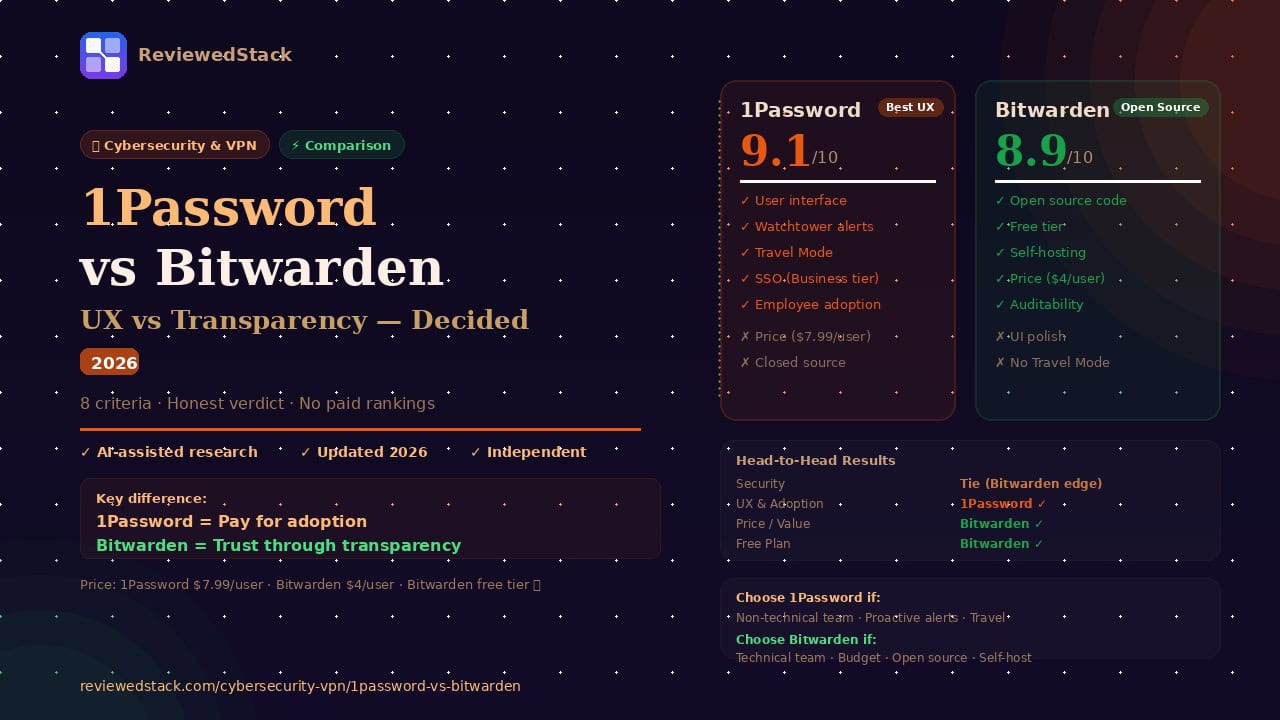
1Password and Bitwarden are the two most recommended business password managers on the market — but they’re built around fundamentally different philosophies. 1Password prioritises polish, UX, and features; Bitwarden prioritises transparency, open-source auditability, and value. Choosing between them depends on whether your team values a seamless experience or verifiable security at a lower cost. This article compares both across 8 criteria with a clear verdict for small business. Our evaluation follows our 5-point review methodology.
Table of Contents
1Password vs Bitwarden — Quick Verdict
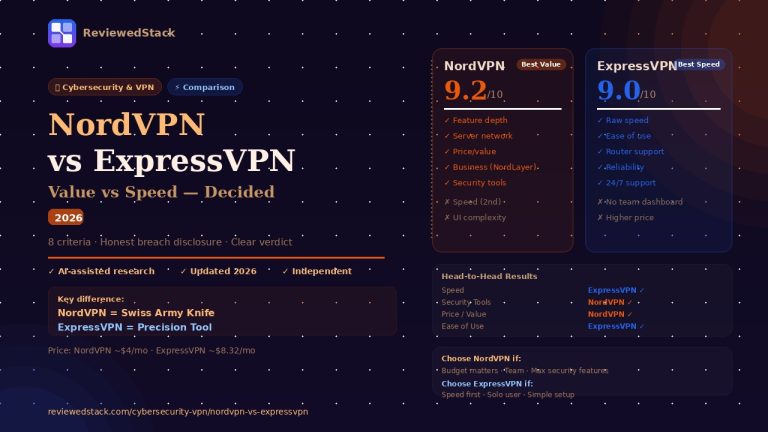
Side-by-Side Comparison Table
| Feature | 1Password | Bitwarden |
|---|---|---|
| Starting Price | $7.99/user/mo | $4/user/mo |
| Free Plan | ❌ (14-day trial) | ✅ Unlimited passwords |
| Open Source | ❌ | ✅ Fully open source |
| Self-Hosting | ❌ | ✅ Available |
| Travel Mode | ✅ | ❌ |
| Watchtower | ✅ | Basic (Vault Health) |
| SSO Integration | ✅ | ✅ (paid) |
| Admin Console | ✅ Full | ✅ Basic |
| Biometric Unlock | ✅ | ✅ |
| Emergency Access | ✅ | ✅ |
| Our Score | 9.1/10 | 8.9/10 |
| Best For | UX + features | Value + transparency |
Note: Pricing verified April 2026. Always check vendor sites for current rates.
1Password Overview
1Password is a password management platform built around one principle: making security tools so pleasant to use that employees never look for a workaround. Founded in 2005, it has grown into the market-leading business password manager by prioritising UX without compromising security.
Key Features
- Team and department vaults with granular access controls
- Admin console with activity logs, policy enforcement, and user management
- Watchtower — real-time monitoring of breached passwords, weak credentials, and expiring certificates across all vaults
- Travel Mode — hides specified vaults from all devices when crossing borders, removing them from view during customs inspections
- SSO integration with Okta, Azure AD, and Google Workspace
- Secret Key architecture — a second authentication factor generated locally that only the user holds
- Passkey support for passwordless authentication
Pricing Breakdown
Note: Verify current pricing at 1password.com — plans change.
Teams Starter: Covers up to 10 users at a $19.95/month flat rate. Includes core vault features, admin console, and basic reporting. Best for very small businesses that want full 1Password functionality without per-seat pricing complexity.
Business Plan: Per-user pricing at $7.99/user/month. Adds SSO integration, advanced admin controls, custom security policies, and 5GB of encrypted file storage per user. The appropriate plan for most small businesses of 5–100 people.
Enterprise: Custom pricing. Adds SIEM integration, custom reporting, dedicated account management, and onboarding support. For businesses with compliance requirements or complex infrastructure.
Annual billing is standard. No month-to-month option on most plans. 14-day free trial available.
What We Liked
- The best user interface in the password manager category — consistent, intuitive, and fast across all platforms. Employees who resist security tools adopt 1Password because it genuinely makes their work easier, not harder
- Watchtower is the standout feature: it actively monitors all team vaults for breached credentials, weak passwords, reused passwords, and expiring certificates — turning the admin console into a proactive security dashboard rather than a passive credential store
- Travel Mode is unique to 1Password — the ability to hide specific vaults from all devices before crossing a border, then restore them after, addresses a real threat that no other password manager handles this directly
- The Secret Key architecture means that even if 1Password’s servers were breached, vault data is mathematically useless without the locally held Secret Key — an additional security layer beyond master password protection
What We Didn’t Like
- The most expensive option on the market at $7.99/user/month — for a 20-person team, that’s $1,917/year compared to Bitwarden’s $960/year, a meaningful difference for a small business
- No free tier for businesses — the 14-day trial is short for evaluating cross-team rollout and requires a credit card
- Closed-source code means the security claims cannot be independently verified without trusting 1Password’s own audits — a philosophical limitation for the most security-conscious organisations
Who 1Password Is Best For
1Password is ideal for businesses where adoption is the primary challenge. If you’ve tried other password managers and found that employees revert to sticky notes or shared spreadsheets, 1Password’s UX removes that friction. It’s particularly strong for client-facing teams, agencies managing multiple client credentials, and businesses where the admin needs a proactive security dashboard rather than a passive credential store.
Bitwarden Overview
Bitwarden is a fully open-source password manager built on the principle that security through transparency is more trustworthy than security through obscurity. Its code is publicly available, independently audited, and deployable on your own infrastructure — making it the most verifiable password manager available at any price.
Key Features
- Fully open-source codebase — available for public audit on GitHub
- Unlimited password storage and device syncing on all tiers including free
- Bitwarden Send — encrypted, expiring file and text sharing
- Directory Connector for Active Directory and LDAP synchronisation
- Self-hosting option on your own infrastructure
- Vault Health Reports — weak, reused, and exposed password detection
- Emergency Access for designated trusted contacts
Pricing Breakdown
Note: Verify current pricing at bitwarden.com — plans change.
Free (Personal): Unlimited passwords, unlimited devices, basic two-factor authentication. The most generous free personal tier in the category — viable for sole traders and freelancers with no shared vault needs.
Teams Organisation: $4/user/month. Adds shared organisational vaults, basic admin console, user management, and event logging. The standard choice for small business teams.
Enterprise: $6/user/month. Adds SSO integration, SCIM provisioning, advanced policies, and custom roles. For businesses with identity provider integration requirements or compliance needs.
Self-hosted deployment is available on all paid tiers — businesses can run Bitwarden entirely on their own infrastructure using the official Docker image, with no data leaving their own servers.
What We Liked
- Open-source code is the most meaningful security differentiator available — any security researcher, IT professional, or curious developer can read exactly how Bitwarden handles encryption, key derivation, and data storage. The code has been independently audited by third-party security firms, and those reports are published publicly
- The free tier is genuinely useful for business — unlimited passwords, unlimited devices, and basic sharing make it viable for very small teams that cannot justify any security budget, with a clear upgrade path when sharing and admin features become necessary
- Self-hosting capability is unique among mainstream password managers — for businesses that cannot place credential data in third-party cloud infrastructure by policy, Bitwarden’s self-hosted deployment provides full control over data residency
- At $4/user/month for Teams, Bitwarden is the best value professional-grade password manager available — half the price of 1Password with no meaningful security compromise
What We Didn’t Like
- The user interface is functional but lacks the polish of 1Password — non-technical employees may find the experience less intuitive, which increases the risk of non-adoption and workarounds
- No Travel Mode equivalent — this is the one feature category where Bitwarden has no comparable offering
- Watchtower equivalent (Vault Health Reports) is less proactive — it provides reports on demand rather than real-time alerts, meaning the admin must check rather than being notified
- Customer support response times can be slower than 1Password, particularly on the free tier
Who Bitwarden Is Best For
Bitwarden is ideal for IT-literate teams, technical organisations, and budget-conscious businesses where security transparency matters more than polish. Development teams who want to audit the code before trusting it with production credentials, businesses with data residency requirements that require self-hosting, and organisations that want enterprise-grade password security at half the market price are all strong Bitwarden fits.
1Password vs Bitwarden — Head to Head
Security and Encryption
Both tools use AES-256 encryption with PBKDF2 key derivation (1Password) and Argon2id (Bitwarden) — both are industry-standard approaches. The fundamental security architecture of both tools is sound and comparable at the technical level.
The meaningful difference is verifiability. Bitwarden’s open-source code allows any competent security professional to verify that the encryption is implemented correctly, that keys are derived client-side, and that no backdoors exist. 1Password’s security is supported by published third-party audits, but those audits are commissioned by 1Password and cover specific scope — they don’t provide the same level of public accountability as open-source code.
For the vast majority of small businesses, both tools provide more than adequate security. For organisations with the highest security requirements or compliance environments that demand verifiable controls, Bitwarden’s open-source approach provides stronger assurance.
Verdict: Tie — with a Bitwarden edge for the most security-conscious organisations.
User Interface and Ease of Use
1Password wins this category clearly. The browser extension integrates seamlessly with login flows, the mobile apps are polished and fast, and the vault organisation system is intuitive for non-technical users. New employees can be productive within minutes of installation.
Bitwarden’s interface is clean and functional but feels more utilitarian. The browser extension occasionally requires an extra click where 1Password handles the same action automatically. Non-technical employees sometimes struggle with vault organisation and the less intuitive autofill behaviour on certain websites.
In practice, this matters because password manager adoption is the real security challenge — a tool that employees find frustrating gets abandoned in favour of insecure workarounds. For teams with non-technical staff, 1Password’s UX advantage translates directly into higher adoption rates and better actual security outcomes.
Verdict: 1Password wins.
Business Features and Admin Console
1Password provides a more comprehensive admin experience. The Business plan includes detailed activity logs, custom security policies, guest access controls, and the Watchtower dashboard that provides proactive breach monitoring across all team vaults. Admins receive alerts when credentials are compromised rather than needing to manually check reports.
Bitwarden’s admin console covers the essentials — user management, vault sharing, event logging, and basic policy enforcement. The Vault Health Reports provide on-demand analysis of weak, reused, and exposed passwords but don’t push alerts to admins. The Enterprise tier adds SSO and SCIM provisioning, which brings it closer to 1Password Business in capability.
For a small business owner who wants to set a security posture and be notified when something goes wrong, 1Password’s proactive approach is stronger. For an IT-managed organisation where an administrator actively monitors the console, Bitwarden’s coverage is sufficient.
Verdict: 1Password wins.
Pricing and Value
Bitwarden wins decisively on price. At $4/user/month for Teams versus 1Password’s $7.99/user/month, the difference is nearly 50% — and Bitwarden includes unlimited password storage, device syncing, and a capable admin console at that price. For a 10-person team on annual billing, Bitwarden costs approximately $480/year compared to 1Password’s $959/year.
The free tier comparison is equally stark: Bitwarden offers unlimited passwords and unlimited devices at no cost. 1Password offers a 14-day trial only. For very small businesses that need basic shared credential management before budget is available for security tools, Bitwarden’s free tier is a legitimate business-grade option.
The question of whether 1Password’s additional cost is justified depends entirely on team size and adoption dynamics. For a 5-person technical team that will adopt either tool enthusiastically, Bitwarden’s value is hard to argue against. For a 20-person team with mixed technical proficiency where adoption risk is real, 1Password’s UX advantage may justify the premium.
Verdict: Bitwarden wins.
Unique Features
1Password has two features with no Bitwarden equivalent that are worth noting for specific use cases.
Travel Mode hides designated vaults from all enrolled devices until re-enabled by the account holder after travel. This directly addresses the scenario where a customs official demands device access — vaults containing sensitive client data, business credentials, or confidential information can be hidden from view without deleting them. For business owners who travel internationally to high-risk jurisdictions, this is a meaningful capability.
Watchtower’s proactive monitoring — specifically the real-time breach alerts when team member credentials appear in a known breach — provides operational value that Bitwarden’s on-demand reports don’t match. An admin who doesn’t check the Vault Health Report regularly won’t receive notification of a breach until they actively look.
Bitwarden’s unique advantage is self-hosting, which 1Password doesn’t offer. For businesses with strict data residency requirements, regulated industries that require credentials never to leave their own infrastructure, or organisations with air-gapped environments, Bitwarden’s self-hosted deployment is the only mainstream option.
Verdict: Depends on use case. 1Password wins for travel and proactive monitoring; Bitwarden wins for self-hosting and open-source auditability.
Free Plan Comparison
Bitwarden wins by a wide margin. The Bitwarden free plan provides unlimited password storage, syncing across unlimited devices, basic two-factor authentication, and access to all standard vault features — indefinitely and for free. It’s a complete personal password manager at no cost.
1Password has no free plan — only a 14-day trial that requires a credit card. For individuals and very small businesses exploring password management for the first time, Bitwarden’s free tier provides a genuine on-ramp that 1Password doesn’t offer.
Verdict: Bitwarden wins.
Integration and SSO
Both tools support SSO integration with major identity providers — Okta, Azure AD, Microsoft Entra, and Google Workspace. 1Password includes SSO on the Business plan; Bitwarden requires the Enterprise tier ($6/user/month) for SSO, which narrows the price gap for organisations that need it.
Both tools support SCIM provisioning for automated user management, hardware security keys for MFA, and API access for custom integrations. The ecosystem is comparable at the Enterprise level for both products.
For organisations not requiring SSO, 1Password’s Business plan offers a more complete feature set at a lower tier — for organisations where SSO is essential, Bitwarden Enterprise closes the gap significantly.
Verdict: Tie at Enterprise level; 1Password wins at mid-tier.
Self-Hosting and Data Control
Bitwarden wins this category outright — 1Password has no self-hosted option. Bitwarden’s official Docker image can be deployed on any server or cloud infrastructure, giving businesses complete control over where credential data resides and who has access to the servers storing it.
This matters for specific scenarios: regulated industries with data residency requirements, businesses with strict vendor access policies, organisations operating in jurisdictions with data sovereignty laws, and development teams who simply prefer to own their own infrastructure.
For the majority of small businesses, cloud-hosted credential management by a reputable provider is entirely appropriate. For businesses with these specific requirements, Bitwarden is the only mainstream option.
Verdict: Bitwarden wins.
Our Verdict: Which Should You Choose?
Choose 1Password if:
- Your team includes non-technical employees where adoption is the real security challenge
- You want a proactive admin dashboard with real-time breach alerts rather than on-demand reports
- You or your employees cross international borders and need Travel Mode
- You’re willing to pay a premium for the best UX in the category
- You want SSO integration without upgrading to an Enterprise tier
Choose Bitwarden if:
- Your team is technically literate and will adopt either tool without UX friction
- Security transparency and open-source auditability are a priority
- Budget is a meaningful constraint — $4 vs $7.99/user/month matters at scale
- You need self-hosted deployment for data residency or compliance reasons
- You want to start with a free tier before committing to a paid plan
Consider alternatives if:
- You need the strongest compliance reporting and audit trails → see Keeper in our Best Password Managers guide
- Your team is under 5 people with minimal budget → Bitwarden free tier or NordPass
For a broader view of business security tools, see our Cybersecurity & VPN reviews.
All ReviewedStack comparisons are editorially independent. Learn how we work →
FAQs
Q: Is 1Password or Bitwarden better for small business? For most small businesses, 1Password is the better choice if adoption is a concern — non-technical employees find it easier to use and stick with. Bitwarden is better if your team is technically literate, budget is tight, or you need open-source transparency.
Q: Is Bitwarden as secure as 1Password? Yes — both use industry-standard AES-256 encryption and zero-knowledge architecture. Bitwarden’s open-source code provides additional verifiability that 1Password’s closed-source approach doesn’t, making it arguably more auditable, not less secure.
Q: Can I migrate from Bitwarden to 1Password (or vice versa)? Yes. Both tools support vault export in standard formats and provide import tools for each other’s exports. Migration is straightforward and can typically be completed in under an hour for most team sizes.
Q: Is Bitwarden really free? The personal free tier is genuinely unlimited — passwords, devices, and core features are all included at no cost indefinitely. The business Teams plan ($4/user/month) is required for organisational vaults, admin console, and shared credential management.
Q: Does 1Password have a free plan? No. 1Password offers a 14-day free trial for all plans but has no permanent free tier. Bitwarden’s free personal plan is the better option for individuals and very small teams evaluating password management before committing budget.
Q: Which is better for HIPAA compliance? Neither 1Password nor Bitwarden is the strongest choice for regulated HIPAA environments — Keeper provides the most comprehensive compliance tooling including formal audit trails and BAA support. See our Best Password Managers for Business guide for the full comparison.
Q: Can Bitwarden be self-hosted? Yes — Bitwarden’s self-hosted deployment runs via Docker and can be installed on any Linux server or cloud VM. This is the only mainstream password manager that offers a fully self-hosted option, making it the default choice for businesses with data residency requirements.
Sources & Further Reading
- 1Password — Business plan documentation and features — pricing, Watchtower, Travel Mode, and SSO reference
- Bitwarden — Teams and Enterprise plan documentation — pricing, self-hosting, and open-source reference
- Bitwarden — Open-source repository (GitHub) — public codebase for independent audit
- Bitwarden — Third-party security audit reports — independent security audit documentation
- 1Password — Security design and Secret Key architecture — encryption and key derivation documentation
- Verizon — Data Breach Investigations Report 2026 — credential theft and password reuse breach statistics
- Have I Been Pwned — Breach database — credential breach monitoring reference

Former engineering leader at HARMAN International, where I acted as business architect in SAP ME and Siemens Teamcenter PLM implementations. Built ERP and process automation applications in .NET. I hold a degree in Business Information Management. I review SaaS tools from the perspective of someone who has evaluated, implemented, and lived with enterprise software at scale.
LinkedIn Profile