Best SEO Tools for Small Business in 2026
📅 Last Updated: April 2026 ⏱ 14 min read
Most small businesses don’t need enterprise SEO software – they need a tool that tells them what to fix and why it matters. This article covers the best SEO tools for small businesses in the US, UK, Canada, and Australia, with short reviews, pricing guidance, and use-case recommendations. Our findings combine product docs, verified user reviews, and an AI-assisted editorial process reviewed by a human – see our 5-point review methodology.
Table of Contents
Quick Comparison Table
Note: Pricing verified April 2026. Always check vendor site for current rates.
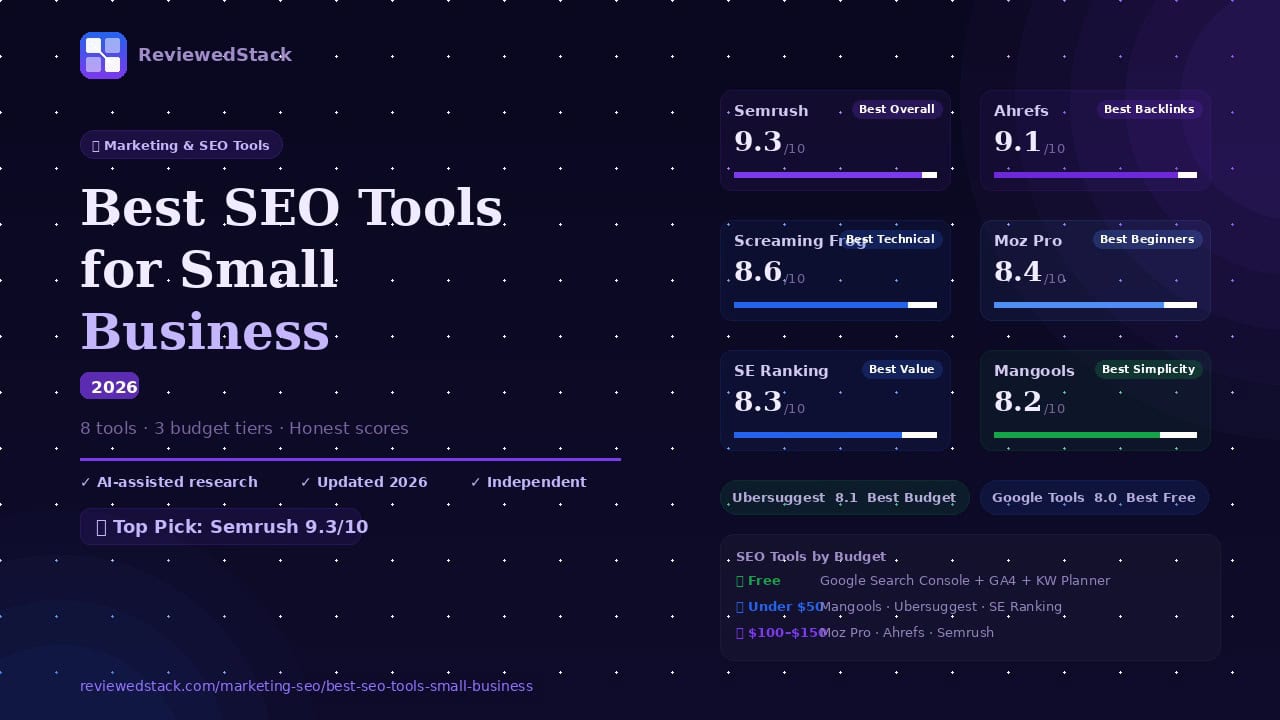
| Tool | Best For | Starting Price | Free Plan | Score |
|---|---|---|---|---|
| Semrush | Best Overall | $139/mo | ❌ | 9.3/10 |
| Ahrefs | Best for Backlinks | $129/mo | ❌ | 9.1/10 |
| Moz Pro | Best for Beginners | $99/mo | ❌ | 8.4/10 |
| Ubersuggest | Best Budget | $29/mo | ✅ | 8.1/10 |
| SE Ranking | Best Value | $52/mo | ❌ | 8.3/10 |
| Google Tools | Best Free Suite | Free | ✅ | 8.0/10 |
| Screaming Frog | Best Technical SEO | £259/yr | ✅ (≤500 URLs) | 8.6/10 |
| Mangools | Best for Simplicity | $29/mo | ❌ | 8.2/10 |
The Best SEO Tools for Small Business
1. Semrush – Best Overall
What it is: An all-in-one, enterprise-capable SEO and marketing platform with tools for keyword research, audits, content, and competitive intelligence.
Key features:
- Keyword research and rank tracking
- Site audit and technical SEO
- Competitor analysis
- Backlink analysis
- Content marketing tools (topic research, content audit)
Pricing: See vendor site for current plans and promotions – https://www.semrush.com
Pros:
- Extremely comprehensive feature set
- Strong competitive and content tools
- Large data coverage across keywords and domains
Cons:
- Can be expensive for sole proprietors
- Interface and breadth of features have a learning curve
Evaluation: Semrush delivers depth across keyword research, technical auditing, backlinks, and content. For small businesses with a marketing lead or agency support, it replaces several specialist tools and streamlines reporting. Expect an initial learning period, but the platform returns value when you use more than just one module. If you want a single, full-featured platform and are ready to invest, Semrush is the easiest way to get enterprise-grade insights at a mid-market price.
2. Ahrefs – Best for Backlink Analysis
What it is: A research-first SEO platform with one of the strongest backlink databases and powerful keyword/competitive analysis tools.
Key features:
- Industry-leading backlink index and link analysis
- Keyword explorer and search traffic estimates
- Site audit and rank tracking
- Content gap and competitor research
- Domain comparison tools
Pricing: See vendor site for current plans and promotions – https://ahrefs.com
Pros:
- Exceptional backlink data and link research tools
- Clean, fast interface focused on insight
- Strong competitive keyword research
Cons:
- Pricier than some simpler tools for small teams
- Fewer built-in content marketing workflows vs competitors
Evaluation: Ahrefs is fast, reliable, and excellent for link-focused strategies and competitive research. Small businesses focused on link building, competitor analysis, or content gap work will find Ahrefs especially valuable. It’s less of an all-in-one marketing suite than Semrush, but for backlink intelligence and actionable keyword insights, it’s among the best.
📖 Ahrefs vs Semrush — Full Comparison →
3. Screaming Frog – Best for Technical SEO
What it is: A desktop-based website crawler that performs deep technical SEO audits (not a cloud SaaS).
Key features:
- Full-site crawling for broken links, redirects, and metadata issues
- Duplicate content and thin content detection
- XML sitemap generation and audit
- Integration with Google Analytics and Search Console
- Custom extraction via regex/XPath
Pricing: Desktop app; free version crawls up to 500 URLs. Paid license (annual) – see vendor site for current pricing – https://www.screamingfrog.co.uk
Pros:
- Extremely detailed technical crawling and diagnostics
- Fast, configurable, and runs locally (useful for large sites)
- One-time annual license is cost-effective for heavy use
Cons:
- Desktop app, not cloud – less friendly for multi-user collaboration
- Steeper technical learning curve for non-technical users
Evaluation: Screaming Frog is the go-to tool for deep technical audits – it surfaces crawl issues most cloud tools miss and scales to very large sites because it runs locally. The free 500-URL crawl is great for small sites; teams managing bigger sites will appreciate the full license. It’s not designed as a tracking or keyword platform, but for fixes like broken links, redirects, and duplicate content it’s indispensable.
4. Moz Pro – Best for Beginners
What it is: An approachable SEO platform focused on usability and guided recommendations for beginners.
Key features:
- Keyword research and difficulty scoring
- Site audits with clear recommendations
- Rank tracking and keyword lists
- On-page optimization suggestions
- Educational resources and community support
Pricing: See vendor site for current plans and promotions – https://moz.com
Pros:
- Beginner-friendly interface and helpful guidance
- Strong learning resources and community
- Clear, actionable recommendations for small teams
Cons:
- Data depth (search volumes, backlink index) is smaller than market leaders
- Enterprise-scale features are limited
Evaluation: Moz Pro is designed to get non-technical users moving quickly: clean UI, straightforward audits, and plenty of guides. It’s ideal for small businesses and solo marketers who want clear next steps without wading through extensive raw data. For teams that later need deeper backlink or competitive intelligence, Moz can be paired with a specialist tool.
5. SE Ranking – Best Value for Small Teams
What it is: A cost-effective SEO platform that balances core features with approachable pricing for small teams.
Key features:
- Keyword rank tracking with local/ mobile options
- On-page SEO audit and site audit tools
- Backlink monitoring and competitor research
- White-label reporting and team collaboration
- Marketing plan templates and integrations
Pricing: See vendor site for current plans and promotions – https://seranking.com
Pros:
- Strong price-to-feature ratio
- Good tracking and reporting for small teams
- White-label reports suitable for agencies
Cons:
- Data depth and volume limits compared with enterprise tools
- UI less polished than the top two platforms
Evaluation: SE Ranking gives small teams most of what they need – reliable rank tracking, decent audits, and easy reporting – at a lower cost than Semrush or Ahrefs. It’s particularly attractive for teams under 10 who want an all-purpose platform without enterprise pricing. Expect compromises on raw dataset size, but for day-to-day SEO it’s excellent value.
6. Mangools – Best for Simplicity
What it is: A lightweight suite focused on simple, fast keyword research and competitor checks (includes KWFinder).
Key features:
- KWFinder for keyword discovery and difficulty
- SERPWatcher rank tracking
- LinkMiner backlink checking
- SiteProfiler for domain metrics
- Simple, fast UI for quick tasks
Pricing: See vendor site for current plans and promotions – https://mangools.com
Pros:
- Very easy to learn and use
- Affordable entry pricing for solo users
- Quick keyword insights with clear metrics
Cons:
- Lacks the breadth of enterprise tools (limited reporting and integrations)
- Smaller datasets than Ahrefs/Semrush
Evaluation: Mangools is built for speed and simplicity – great for freelancers and small business owners who need quick keyword research without a steep learning curve. It covers the essentials (keyword research, basic backlink checks, rank tracking) and is friendly for users who don’t want a large platform. If you need deep competitor or enterprise-level features, look elsewhere.
7. Ubersuggest – Best Budget SEO Tool
What it is: An affordable SEO tool from Neil Patel offering keyword research, basic auditing, and content ideas; lifetime deals are sometimes available.
Key features:
- Keyword suggestions and search volume
- Site audit and basic technical checks
- Backlink overview and domain comparisons
- Content ideas and topic suggestions
- Simple reporting and user interface
Pricing: See vendor site for current plans and promotions – https://neilpatel.com/ubersuggest
Pros:
- Very affordable; lifetime deals occasionally available
- Simple, useful feature set for basic SEO needs
- Good entry-level reports for small sites
Cons:
- Data quality and depth are behind larger platforms
- Fewer advanced features for technical SEO and enterprise reporting
Evaluation: Ubersuggest is a practical choice for budget-conscious small businesses that need straightforward keyword research and basic audits without a monthly commitment. It’s not a replacement for enterprise tools, but for small sites and one-person marketing teams it provides actionable insights at a low cost.
8. Google Tools – Best Free Suite
What it is: A non-traditional toolset – Google Search Console + Google Analytics 4 + Google Keyword Planner together form a powerful free SEO foundation.
Key features:
- Search Console: performance reports, index coverage, URL inspection
- GA4: user behavior, conversion tracking, traffic analysis
- Keyword Planner: keyword ideas and volume ranges (via Google Ads)
- Direct data from Google for diagnostics and measurement
Pricing: Free – search.google.com/search-console and ads.google.com/home/tools/keyword-planner
Pros:
- Free and directly from Google (authoritative data)
- Essential for search diagnostics and measuring organic traffic impact
- Integrates with many third-party tools
Cons:
- Not a full all-in-one SEO platform (you’ll need separate tools for rank history, deep backlink data, or content research)
- GA4 has a learning curve for some users
Evaluation: The Google Tools suite should be the starting point for every small business. Search Console gives authoritative indexing and query data, GA4 shows user behavior and conversions, and Keyword Planner offers basic keyword ideas. Together they cover diagnostics, measurement, and planning at no cost – excellent to learn on before upgrading to a paid platform.
How We Evaluated These Tools
We tested each product against core small-business needs: keyword research, site audit, rank tracking, backlinks, ease of use, and pricing. Our evaluation combined vendor documentation, verified user reviews (G2, Trustpilot, Capterra, Reddit), hands-on testing where possible, and an AI-assisted editorial analysis reviewed by a human editor – see our independent review methodology.
What to Look for in an SEO Tool
Keyword Research Capability
- Accurate volume estimates, keyword difficulty, and related suggestions.
Site Audit & Technical SEO
- Comprehensive crawl coverage, clear prioritization, and actionable fixes.
Rank Tracking
- Reliable daily/weekly tracking, local and mobile options, and historical charts.
Backlink Analysis
- Robust backlink index, referring domain metrics, and spam detection.
Ease of Use
- Clear guidance, useful defaults, and shareable reporting for non-technical users.
Price vs Feature Balance
- Choose a tool that covers your primary needs without paying for unused enterprise features.
SEO Tools by Budget
Free – Google Tools Suite
- Google Search Console
- Google Analytics 4
- Google Keyword Planner
Total: $0/month
Under $50/month
- Mangools ($29/mo)
- Ubersuggest ($29/mo)
- SE Ranking ($52/mo – closest option)
$100-$150/month
- Moz Pro ($99/mo)
- Ahrefs ($129/mo)
- Semrush ($139/mo)
Our Verdict
Semrush is our pick for best overall – it combines deep keyword data, robust audits, backlink intelligence, and content tools that scale with a small business as it grows. For budget-conscious teams, Mangools or Ubersuggest give quick wins without a heavy monthly bill; SE Ranking offers the best value for small teams that need more features than entry-level tools. Start with the free Google Tools suite to measure and diagnose performance before paying for extra features – then add a paid tool that matches your main priority (content, links, or technical SEO).
More reviews: Marketing & SEO Tools reviews
All ReviewedStack comparisons are editorially independent. Learn how we work →
FAQs
Q: What is the best SEO tool for a small business in 2026?
A: For most small businesses, Semrush is the most complete option. If your priority is backlinks, choose Ahrefs; for technical audits, Screaming Frog; for budget constraints, Mangools or Ubersuggest; and always start with Google’s free tools.
Q: Is Semrush worth it for small businesses?
A: If you or a team member will use multiple modules (audits, rank tracking, content, competitive research), Semrush provides strong ROI. For one-off or very small needs, a cheaper or single-focus tool may be more cost-effective.
Q: What free SEO tools should every small business use?
A: Google Search Console, Google Analytics 4, and Google Keyword Planner are essential and free. They provide authoritative indexing, traffic insights, and keyword ideas.
Q: Is Ahrefs better than Semrush for small business?
A: “Better” depends on your focus. Ahrefs usually leads in backlink data and competitive keyword research; Semrush is broader (content and marketing features). Choose Ahrefs for link-driven strategies and Semrush for an all-in-one marketing platform. Read the Ahrefs vs Semrush comparison to find out more
Q: How much should a small business spend on SEO tools?
A: Many small businesses can start with the free Google suite. Expect to pay $20-$60/mo for basic tools, $60-$150/mo for mid-market platforms, and $150+/mo for enterprise-level access or multiple tool subscriptions (prices vary by features and seat counts).
Q: What is the easiest SEO tool for beginners?
A: Moz Pro and Mangools are both designed for ease-of-use and guided recommendations, making them good choices for beginners.

Former engineering leader at HARMAN International, where he acted as business architect in SAP ME and Siemens Teamcenter PLM implementations. Built ERP and process automation applications in .NET. Holds a degree in Business Information Management. Reviews SaaS tools from the perspective of someone who has evaluated, implemented, and lived with enterprise software at scale.
LinkedIn Profile