Best Invoicing Software for Freelancers in 2026
📅 Last Updated: March 2026 ⏱ 8 min read ✓ Tested by ReviewedStack
If you’re a freelancer or solo business owner in the US, UK, Canada, or Australia, you need invoicing that’s quick, accurate, and doesn’t cost time you don’t have. This guide cuts the fluff: the best invoicing software for freelancers in 2026, why each app works, who it’s for, costs to expect, and how to choose and set up the right one fast. Every tool in this list was evaluated using our 5-point review methodology — features, usability, pricing, integrations, and support.
Table of Contents
Top picks (quick summary)
- FreshBooks – Best overall for freelancers who want easy invoicing + time tracking and polished client-facing invoices.
- QuickBooks Online / Self-Employed – Best for US freelancers who need robust accounting and tax reporting.
- Xero – Best if you need bank-heavy accounting, multi-currency, and accountant collaboration (good for UK, AU, NZ).
- Bonsai – Best freelance billing software for contracts, proposals, and one-stop client workflows.
- Wave – Best free invoicing tools for freelancers (North America-focused).
- Stripe Invoicing – Best invoice app 2026 for online payments and international clients.
- Zoho Invoice / Zoho Books – Best budget option with advanced features if you want low cost and good automation.
- Harvest – Best for freelancers who bill by time and need integrated time-tracking.
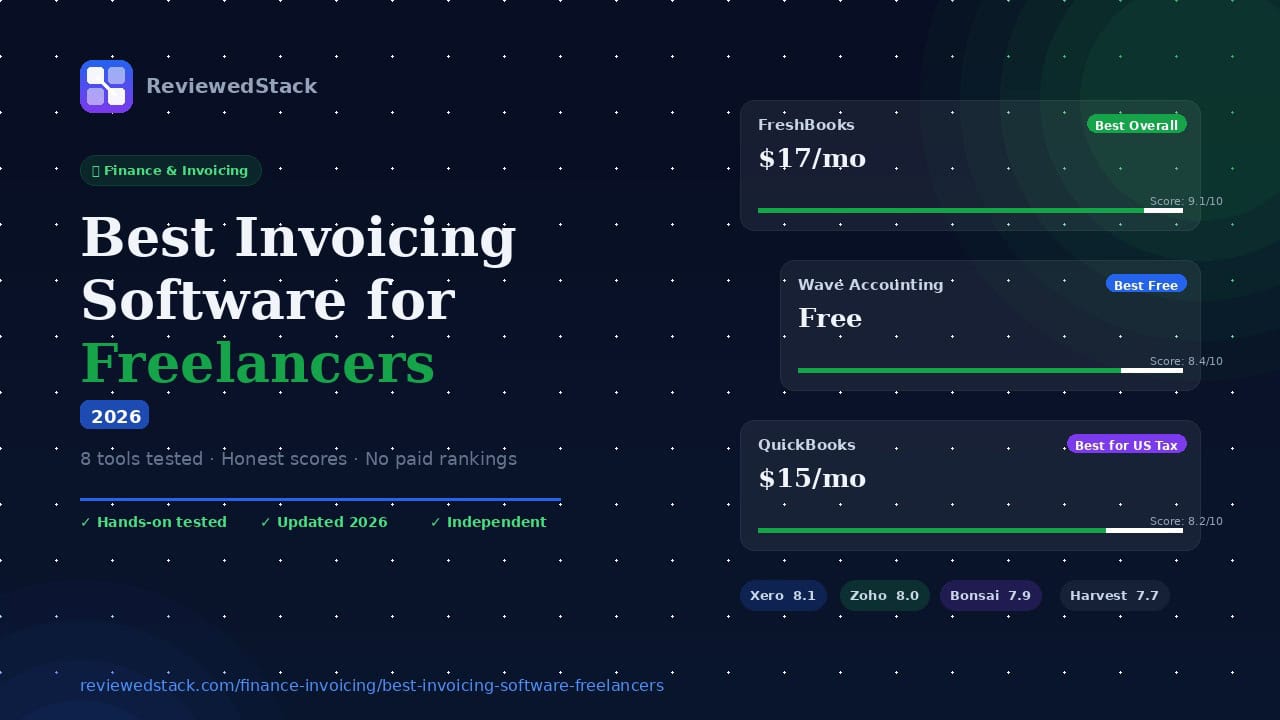
| Tool | Best For | Starting Price | Free Plan | Score |
|---|---|---|---|---|
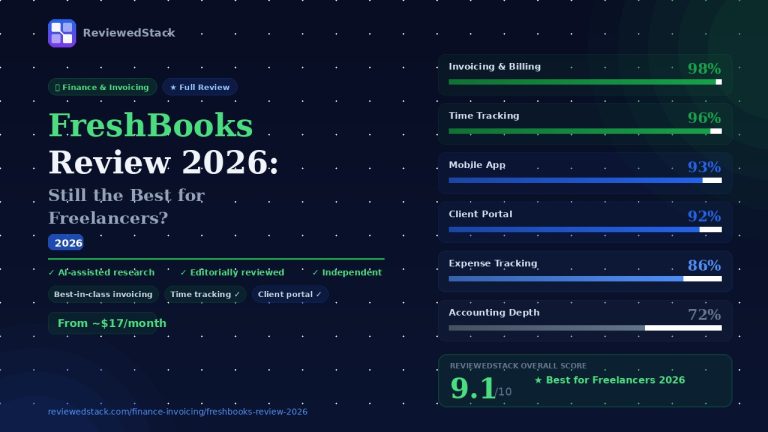
| FreshBooks | Best Overall | $6.90/mo | ❌ | 9.1/10 |
| QuickBooks | Best for US Tax | $2.10/mo ($21 after 3 months) | ❌ | 8.8/10 |
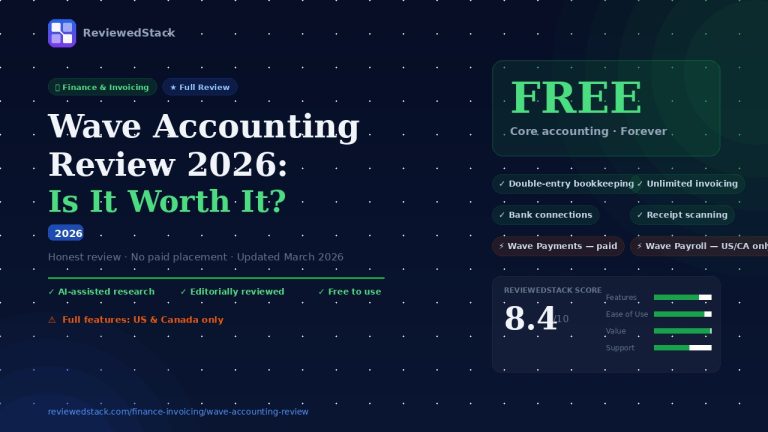
| Wave | Best Free | $0 | ✅ | 8.4/10 |
| Xero | Best for Scale | $2.90/mo ($29 after 3 months) | ❌ | 8.1/10 |
| Zoho Invoice | Best Budget | Free | ✅ | 8.0/10 |
| Bonsai | Best for Proposals | $19/mo/user | ❌ | 7.9/10 |
| Harvest | Best for Hourly | Free (1 user) | ✅ | 7.7/10 |
| Stripe | Best for Payments | Pay-per-use | ✅ | 7.6/10 |
Why these matter: they cover the common needs – simple invoices, recurring billing, time-tracking, expense capture, tax reporting, mobile invoicing, and fast payments. Now the practical details.
FreshBooks – Best overall for freelancers
What it is: Cloud invoicing + time tracking built for service-based freelancers. Strong mobile apps and client portals.
Key invoicing features: professional invoice templates, recurring invoices, automated late reminders, online payments (Stripe, PayPal), built-in time tracking, automatic expense capture from photos.
Pros: Extremely freelancer-friendly UX; templates & proposals; simple tax categories; good customer support; strong mobile app.
Cons: Accounting features aren’t as deep as Xero/QuickBooks; can get pricey as clients scale.
Pricing: Plans start around $15-$25/month for single users; higher tiers add more clients/projects. Check current pricing.
Best for: Designers, consultants, writers, developers who want quick invoices and time tracking without configuring full accounting.
📖 Read our full FreshBooks Review →
QuickBooks Online / QuickBooks Self-Employed – Best for US tax and accounting
What it is: The market leader in small business accounting. QuickBooks Self-Employed is a lighter product aimed at freelancers; QuickBooks Online is the full accounting suite.
Key invoicing features: customizable invoices, recurring billing, online payments, bank feeds, robust tax reporting, estimated taxes (Self-Employed).
Pros: Strong US tax tools, deep reporting, integrates with many payroll and payment partners, widely accepted by accountants.
Cons: UI complexity for non-accountants; add-ons and accountant access can increase cost.
Pricing: Self-Employed tier and QBO plans vary; Self-Employed often cheaper but limited. Verify current tiers.
Best for: US freelancers who want full accounting and easy tax-ready reports.
📖 FreshBooks vs QuickBooks — Full Comparison →
Xero – Best for bank feeds, multi-currency and accountant collaboration
What it is: Cloud accounting that balances invoicing with full bookkeeping. Popular in UK, Australia, Canada.
Key invoicing features: professional invoices, multi-currency, invoice reminders, online payments, automatic bank reconciliation, strong integrations.
Pros: Excellent bank feed matching, scalable accounting features, easy accountant collaboration, handles GST/VAT with tax rates.
Cons: Not as beginner-friendly as FreshBooks; can be overkill if you only need simple invoices.
Pricing: Multiple tiers; expect mid-level pricing. Check region-specific pricing.
Best for: Freelancers who will scale, have multi-currency clients, or work with an accountant.
Bonsai – Best freelance billing software for contracts + proposals
What it is: All-in-one freelance business app: proposals, contracts, time tracking, invoices, and client forms.
Key invoicing features: Create invoice from contract or proposal, instant payments, retainer/partial payments, recurring invoices.
Pros: Built for workflows freelancers use: proposal → contract → invoice; legal templates included; great for creatives and consultants.
Cons: Invoicing features are strong but accounting/reporting are basic; better as a client workflow system than a full accounting system.
Pricing: Monthly subscription; typically higher than Wave but competitive with FreshBooks.
Best for: Freelancers who sell packaged services and need streamlined proposal-to-invoice workflows.
Wave – Best free invoicing tools for freelancers
What it is: Free invoicing and accounting with paid payment processing. Best for small freelancers with limited budgets.
Key invoicing features: Unlimited invoices, recurring invoices, basic reporting, simple receipt scanning.
Pros: Truly free for invoicing and accounting; easy to use; decent reporting for early-stage freelancers.
Cons: Payment processing fees apply; limited advanced automation; customer support priority is lower.
Pricing: Free for invoicing and accounting. Payment processing fees for credit cards and ACH apply.
Best for: Freelancers who need a free, reliable invoicing tool and don’t need advanced features.
Stripe Invoicing – Best invoice app 2026 for online payments
What it is: Stripe’s invoicing product lets you send invoices and accept a wide range of payment methods globally.
Key invoicing features: Customizable invoices, automatic reconciliation, payment links, multi-currency, automated reminders.
Pros: Best-in-class payments and payouts globally; excellent for recurring and one-off online payments; strong API for automation.
Cons: Not a full accounting system – pair with accounting software; Stripe fees apply.
Pricing: Per-invoice or transaction fees; check Stripe site for up-to-date rates.
Best for: Freelancers with international clients and who need reliable payment processing and developer-friendly APIs.
Zoho Invoice / Zoho Books – Best budget invoicing and automation
What it is: Zoho Invoice (free tier) and Zoho Books (full accounting) provide low-cost invoicing with automation and tax handling.
Key invoicing features: Recurring invoices, automated reminders, time-tracking add-on, multi-currency.
Pros: Cost-effective, highly customizable automation, integrates with the Zoho ecosystem.
Cons: Interface can feel dated; support varies by region.
Pricing: Free tier with limits; affordable paid plans.
Best for: Freelancers on a budget who want automation and may later upgrade to full accounting.
Harvest – Best for time-based billing
What it is: Time-tracking and invoicing focused on hourly billing and project-based work.
Key invoicing features: Convert tracked time to invoices, line-item rates, retainers, reporting.
Pros: Best-in-class time-tracking UX and reporting; integrates with popular project apps.
Cons: Not a full accounting system; payment options more limited.
Pricing: Free limited plan; paid plans per user.
Best for: Consultants, attorneys, and agencies who bill primarily by the hour.
Invoice Ninja / FreeAgent / Square Invoices – Other solid options
- Invoice Ninja: Powerful open-source option with invoicing, proposals, time-tracking. Good for freelancers with some technical comfort.
- FreeAgent: Popular in the UK for freelancers and contractors; good for tax (self-assessment, VAT).
- Square Invoices: Great for freelancers who also take in-person or POS payments; simple, transparent pricing.
Browse all our Finance & Invoicing reviews →
How to choose: practical checklist
Volume and complexity
- Low volume, simple invoices → FreshBooks, Wave, Zoho Invoice.
- High volume, multi-currency, heavy bank reconciliation → Xero or QuickBooks Online.
Payment needs
- Need fast global payouts and many payment types → Stripe Invoicing.
- Need in-person/card readers → Square.
Time tracking & hourly billing
- Use Harvest or FreshBooks (both have good time-tracking).
Contracts & proposals
- Want one app for proposals → Bonsai or HoneyBook (popular with creatives).
Taxes and compliance
- Need solid tax reporting for US self-employment taxes → QuickBooks Self-Employed.
- VAT/GST handling for UK/AU → Xero or Zoho/FreeAgent.
Budget
- Free or very low cost → Wave or Zoho Invoice.
Accountant collaboration
- Will work with an accountant or need complex reporting → Xero or QuickBooks Online.
Mobility and client UX
- Strong client portal and mobile app → FreshBooks, Bonsai, Stripe.
For full details on our evaluation criteria, see our review methodology →.
Practical setup: 7 steps to get invoicing right in one hour
- Pick one system and create your account (try a free trial). Don’t test multiple live-pick one and stick with it for 30 days.
- Enter your business details: legal name, display name, logo, contact info, tax ID (if any).
- Set invoice defaults: payment terms (7, 14, 30 days), invoice number format, currency, late fee rules.
- Connect payment processors: Stripe, PayPal, Square, or bank payment methods. Test a payment (use a small amount or test mode).
- Add products/services and hourly rates: saves typing and keeps line-item consistency.
- Automate essentials: recurring invoices, automatic reminders, and late fees if your software supports them.
- Link bank accounts (where supported) or set up manual reconciliation workflow. If you’re using Wave or Xero, connect bank feeds for automatic matching.
Invoicing best practices that save time and get paid faster
- Invoice immediately: Send an invoice or payment link when the job is done or when milestones complete. Late invoices = late payments.
- Use clear payment terms: State due date, accepted payment methods, and late fee policy on every invoice.
- Offer convenient online payments: Clients pay faster with card, bank transfer, or payment links.
- Break big projects into milestones and ask for deposits (30-50%) before starting.
- Send reminders early and politely: Most systems automate this. First reminder a week before due is often effective.
- Keep consistent invoice numbers and categories for easy accounting.
- Back up critical records: export invoices quarterly to CSV/PDF and store copies.
- For international invoices: clearly list currency, who pays fees, and use an exchange-rate note if you accept payments in local currencies.
- Track expenses and attach receipts to invoices where possible (helps with taxes).
Security and compliance (practical notes)
- Use two-factor authentication for your invoicing/accounting app.
- Keep payment processors PCI-compliant (Stripe, Square, PayPal are).
- For VAT/GST: enable tax rates in your system and use software that supports tax filing if required in your country. UK/AU freelancers should ensure the system supports VAT/GST reporting.
- Consider e-invoicing requirements: some countries/clients require PEPPOL or other e-invoicing standards – Xero and some providers support this.
Common freelancer questions (direct answers)
- Can I use free software and be tax-compliant? Yes – Wave or Zoho Invoice can work for small operations. But if you’re tracking many clients, doing VAT/GST, or want easy tax summaries, paid software (Xero, QuickBooks) is worth it.
- Do I need accounting software or just an invoice app? If you only invoice occasionally and track income manually, a simple invoice app is OK. If you want bookkeeping, profit/loss, tax estimates, and bank reconciliation, use accounting software (Xero/QuickBooks/FreshBooks with accounting add-ons).
- What about PayPal vs Stripe? Stripe generally has better international coverage, card types, and payouts. PayPal is widespread and sometimes preferred by certain clients. Offer both if fees are acceptable.
- Best invoice app 2026? For many freelancers needing both beautiful invoicing and practical features, FreshBooks is still the most user-friendly “best invoice app 2026” pick. See our full FreshBooks Review for a detailed breakdown. For payments-first users, Stripe Invoicing tops the list. Check our Finance & Invoicing category for all our tested tools.
Pricing reality check (be realistic)
- Expect to pay something unless you choose free options. Free apps like Wave work but you pay payment processing fees.
- Paid plans often scale by number of clients or features (time tracking, proposals, multi-currency).
- Add-on costs: payroll, advanced reporting, accountant access, and extra users often add fees.
- Always test the trial and estimate yearly cost before you commit.
Final recommendations (direct)
- Best overall: FreshBooks – fastest setup, best client UX, and enough features for most freelancers.
- Best for U.S. tax reporting/accounting: QuickBooks (Self-Employed or QBO).
- Best for scale and multi-currency: Xero.
- Best free: Wave (if you’re in Wave-supported countries).
- Best for proposals + contracts + invoices: Bonsai.
- Best for payments/international clients: Stripe Invoicing.
- Best cheap/feature-rich alternative: Zoho Invoice / Zoho Books.
ReviewedStack independently tests every tool we cover. Learn about our editorial standards →

Former engineering leader at HARMAN International, where he acted as business architect in SAP ME and Siemens Teamcenter PLM implementations. Built ERP and process automation applications in .NET. Holds a degree in Business Information Management. Reviews SaaS tools from the perspective of someone who has evaluated, implemented, and lived with enterprise software at scale.
LinkedIn Profile