Best Accounting Tools for Small Business in 2026
📅 Last Updated: March 2026 ⏱ 9 min read
Most small businesses either overpay for accounting software they don’t fully use or underpay and then spend hours fixing their books at tax time. This guide lists the best accounting tools for small businesses in 2026, why we picked them, and who they suit. Our recommendations combine official product documentation, verified user reviews (G2, Trustpilot, Capterra, Reddit), and AI-assisted editorial analysis reviewed by a human editor. See our 5-point review methodology.
Table of Contents
Quick Comparison Table
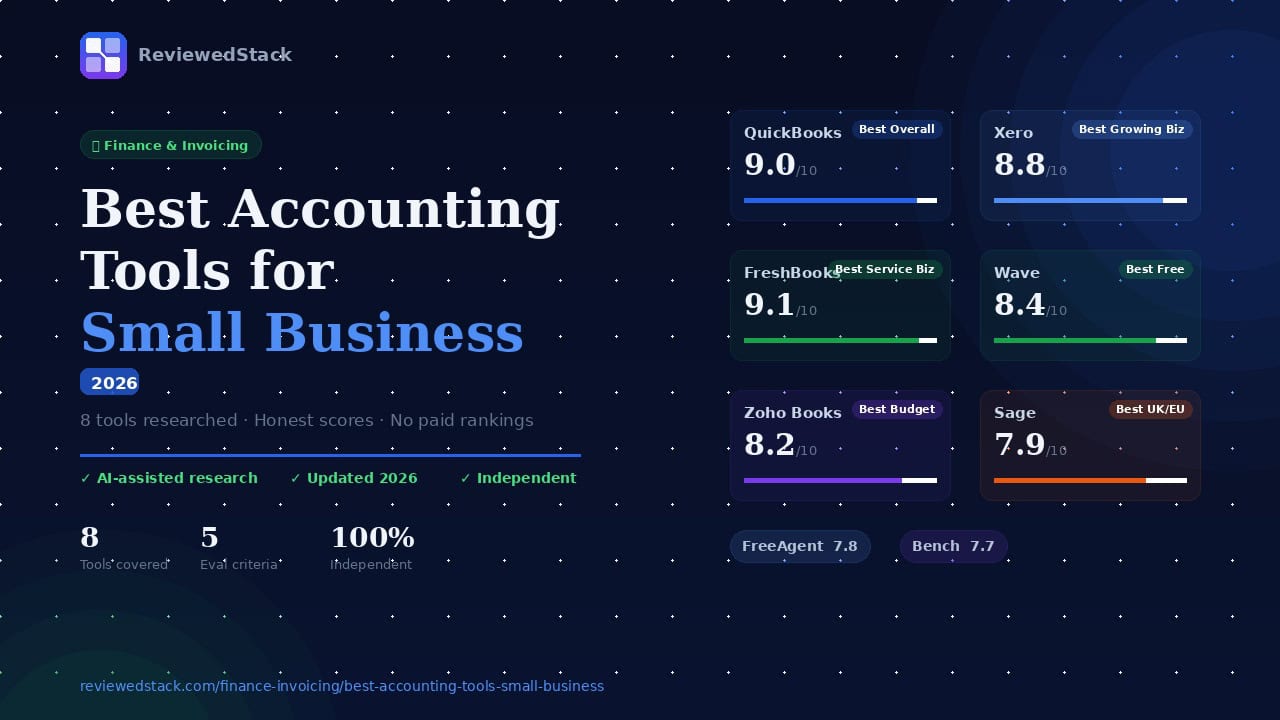
| Tool | Best For | Price | Free | Score |
|---|---|---|---|---|
| QuickBooks | Best Overall | $2.10/mo ($21 after 3 months) | ❌ | 9.0/10 |
| Xero | Best for Growing Biz | $2.90/mo ($29 after 3 months) | ❌ | 8.8/10 |
| FreshBooks | Best for Growing Biz | $6.90/mo | ❌ | 9.1/10 |
| Wave | Best Free Option | Free | ✅ | 8.4/10 |
| Zoho Books | Best Budget | $15/mo | ✅ | 8.2/10 |
| Sage | Best for UK/EU | $24/mo | ❌ | 7.9/10 |
| FreeAgent | Best for UK Freelance | $25/mo | ❌ | 7.8/10 |
| Bench | Best Managed Service | $199/mo | ❌ | 7.7/10 |
The Best Accounting Tools for Small Business
We prioritized ease of use, bank-feed reliability, invoicing and payroll capabilities, compliance features (VAT/HMRC or US tax support), and scalability. Below are the top picks for different needs and geographies.
1. QuickBooks Online – Best Overall
What it is: Cloud-first, full-featured accounting and payroll platform widely used by small businesses and accountants.
Key features:
- Full double-entry bookkeeping, invoicing, expense capture, and bank reconciliation
- Integrated payroll and tax filing (US-focused payroll tiers)
- Robust reporting and customisable dashboards
- Large third‑party app ecosystem (time tracking, inventory, payments)
- Accountant collaboration tools and audit trail
Pricing: Simple Start, Essentials, Plus, Advanced (pricing and regional plans vary; confirm current rates on QuickBooks’ site).
Pros:
- Deep feature set that covers most small business needs
- Extensive accountant ecosystem and support
- Scales from sole traders to larger SMBs
Cons:
- Can be expensive at higher tiers
- Learning curve for non-accountants
2. Xero – Best for Growing Businesses
What it is: Cloud accounting platform with strong bank reconciliation and accountant collaboration, popular in the UK, Australia, and New Zealand.
Key features:
- Easy bank feeds and reconciliation with smart matching
- Multi-currency and invoicing with payment integrations
- Robust partner ecosystem and accountant collaboration
- Purchase bills, inventory tracking (higher tiers), and reporting
- Add-on marketplace for payroll and niche apps
Pricing: Typical tiers include Starter, Standard, Premium (regional plans available; check Xero for current pricing).
Pros:
- Excellent reconciliation and bank feed reliability
- Strong accountant-focused workflows
- Good multi-currency support for international sellers
Cons:
- Some advanced features require third-party add-ons
- Inventory and payroll may need higher tiers or integrations
3. FreshBooks – Best for Service Businesses
What it is: Invoicing-first cloud accounting built around freelancers and service businesses.
Key features:
- Professional invoicing, recurring invoices, and automated payment reminders
- Built-in time tracking and project-based billing
- Expense capture and simple reporting
- Client portal and retainer/estimate workflows
- Integrations for payments, apps, and payroll (via partners)
Pricing: Common tiers include Lite, Plus, Premium, Select (check FreshBooks for current pricing).
Pros:
- Best-in-class invoicing and time-tracking UX
- Fast setup for freelancers and service firms
- Strong client-facing features (proposals, portals)
Cons:
- Not a full double-entry accounting suite for complex businesses
- Payroll and advanced bookkeeping often require add-ons
📖 Read our full FreshBooks review →
4. Wave – Best Free Accounting Tool
What it is: Free accounting and invoicing platform with paid processing and payroll add-ons, aimed at sole traders and microbusinesses.
Key features:
- Free double-entry accounting and unlimited invoicing
- Receipts and expense scanning via mobile app
- Paid payroll (where available) and payment processing
- Basic reporting and bank connections
Pricing: Core accounting and invoicing are free; paid services include payroll and payment processing fees (check Wave for region-specific pricing).
Pros:
- Truly free core accounting for small businesses
- Simple and easy to use for sole traders
- No monthly commitment for accounting/invoicing
Cons:
- Customer support and advanced features are limited compared with paid competitors
- Payroll/processing fees apply and regional availability varies
5. Zoho Books – Best Budget Option
What it is: Affordable cloud accounting that integrates tightly with the broader Zoho business app ecosystem.
Key features:
- Invoicing, billing, bank reconciliation, and automated workflows
- Inventory, project billing, and multi-user roles (depending on tier)
- Strong automation (recurring transactions, payment reminders)
- Integration with Zoho CRM, Projects, and People
Pricing: Tiers typically include Free/Standard/Professional/Premium – confirm current pricing on Zoho Books.
Pros:
- Very competitive pricing and automation options
- Seamless integration with other Zoho apps for CRM, HR, and inventory
- Good for businesses that plan to expand into Zoho ecosystem
Cons:
- Some reports and features are less mature than top-tier rivals
- International bank feed coverage can vary
6. Sage – Best for UK and European Businesses
What it is: Long-established accounting brand offering cloud and hybrid solutions tailored for UK/EU compliance (VAT, payroll).
Key features:
- VAT-ready accounting with Making Tax Digital (MTD) support (UK)
- Local payroll and compliance workflows for multiple European markets
- Invoicing, purchase ledger, and cashflow reporting
- Enterprise-grade security and partner network
Pricing: Sage Business Cloud plans typically include Start and Accounting (and payroll add-ons); confirm local offerings and pricing on Sage’s site. Currently offers 90% discount for the first six months of certain plans.
Pros:
- Strong compliance and VAT support for UK/EU businesses
- Local payroll integrations and advisory partner network
- Trusted brand with long-term SMB focus
Cons:
- UX and innovation can lag behind newer cloud-first competitors
- Pricing and editions can be complex across regions
7. FreeAgent – Best for UK Freelancers and Contractors
What it is: Accounting software built specifically for UK freelancers, contractors, and small limited companies.
Key features:
- Self-assessment and corporation tax workflows built in
- VAT return filing and MTD-compatible features
- Time tracking, expenses, invoicing, and project profitability
- Simple user interface tailored to sole traders and directors
Pricing: Typically a single monthly plan for small businesses with a 30-day free trial offer; check FreeAgent for current pricing and any partner discounts.
Pros:
- Designed around UK tax workflows (self-assessment, CIS, VAT)
- Easy for freelancers and contractors to use without an accountant
- Clear, simple reporting for directors
Cons:
- Not ideal for businesses with complex inventory or multi-currency needs
- Fewer enterprise features and integrations than larger platforms
8. Bench – Best Managed Bookkeeping Service
What it is: A managed bookkeeping service that pairs small businesses with a bookkeeping team; not a DIY accounting app.
Key features:
- Monthly bookkeeping performed by a trained team
- Monthly financial statements and year-end packages
- Optional add-ons for tax filing and payroll coordination
- Simple client dashboard to review reports and collaborate
Pricing: Bench uses tiered pricing based on volume and services (e.g., bookkeeping-only vs bookkeeping + tax); check Bench for exact plans and rates.
Pros:
- Hands-off bookkeeping for business owners who prefer to outsource
- Consistent monthly reporting and reconciliation by professionals
- Good option for owners with limited time or accounting expertise
Cons:
- Higher monthly cost than DIY software
- Less control for businesses that want to manage books in-house
How We Evaluated These Tools
We compared products using official documentation, verified user reviews (G2, Trustpilot, Capterra, Reddit), and hands-on vendor demos where available. Criteria included core accounting features, bank-feed reliability, payroll and tax compliance support, ease of use, pricing and value, integrations, and customer support. For full details, see our independent review methodology.
What to Look for in Small Business Accounting Software
Cloud-Based vs Desktop
Choose cloud for automatic updates, bank feeds, and remote collaboration; desktop can suit existing workflows but limits mobility and automatic integrations.
Bank Feed Integration
Reliable bank feeds and automated reconciliation save hours each month; verify coverage for your bank and currency.
Payroll Capabilities
If you run payroll, prefer vendors with native payroll (region-specific) or seamless integrations to avoid manual tax filings.
Tax and Compliance Features
Look for built-in support for local tax regimes (VAT, MTD, HMRC, US payroll taxes) and accountant collaboration tools.
Multi-Currency Support
Essential for export-focused businesses – check how exchange rates, invoicing, and reporting handle multiple currencies.
Scalability as Your Team Grows
Assess user seats, advanced features (inventory, project accounting, advanced reporting), and app ecosystems to grow without replatforming.
Our Verdict
Best overall pick and why
QuickBooks Online is our best overall pick for 2026 thanks to its deep feature set, payroll integrations, and extensive accountant ecosystem – it covers the widest range of small-business needs, especially for US-based teams.
Best pick by business size
Solo freelancers: FreshBooks or Wave (FreshBooks for invoicing and time tracking; Wave for free core accounting).
Small teams: Xero or Zoho Books for balanced features and cost.
Growing businesses: QuickBooks Online or Xero (depending on region) because they scale into more advanced bookkeeping and reporting.
When to consider a managed service like Bench
Consider a managed service like Bench if you’d rather outsource bookkeeping completely and focus on running the business instead of maintaining the books.
FAQs
Q: What is the best accounting software for a small business in 2026?
A: For most US-based small businesses, QuickBooks Online is the best overall choice; Xero is an excellent alternative in the UK, Australia, and NZ, while FreshBooks suits freelancers and service businesses.
Q: Is there a free accounting tool for small businesses?
A: Yes – Wave offers free core accounting and invoicing; other vendors sometimes offer free or low-cost tiers but often charge for payroll, payments, or advanced features.
Q: What accounting software do most small businesses use?
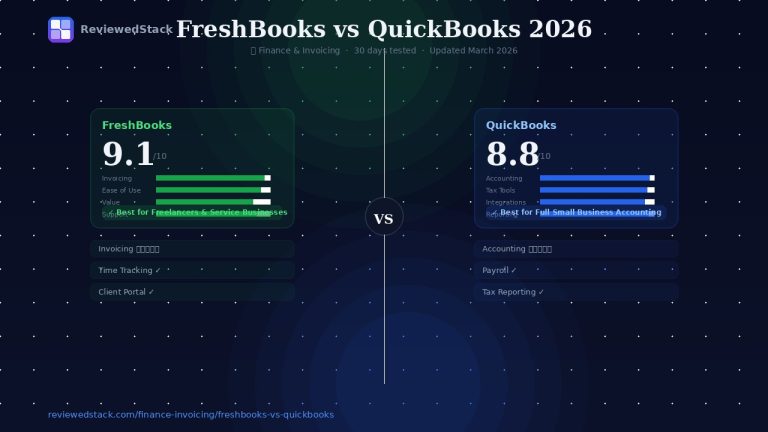
A: Usage varies by region: QuickBooks and Xero are among the most common globally, with FreshBooks popular among freelancers and regional vendors (Sage, FreeAgent) strong in the UK/EU. Recently we made a FreshBooks vs QuickBooks comparison, read it to find out more.
Q: Do I need accounting software or just a spreadsheet?
A: Spreadsheets can work short-term, but accounting software saves time with bank feeds, reconciliations, compliance, and reporting – critical as transactions and complexity grow.
Q: Which accounting tool is best for UK small businesses?
A: Xero, Sage, FreeAgent, and QuickBooks (UK edition) are top choices; pick based on VAT/MTD needs, payroll requirements, and whether you want a managed service or DIY software.
Q: What is the difference between invoicing software and accounting software?
A: Invoicing software focuses on creating and sending invoices, tracking payments, and basic client billing. Accounting software includes double-entry bookkeeping, reconciliation, tax reporting, and comprehensive financial reports. See our Best Invoicing Software for Freelancers guide.
All ReviewedStack comparisons are editorially independent. Learn how we work →

Former engineering leader at HARMAN International, where he acted as business architect in SAP ME and Siemens Teamcenter PLM implementations. Built ERP and process automation applications in .NET. Holds a degree in Business Information Management. Reviews SaaS tools from the perspective of someone who has evaluated, implemented, and lived with enterprise software at scale.
LinkedIn Profile